I’ve had AI Skills on the mind lately and realized I had neglected updating a few of my own and it was high time to handle that.
In this article we’ll cover installing and using some common public skills, like Anthropic’s skills and specifically their “skill creator” skill. We’ll use that in Google Antigravity and Copilot to cleanup an older Python App skill I have.
We’ll then test using the Python App skill in Cline, a local CLI Harness with a 12b gemma4 model running in Ollama on a laptop with a 12Gb 3070 card in it.
The question we are trying to answer is: Would a well crafted AI Skill enable us to use moderate (read: cheap) local hardware to accomplish similar work to an expensive SaaS cloud offering?
Let’s start by installing some fresh AI skills from Github…
Claude Skills
Some time ago, I mentioned Anthropic’s Skills repo. In particular, I use the skill creator skill on a semi-regular basis.
If you use Claude Code, you can just use /plugin marketplace add anthropics/skills to install this. I’m going to set it up for all my harnesses instead (covers more ground)
I clone down their repo from Github:
builder@bosgamerz9:~/Workspaces$ git clone https://github.com/anthropics/skills.git
Cloning into 'skills'...
remote: Enumerating objects: 1209, done.
remote: Counting objects: 100% (23/23), done.
remote: Compressing objects: 100% (23/23), done.
remote: Total 1209 (delta 0), reused 0 (delta 0), pack-reused 1186 (from 2)
Receiving objects: 100% (1209/1209), 4.32 MiB | 11.27 MiB/s, done.
Resolving deltas: 100% (387/387), done.
builder@bosgamerz9:~/Workspaces$ cd skils
bash: cd: skils: No such file or directory
builder@bosgamerz9:~/Workspaces$ cd skills/
builder@bosgamerz9:~/Workspaces/skills$ ls
README.md  THIRD_PARTY_NOTICES.md  skills  spec  template
builder@bosgamerz9:~/Workspaces/skills$ cd skills/
builder@bosgamerz9:~/Workspaces/skills/skills$ ls
Then use a quick find command to create sym links out in the global ~/.agents/skills path. If you don’t have that path yet, you can use mkdir -p ~/.agents/skills to create it first
builder@bosgamerz9:~/Workspaces/skills/skills$ ls
algorithmic-art   canvas-design  doc-coauthoring  frontend-design  mcp-builder  pptx           slack-gif-creator  web-artifacts-builder  xlsx
brand-guidelines  claude-api     docx             internal-comms   pdf          skill-creator  theme-factory      webapp-testing
builder@bosgamerz9:~/Workspaces/skills/skills$ find . -maxdepth 1 -type d -exec ln -s $PWD/{} ~/.agents/skills/{} \;
builder@bosgamerz9:~/Workspaces/skills/skills$ ls -l ~/.agents/skills/
total 4
lrwxrwxrwx 1 builder builder 56 Aug  3 06:56 algorithmic-art -> /home/builder/Workspaces/skills/skills/./algorithmic-art
lrwxrwxrwx 1 builder builder 57 Aug  3 06:56 brand-guidelines -> /home/builder/Workspaces/skills/skills/./brand-guidelines
lrwxrwxrwx 1 builder builder 54 Aug  3 06:56 canvas-design -> /home/builder/Workspaces/skills/skills/./canvas-design
lrwxrwxrwx 1 builder builder 51 Aug  3 06:56 claude-api -> /home/builder/Workspaces/skills/skills/./claude-api
lrwxrwxrwx 1 builder builder 56 Aug  3 06:56 doc-coauthoring -> /home/builder/Workspaces/skills/skills/./doc-coauthoring
lrwxrwxrwx 1 builder builder 45 Aug  3 06:56 docx -> /home/builder/Workspaces/skills/skills/./docx
lrwxrwxrwx 1 builder builder 56 Aug  3 06:56 frontend-design -> /home/builder/Workspaces/skills/skills/./frontend-design
lrwxrwxrwx 1 builder builder 55 Aug  3 06:56 internal-comms -> /home/builder/Workspaces/skills/skills/./internal-comms
lrwxrwxrwx 1 builder builder 52 Aug  3 06:56 mcp-builder -> /home/builder/Workspaces/skills/skills/./mcp-builder
lrwxrwxrwx 1 builder builder 44 Aug  3 06:56 pdf -> /home/builder/Workspaces/skills/skills/./pdf
lrwxrwxrwx 1 builder builder 45 Aug  3 06:56 pptx -> /home/builder/Workspaces/skills/skills/./pptx
lrwxrwxrwx 1 builder builder 54 Aug  3 06:56 skill-creator -> /home/builder/Workspaces/skills/skills/./skill-creator
lrwxrwxrwx 1 builder builder 40 Aug  3 06:56 skills -> /home/builder/Workspaces/skills/skills/.
lrwxrwxrwx 1 builder builder 58 Aug  3 06:56 slack-gif-creator -> /home/builder/Workspaces/skills/skills/./slack-gif-creator
lrwxrwxrwx 1 builder builder 46 Jul 29 06:52 ste100 -> /home/builder/Workspaces/makeMyOwnSkill/ste100
lrwxrwxrwx 1 builder builder 54 Aug  3 06:56 theme-factory -> /home/builder/Workspaces/skills/skills/./theme-factory
lrwxrwxrwx 1 builder builder 62 Aug  3 06:56 web-artifacts-builder -> /home/builder/Workspaces/skills/skills/./web-artifacts-builder
lrwxrwxrwx 1 builder builder 55 Aug  3 06:56 webapp-testing -> /home/builder/Workspaces/skills/skills/./webapp-testing
lrwxrwxrwx 1 builder builder 45 Aug  3 06:56 xlsx -> /home/builder/Workspaces/skills/skills/./xlsx
If you have a skill already there and just want to replace it, you can do that pretty easily. For instance, I had an early draft of ste100 still on this host and I wanted to use my new official aiskills repo:
builder@bosgamerz9:~/.agents/skills$ ls -l | grep ste
lrwxrwxrwx 1 builder builder 46 Jul 29 06:52 ste100 -> /home/builder/Workspaces/makeMyOwnSkill/ste100
builder@bosgamerz9:~/.agents/skills$ rm ste100
builder@bosgamerz9:~/.agents/skills$ ln -s /home/builder/Workspaces/aiskills/skills/ste100 /home/builder/.agents/skills/ste100
builder@bosgamerz9:~/.agents/skills$ ls -l | grep ste
lrwxrwxrwx 1 builder builder 47 Aug  3 06:59 ste100 -> /home/builder/Workspaces/aiskills/skills/ste100
Making and updating our Skills in Agy
A while back, when I wrote about Opencode in March, I mentioned (but did not show) my Python skill.
As it stands, it looks like (note, I replaced the 3 back ticks with 3 pound signs as Markdown in Markdown doesn’t really work for the blog. You can view the raw YAML here)
$ cat SKILL.md
---
name: my-python-app-skill
description: When I ask for my python process, or my python skill, follow these rules.  Use this skill whenCreating a new Python application, Scaffolding a Python project, Setting up a new FastAPI or FastMCP project, or Initializing a Python project from scratch
metadata:
  copyright: Copyright Freshbrewed. 2026
  version: "0.0.1"
---

# Python App Setup Skill

This skill defines the preferred setup for Python applications in this workspace.

## When to Use This Skill

Use this skill when:
- Creating a new Python application
- Scaffolding a Python project
- Setting up a new FastAPI or FastMCP project
- Initializing a Python project from scratch

## Required Project Structure

All Python apps must include the following files and structure:

###
project/
├── Dockerfile
├── pyproject.toml
├── pytest.ini
├── openapi.yaml
├── README.md
├── INSTALL.md
├── SYSTEM.md
├── app/
│   ├── __init__.py
│   └── main.py
└── tests/
    ├── __init__.py
    └── test_main.py
###

## Requirements

### 1. Testing with pytest
- Use `pytest` as the testing framework
- Configure `pytest.ini` with appropriate settings
- All tests must be in a `tests/` directory
- Test files must follow `test_*.py` naming convention
- Include conftest.py if shared fixtures are needed

### 2. Docker Support
- Always include a `Dockerfile`
- Use Python 3.11+ as base image
- Use multi-stage builds for production images
- Include healthcheck for the container
- Expose appropriate port (default: 8000)

### 3. Framework
- Use either **FastAPI** or **FastMCP** as the web framework
- FastMCP preferred for MCP (Model Context Protocol) servers
- FastAPI for traditional REST APIs

### 4. OpenAPI Specification
- Generate `openapi.yaml` file
- Must be valid OpenAPI 3.x spec
- Include endpoint documentation
- Expose at `/openapi.yaml` endpoint
- Enable Swagger UI at `/docs`

### 5. Required Documentation Files

#### README.md
- Project title and description
- Quick start instructions
- Prerequisites
- How to run the application
- API endpoints overview

#### INSTALL.md
- Detailed installation instructions
- Environment variables configuration
- Dependencies setup
- Database setup if applicable

#### SYSTEM.md
- Architecture diagram in MermaidJS format
- System components description
- Data flow
- External dependencies
- Deployment notes

Example mermaid architecture:
###mermaid
graph TB
    Client --> API[FastAPI/FastMCP]
    API --> Service[Business Logic]
    Service --> DB[(Database)]
    API --> External[External Services]
###

### 6. Python Virtual Environment
- Always use a virtual environment for local development
- Create the virtual environment using `python -m venv venv`
- Activate the virtual environment using `source venv/bin/activate` (or `venv\Scripts\activate` on Windows)

## Implementation Checklist

When creating a new Python app, ensure:

- [ ] Virtual environment created with `python -m venv venv`
- [ ] Dockerfile with proper Python base image
- [ ] pyproject.toml with all dependencies
- [ ] pytest.ini configured
- [ ] FastAPI or FastMCP app in app/main.py
- [ ] openapi.yaml generated
- [ ] README.md with quick start
- [ ] INSTALL.md with detailed setup
- [ ] SYSTEM.md with MermaidJS architecture
- [ ] tests/ directory with test files
- [ ] .dockerignore file
- [ ] Requirements/dependencies properly pinned

## Commands

After setup, the following should work:

###bash
# Setup virtual environment
python -m venv venv && source venv/bin/activate

# Run tests
pytest

# Run with Docker
docker build -t app .
docker run -p 8000:8000 app

# Generate OpenAPI spec
python -c "from app.main import app; print(app.openapi())"
###
Let’s use the AI skill creator to update this skill with some additional details.
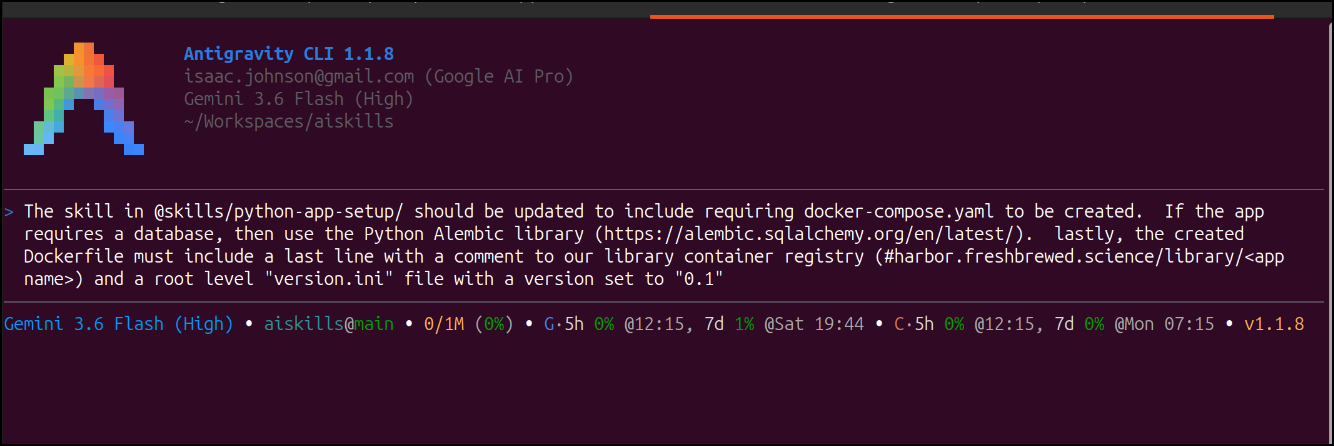
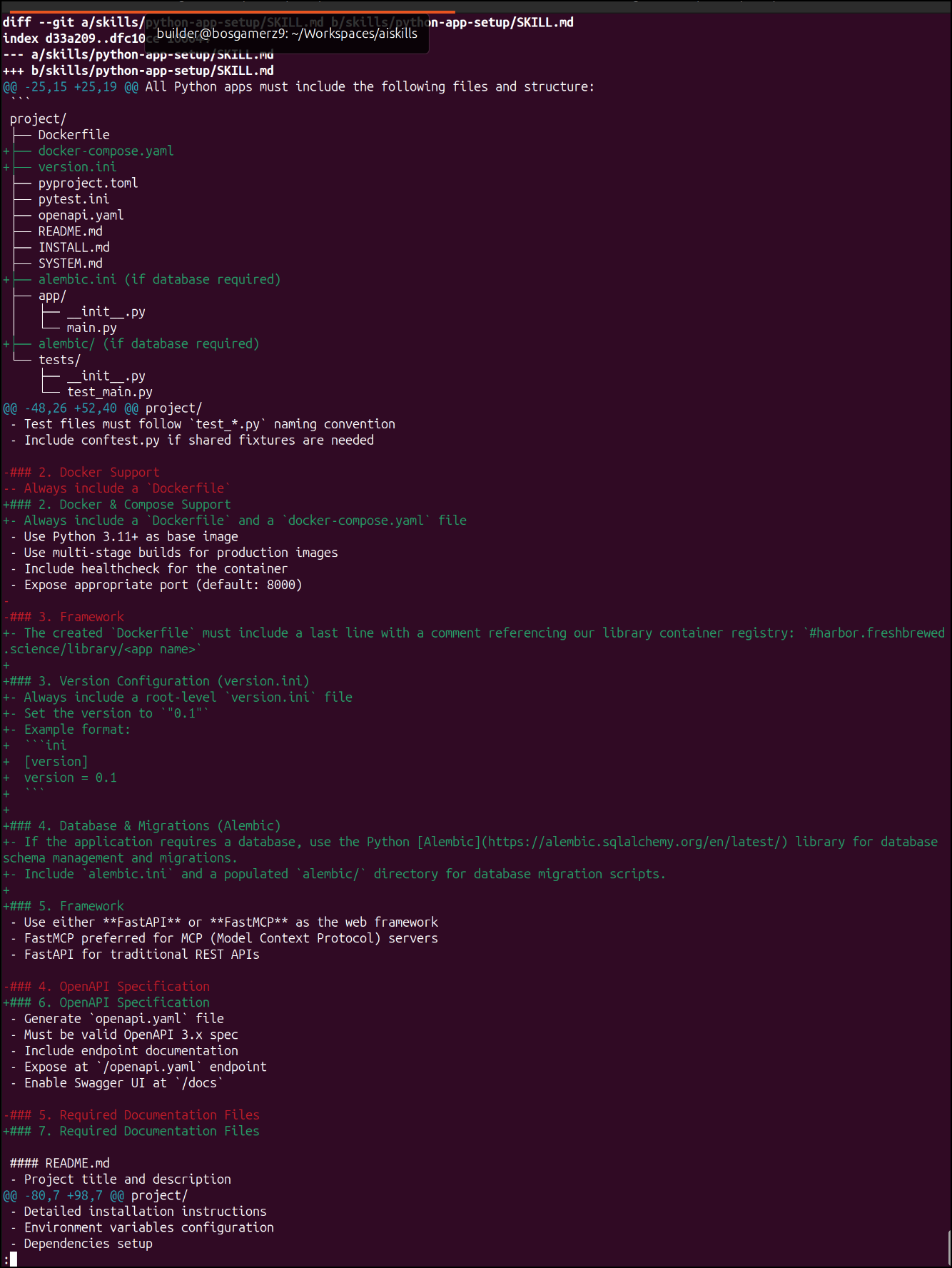
Agy did a good job:
But let’s run this through the skill creator skill as well to see if it needs refinement.
Unlike Gemini CLI, agy doesn’t seem to be checking the standard ~/.agents/skills path
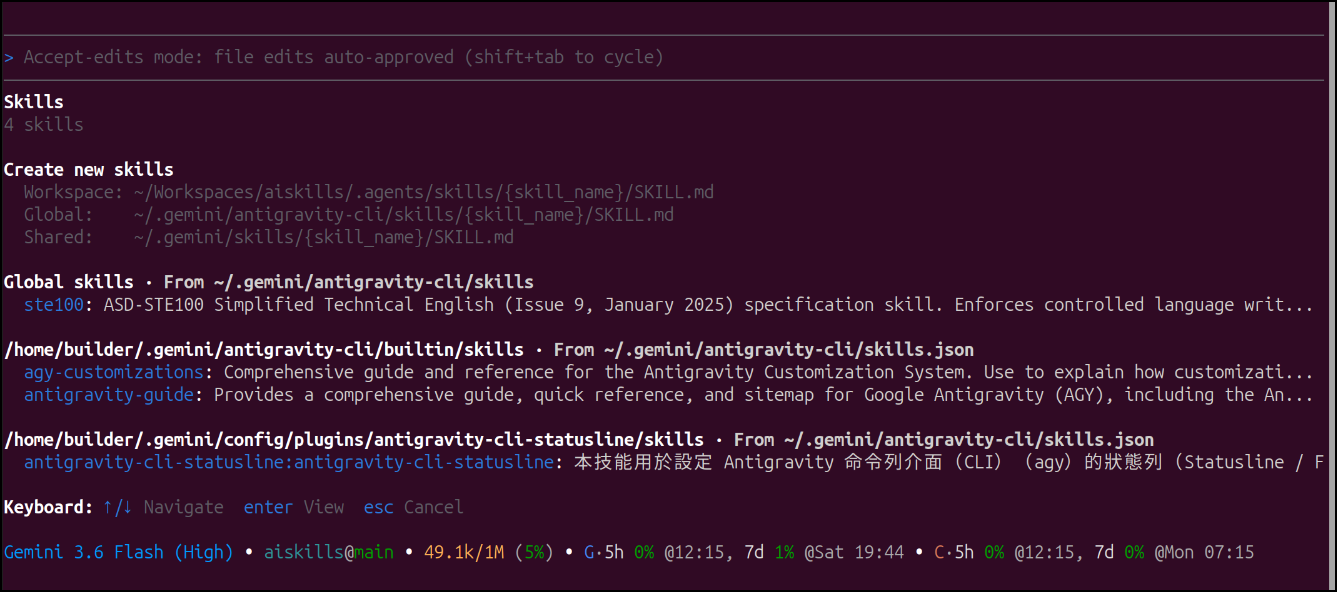
It would seem we need to replicate things into ~/.gemini/antigravity-cli/skills
builder@bosgamerz9:~/Workspaces/skills/skills$ find . -maxdepth 1 -type d -exec ln -s $PWD/{} ~/.gemini/antigravity-cli/skills/{} \;
I can now see the Anthropic skills in Agy
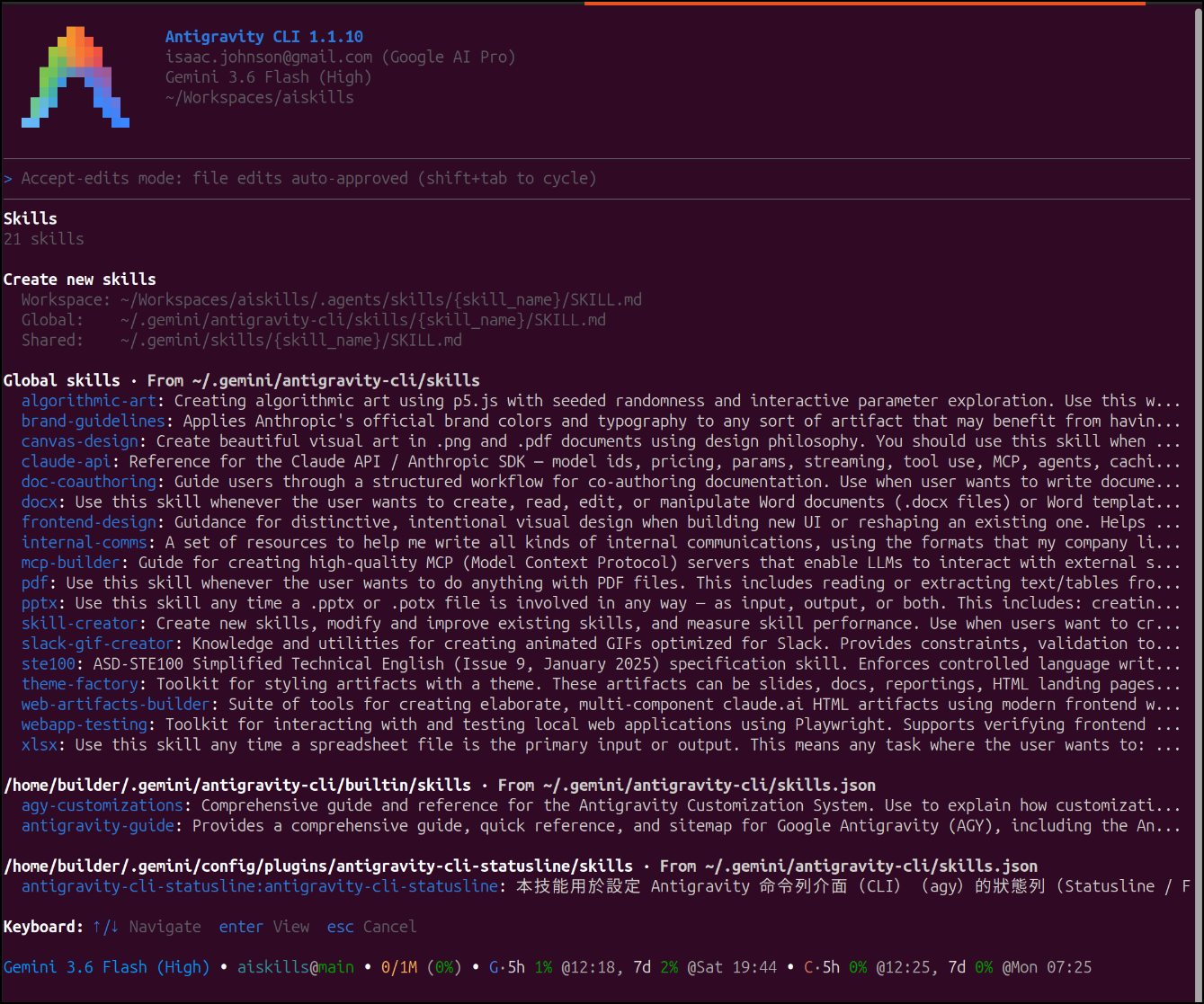
I used the skill creator skill to find and rewrite my existing skill. Some of the key things were correcting the skill name (match the folder)
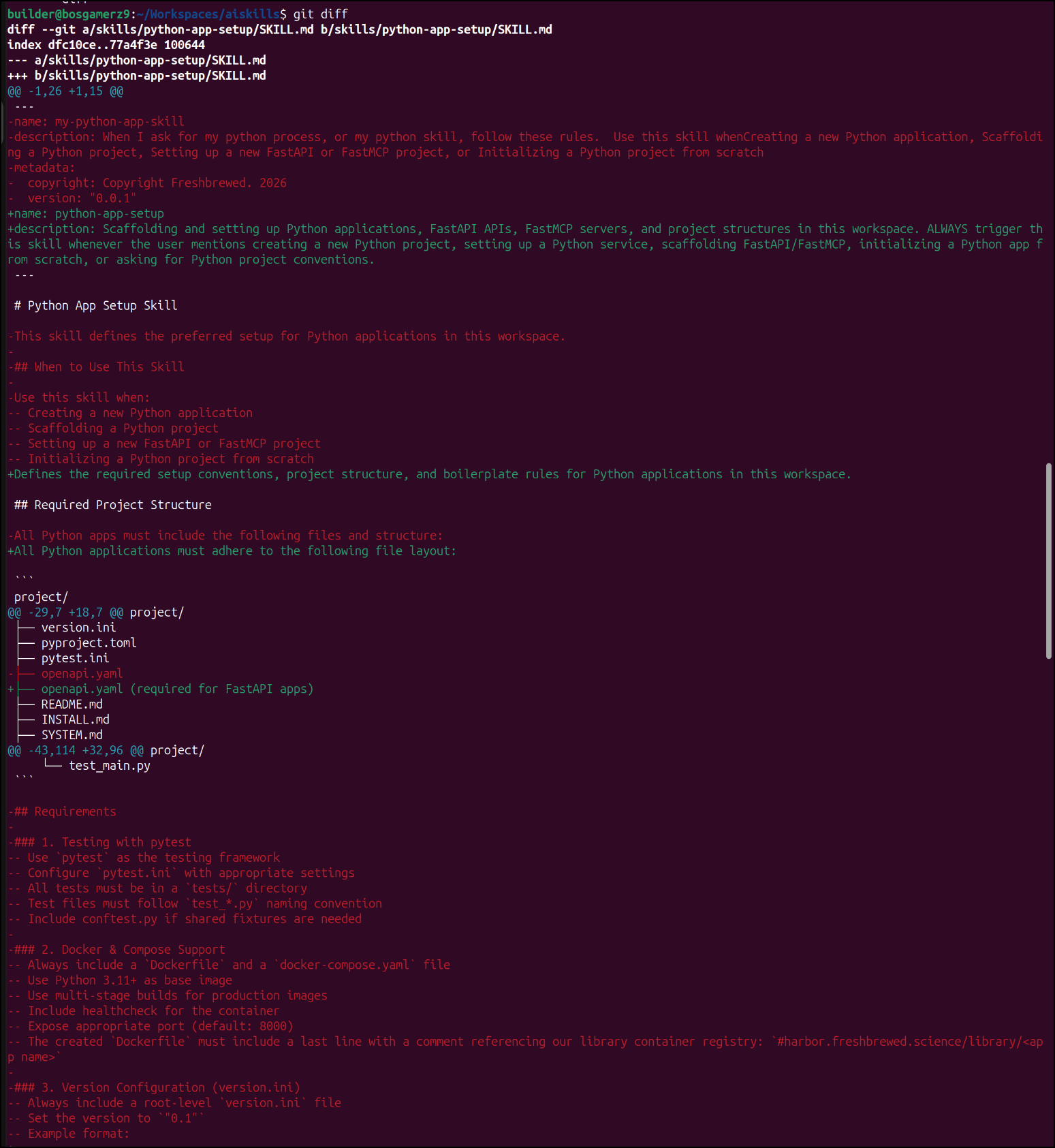
Again, with back ticks, it’s hard to show here in the blog, but you can view this diff above here in Github
Skill updates in Copilot
We can see our Anthropic skills were picked up in Copilot by looking at “skills” in the agent interface
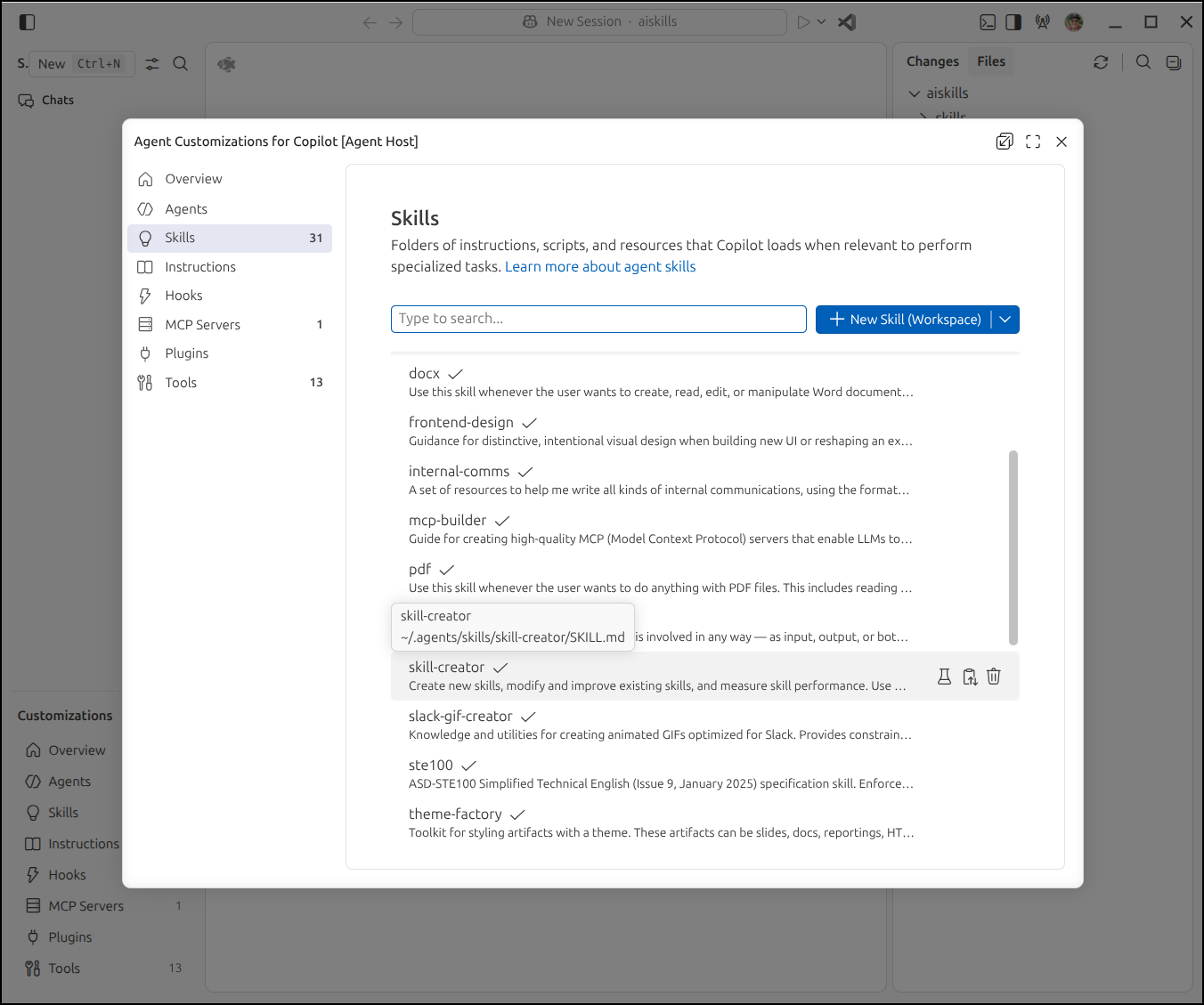
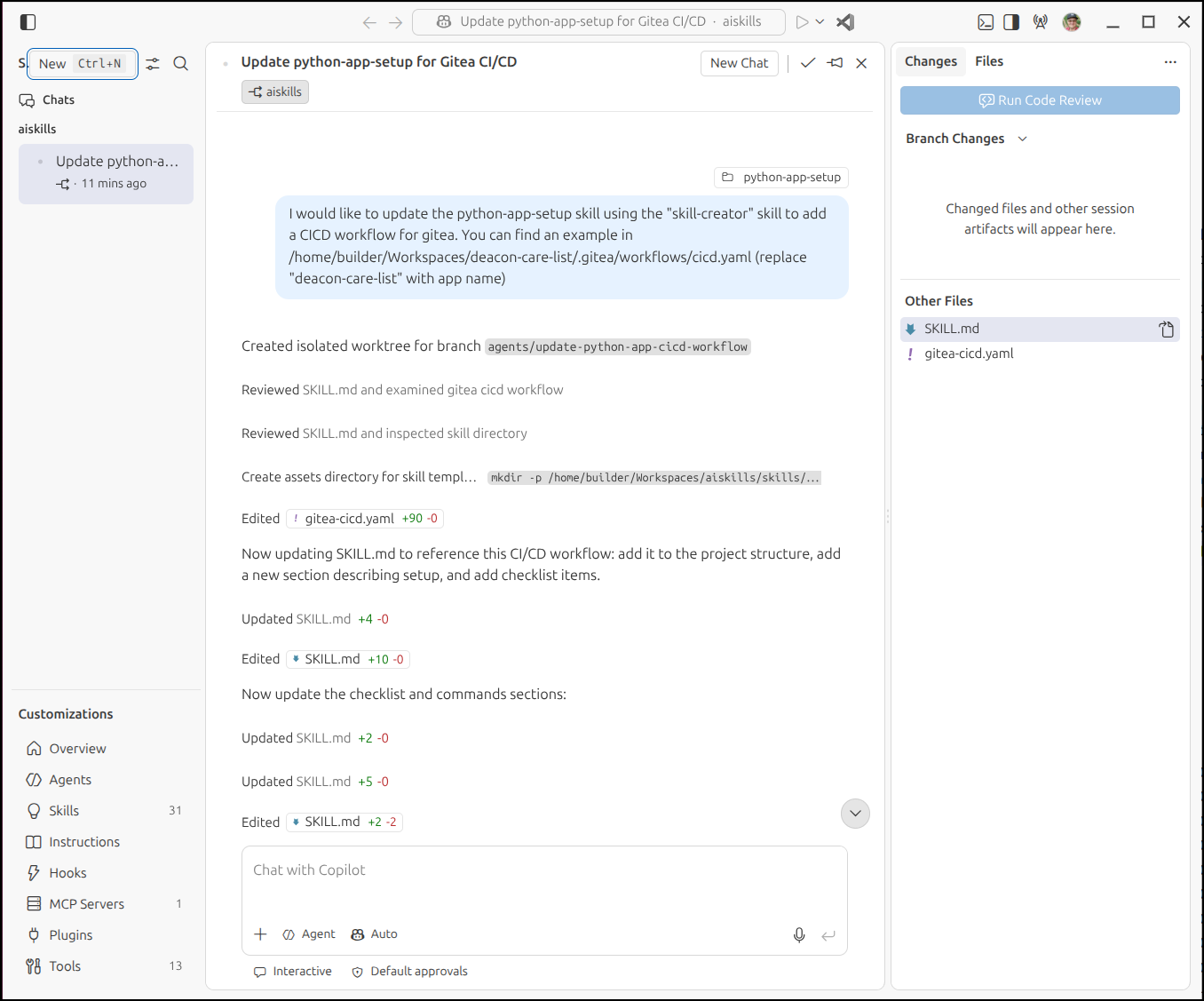
The ask:
Here we can see it when it completed:
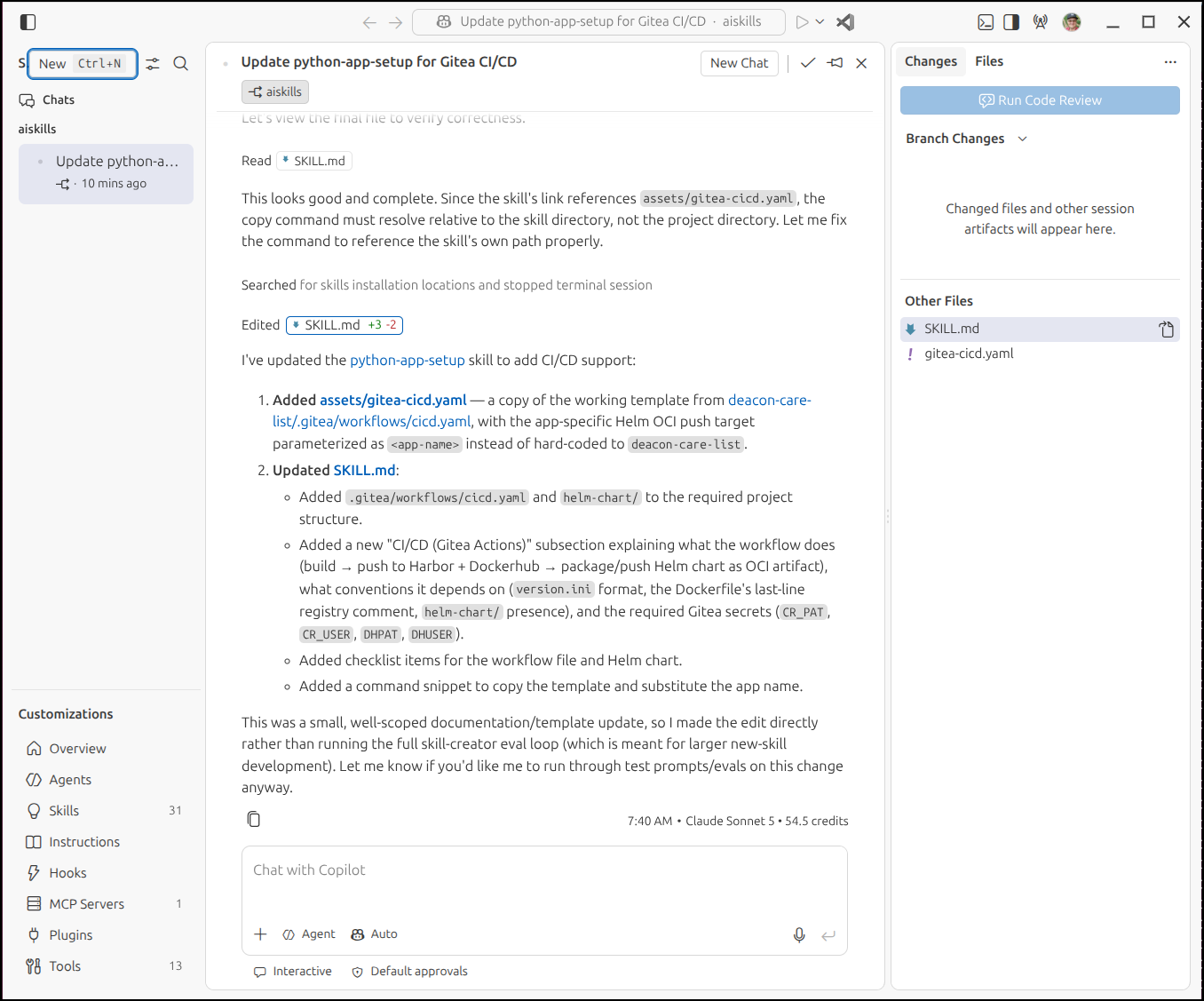
I thought it was interesting it never asked for permissions to explore the rest of my filesystem (ie. the deacon-care-list repo).
As you noticed, the skill creator now created some Assets
builder@bosgamerz9:~/Workspaces/aiskills/skills/python-app-setup$ tree .
.
├── assets
│   └── gitea-cicd.yaml
└── SKILL.md

2 directories, 2 files
I feel confident this skill is good enough to share and test
builder@bosgamerz9:~/Workspaces/aiskills/skills$ git status
On branch main
Your branch is up to date with 'origin/main'.

Changes not staged for commit:
  (use "git add <file>..." to update what will be committed)
  (use "git restore <file>..." to discard changes in working directory)
	modified:   python-app-setup/SKILL.md

Untracked files:
  (use "git add <file>..." to include in what will be committed)
	python-app-setup/assets/

no changes added to commit (use "git add" and/or "git commit -a")
builder@bosgamerz9:~/Workspaces/aiskills/skills$ git add -A
builder@bosgamerz9:~/Workspaces/aiskills/skills$ git commit -m "Updates from GH w/ Gitea skill"
[main 9aefc46] Updates from GH w/ Gitea skill
 2 files changed, 111 insertions(+)
 create mode 100644 skills/python-app-setup/assets/gitea-cicd.yaml
builder@bosgamerz9:~/Workspaces/aiskills/skills$ git push
Enumerating objects: 11, done.
Counting objects: 100% (11/11), done.
Delta compression using up to 16 threads
Compressing objects: 100% (6/6), done.
Writing objects: 100% (7/7), 2.69 KiB | 2.69 MiB/s, done.
Total 7 (delta 3), reused 0 (delta 0), pack-reused 0 (from 0)
remote: Resolving deltas: 100% (3/3), completed with 3 local objects.
To https://github.com/idjohnson/aiskills.git
   391809f..9aefc46  main -> main
Let’s give it a try with a local harness like Cline
Skills with Cline
We’ll start in a new repo
builder@bosgamerz9:~/Workspaces$ mkdir myTestPythonApp
builder@bosgamerz9:~/Workspaces$ cd myTestPythonApp/
builder@bosgamerz9:~/Workspaces/myTestPythonApp$ ls
builder@bosgamerz9:~/Workspaces/myTestPythonApp$
I first need to make sure this new Python skill is linked properly in agents
builder@bosgamerz9:~/Workspaces/myTestPythonApp$ ls ~/.agents/skills/
algorithmic-art/       docx/                  pptx/                  theme-factory/
brand-guidelines/      frontend-design/       skill-creator/         webapp-testing/
canvas-design/         internal-comms/        skills/                web-artifacts-builder/
claude-api/            mcp-builder/           slack-gif-creator/     xlsx/
doc-coauthoring/       pdf/                   ste100/
builder@bosgamerz9:~/Workspaces/myTestPythonApp$ ln -s /home/builder/Workspaces/aiskills/skills/python-app-setup /home/builder/.agents/skills/python-app-setup
builder@bosgamerz9:~/Workspaces/myTestPythonApp$ ls ~/.agents/skills/
algorithmic-art   doc-coauthoring  mcp-builder       skill-creator      theme-factory
brand-guidelines  docx             pdf               skills             web-artifacts-builder
canvas-design     frontend-design  pptx              slack-gif-creator  webapp-testing
claude-api        internal-comms   python-app-setup  ste100             xlsx
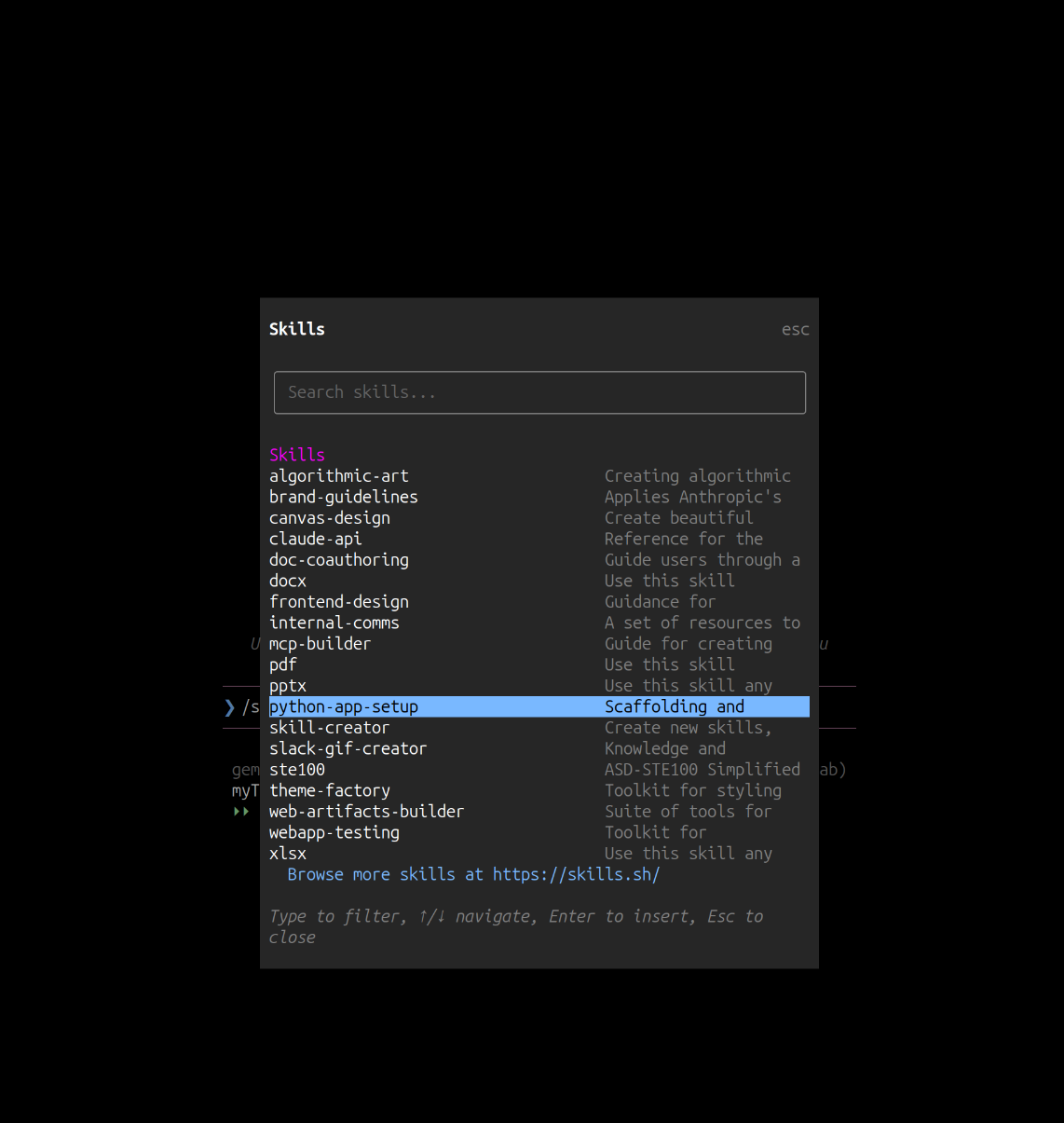
I can then fire up cline and use /skills to check that we see the “python-app-setup” skill listed
Here is my first shot
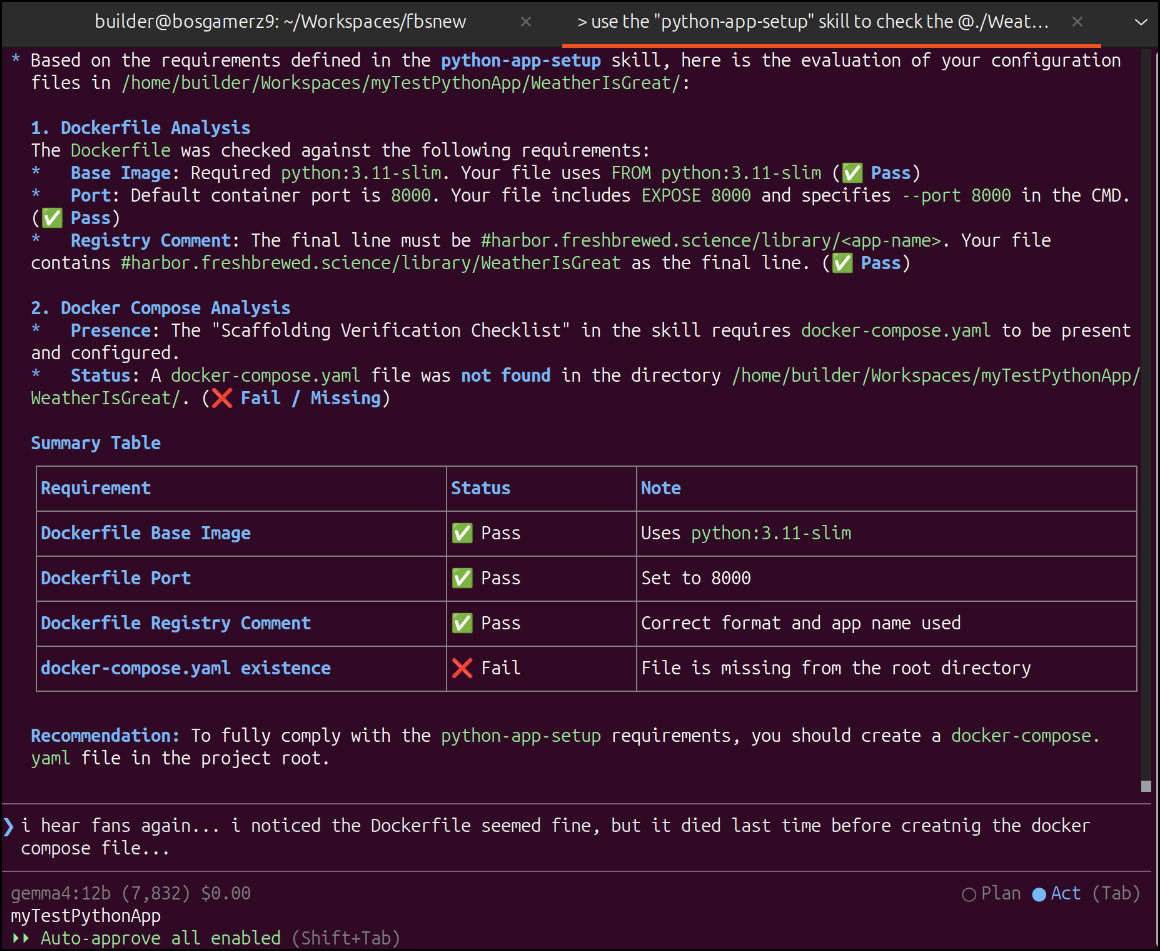
I think the issue lies in the fact I asked too much in one round.
Let’s try again but keep our ask small:
As you can see, this is a far more successful approach.
There are some harnesses that do really good with Planning mode and checklists.
But in my case, I’m just going through the steps a bit at a time to handle the constraints of my hardware
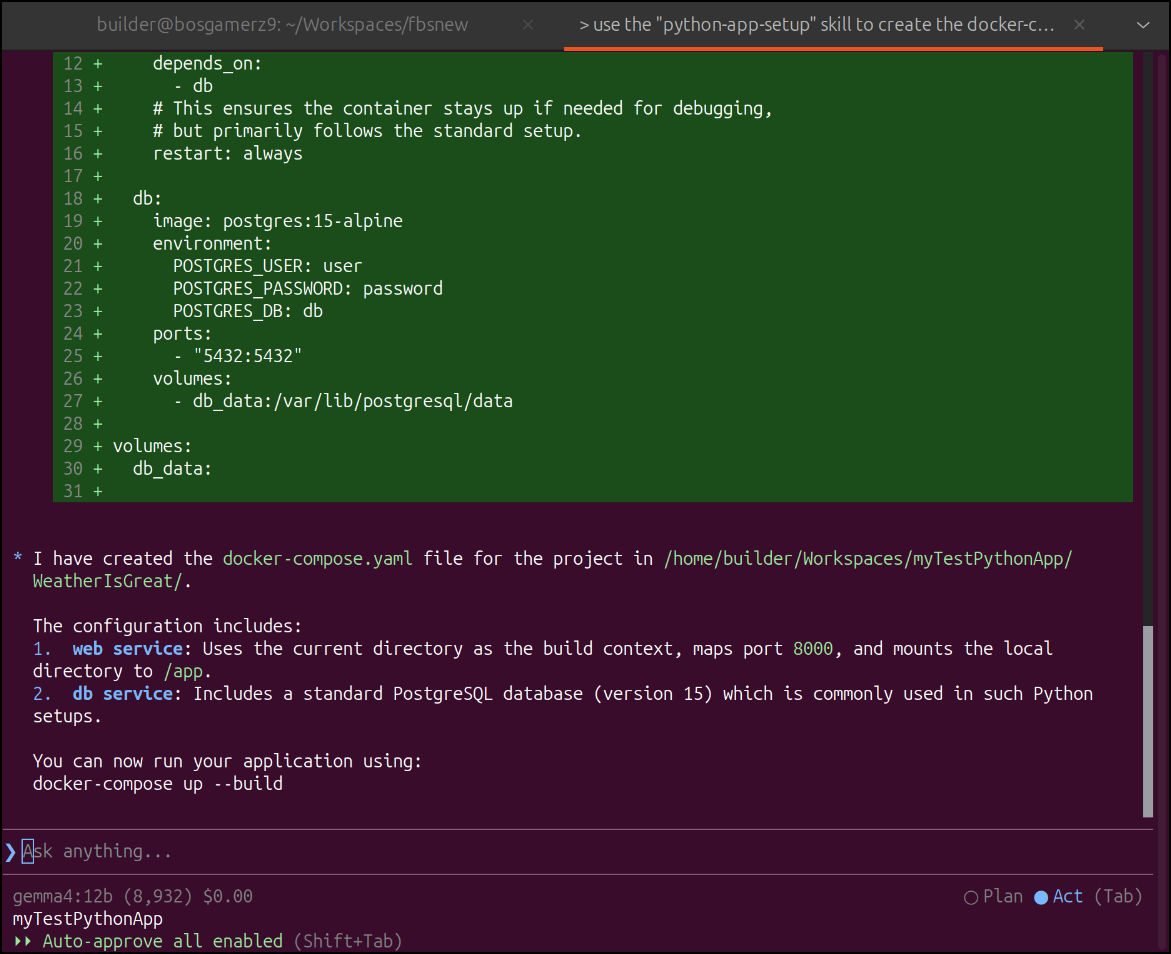
Let’s give it a test:
uilder@bosgamerz9:~/Workspaces/myTestPythonApp$ cd WeatherIsGreat/
builder@bosgamerz9:~/Workspaces/myTestPythonApp/WeatherIsGreat$ ls
Dockerfile  app  docker-compose.yaml  tests  version.ini
builder@bosgamerz9:~/Workspaces/myTestPythonApp/WeatherIsGreat$ docker compose up --build
WARN[0000] /home/builder/Workspaces/myTestPythonApp/WeatherIsGreat/docker-compose.yaml: the attribute `version` is obsolete, it will be ignored, please remove it to avoid potential confusion
[+] up 12/12
 ✔ Image postgres:15-alpine Pulled                                                                             3.3s
[+] Building 3.0s (9/9) FINISHED
 => [internal] load local bake definitions                                                                    0.0s
 => => reading from stdin 564B                                                                                0.0s
 => [internal] load build definition from Dockerfile                                                          0.0s
 => => transferring dockerfile: 273B                                                                          0.0s
 => [internal] load metadata for docker.io/library/python:3.11-slim                                           0.8s
 => [internal] load .dockerignore                                                                             0.0s
 => => transferring context: 2B                                                                               0.0s
 => [1/4] FROM docker.io/library/python:3.11-slim@sha256:db3ff2e1800a8581e2c48a27c3995339d47bdf046da21c7627a  0.1s
 => => resolve docker.io/library/python:3.11-slim@sha256:db3ff2e1800a8581e2c48a27c3995339d47bdf046da21c7627a  0.0s
 => => sha256:1c03896dbf0ef4a2b86f1462395249e810c589e25d8c0b002faabc38aa144686 5.48kB / 5.48kB                0.0s
 => => sha256:db3ff2e1800a8581e2c48a27c3995339d47bdf046da21c7627accd3d51053a93 10.37kB / 10.37kB              0.0s
 => => sha256:00af38ae2ed311628970782e8a2d7f014d8909dbc63cb97bc0a158187f4db045 1.75kB / 1.75kB                0.0s
 => [internal] load build context                                                                             0.0s
 => => transferring context: 1.81kB                                                                           0.0s
 => [2/4] WORKDIR /app                                                                                        0.2s
 => [3/4] COPY . .                                                                                            0.0s
 => ERROR [4/4] RUN pip install --no-cache-dir -r requirements.txt                                            1.7s
------
 > [4/4] RUN pip install --no-cache-dir -r requirements.txt:
1.371 ERROR: Could not open requirements file: [Errno 2] No such file or directory: 'requirements.txt'
1.564
1.564 [notice] A new release of pip is available: 24.0 -> 26.2
[+] up 12/13e] To update, run: pip install --upgrade pip
 ✔ Image postgres:15-alpine Pulled                                                                             3.3s
 ⠙ Image weatherisgreat-web Building                                                                           3.0s
Dockerfile:7

--------------------

   5 |     COPY . .

   6 |

   7 | >>> RUN pip install --no-cache-dir -r requirements.txt

   8 |

   9 |     EXPOSE 8000

--------------------

failed to solve: process "/bin/sh -c pip install --no-cache-dir -r requirements.txt" did not complete successfully: exit code: 1
Again, here we see a file was missing and I just needed to invoke the skill again for that missing file:
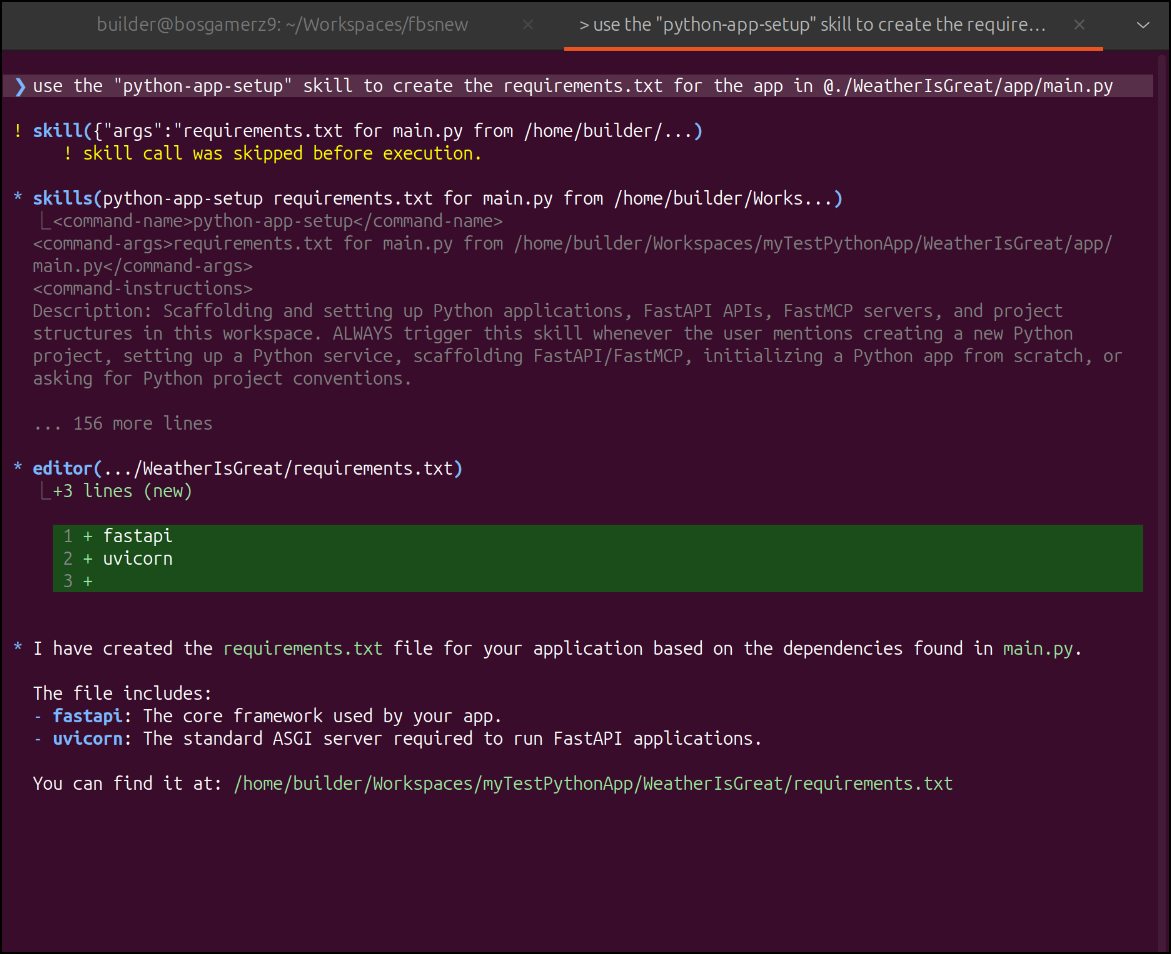
My next error is just a bind issue as I was using port 8000 already
builder@bosgamerz9:~/Workspaces/myTestPythonApp/WeatherIsGreat$ docker compose up --build
WARN[0000] /home/builder/Workspaces/myTestPythonApp/WeatherIsGreat/docker-compose.yaml: the attribute `version` is obsolete, it will be ignored, please remove it to avoid potential confusion
[+] Building 5.5s (11/11) FINISHED
 => [internal] load local bake definitions                                                                    0.0s
 => => reading from stdin 564B                                                                                0.0s
 => [internal] load build definition from Dockerfile                                                          0.0s
 => => transferring dockerfile: 273B                                                                          0.0s
 => [internal] load metadata for docker.io/library/python:3.11-slim                                           0.2s
 => [internal] load .dockerignore                                                                             0.0s
 => => transferring context: 2B                                                                               0.0s
 => [1/4] FROM docker.io/library/python:3.11-slim@sha256:db3ff2e1800a8581e2c48a27c3995339d47bdf046da21c7627a  0.0s
 => [internal] load build context                                                                             0.0s
 => => transferring context: 303B                                                                             0.0s
 => CACHED [2/4] WORKDIR /app                                                                                 0.0s
 => [3/4] COPY . .                                                                                            0.0s
 => [4/4] RUN pip install --no-cache-dir -r requirements.txt                                                  5.0s
 => exporting to image                                                                                        0.1s
 => => exporting layers                                                                                       0.1s
 => => writing image sha256:2bd9a31207f9428cdab172a7a3d01e439a9253efbe753f030122d8c68675adb9                  0.0s
 => => naming to docker.io/library/weatherisgreat-web                                                         0.0s
 => resolving provenance for metadata file                                                                    0.0s
[+] up 5/5
 ✔ Image weatherisgreat-web       Built                                                                        5.5s
 ✔ Network weatherisgreat_default Created                                                                      0.0s
 ✔ Volume weatherisgreat_db_data  Created                                                                      0.0s
 ✔ Container weatherisgreat-db-1  Created                                                                      0.0s
 ✔ Container weatherisgreat-web-1 Created                                                                      0.0s
Attaching to db-1, web-1
db-1  | The files belonging to this database system will be owned by user "postgres".
db-1  | This user must also own the server process.
db-1  |
db-1  | The database cluster will be initialized with locale "en_US.utf8".
db-1  | The default database encoding has accordingly been set to "UTF8".
db-1  | The default text search configuration will be set to "english".
db-1  |
db-1  | Data page checksums are disabled.
db-1  |
db-1  | fixing permissions on existing directory /var/lib/postgresql/data ... ok
db-1  | creating subdirectories ... ok
db-1  | selecting dynamic shared memory implementation ... posix
db-1  | selecting default max_connections ... 100
db-1  | selecting default shared_buffers ... 128MB
db-1  | selecting default time zone ... UTC
db-1  | creating configuration files ... ok
Error response from daemon: failed to set up container networking: driver failed programming external connectivity on endpoint weatherisgreat-web-1 (a8dba571117200e55d0aed56d2d0dff6090a65d70298d7cf308eea9f6cf96353): Bind for :::8000 failed: port is already allocated
For now, I’ll just use port 8088 which should be open
builder@bosgamerz9:~/Workspaces/myTestPythonApp/WeatherIsGreat$ vi docker-compose.yaml
builder@bosgamerz9:~/Workspaces/myTestPythonApp/WeatherIsGreat$ cat docker-compose.yaml | head -n10
version: '3.8'

services:
  web:
    build: .
    ports:
      - "8088:8000"
    volumes:
      - .:/app
    environment:
That ran just fine
builder@bosgamerz9:~/Workspaces/myTestPythonApp/WeatherIsGreat$ docker compose up --build
WARN[0000] /home/builder/Workspaces/myTestPythonApp/WeatherIsGreat/docker-compose.yaml: the attribute `version` is obsolete, it will be ignored, please remove it to avoid potential confusion
[+] Building 5.3s (11/11) FINISHED
 => [internal] load local bake definitions                                                                    0.0s
 => => reading from stdin 564B                                                                                0.0s
 => [internal] load build definition from Dockerfile                                                          0.0s
 => => transferring dockerfile: 273B                                                                          0.0s
 => [internal] load metadata for docker.io/library/python:3.11-slim                                           0.2s
 => [internal] load .dockerignore                                                                             0.0s
 => => transferring context: 2B                                                                               0.0s
 => [1/4] FROM docker.io/library/python:3.11-slim@sha256:db3ff2e1800a8581e2c48a27c3995339d47bdf046da21c7627a  0.0s
 => [internal] load build context                                                                             0.0s
 => => transferring context: 842B                                                                             0.0s
 => CACHED [2/4] WORKDIR /app                                                                                 0.0s
 => [3/4] COPY . .                                                                                            0.0s
 => [4/4] RUN pip install --no-cache-dir -r requirements.txt                                                  4.8s
 => exporting to image                                                                                        0.1s
 => => exporting layers                                                                                       0.1s
 => => writing image sha256:269a8aab331548a1130a0390eb3b4d0ddb67883f9e40f7b2ed45372075c2a372                  0.0s
 => => naming to docker.io/library/weatherisgreat-web                                                         0.0s
 => resolving provenance for metadata file                                                                    0.0s
[+] up 3/3
 ✔ Image weatherisgreat-web       Built                                                                        5.3s
 ✔ Container weatherisgreat-db-1  Running                                                                      0.0s
 ✔ Container weatherisgreat-web-1 Recreated                                                                    0.0s
Attaching to db-1, web-1
web-1  | INFO:     Started server process [1]
web-1  | INFO:     Waiting for application startup.
web-1  | INFO:     Application startup complete.
web-1  | INFO:     Uvicorn running on http://0.0.0.0:8000 (Press CTRL+C to quit)
Because we have FastAPI, I can see the swagger page
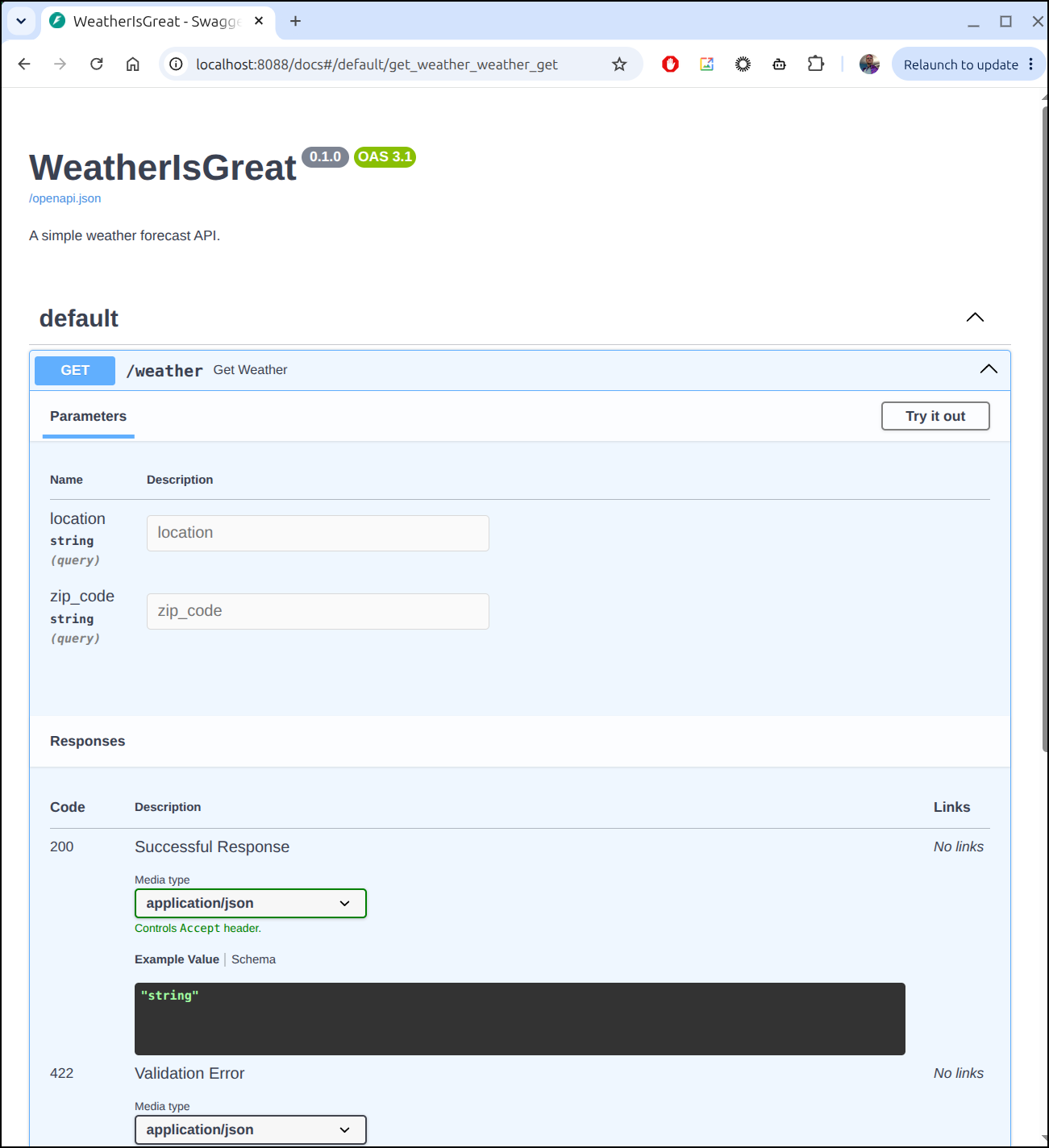
And give it a quick test:
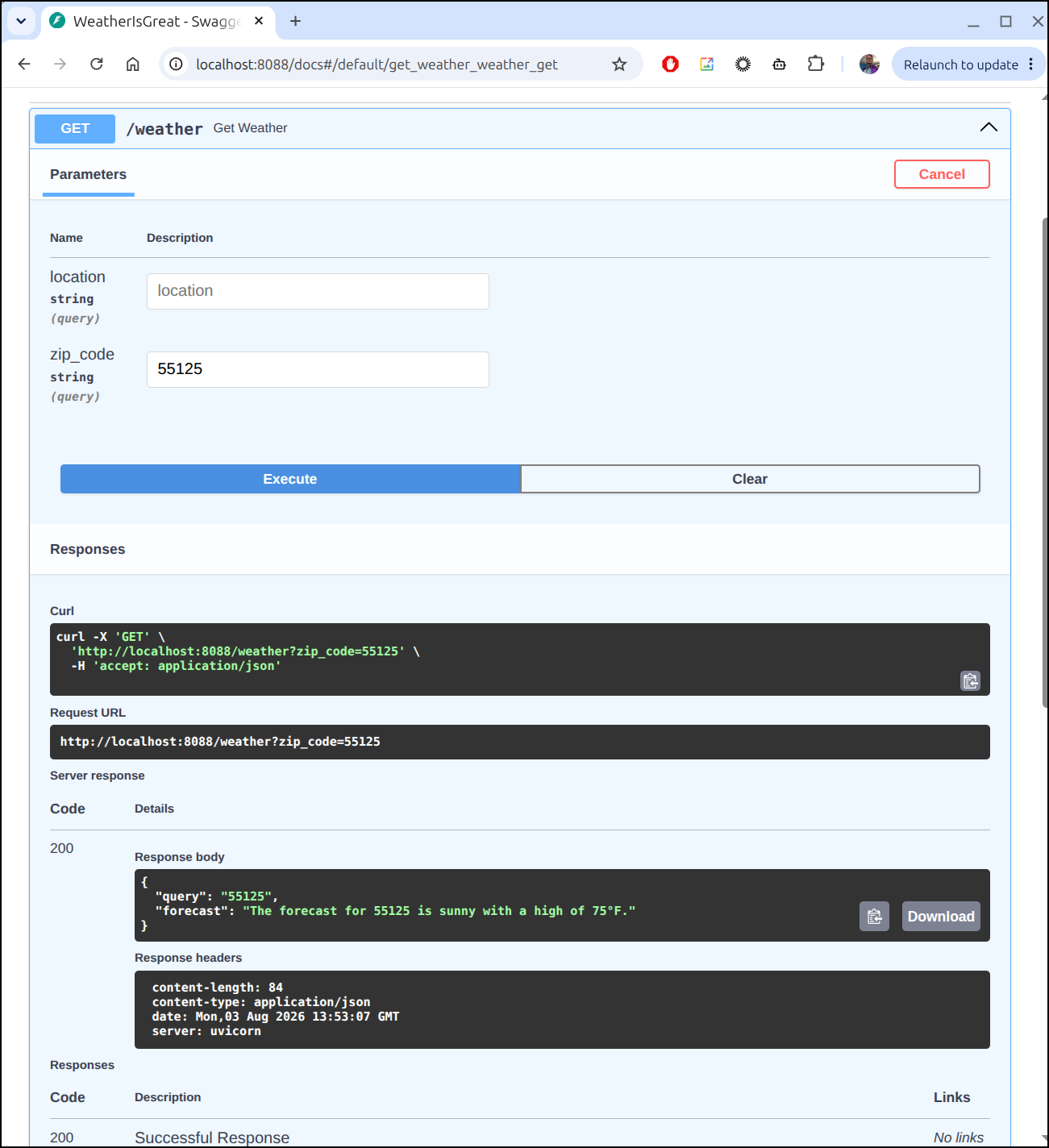
I see the app works, Dockerfile and docker-compose are fine, but the CICD workflow is missing:
builder@bosgamerz9:~/Workspaces/myTestPythonApp/WeatherIsGreat$ ls
Dockerfile  app  docker-compose.yaml  requirements.txt  tests  version.ini
builder@bosgamerz9:~/Workspaces/myTestPythonApp/WeatherIsGreat$ ls .gitea/workflows/
builder@bosgamerz9:~/Workspaces/myTestPythonApp/WeatherIsGreat$
As before I kicked up the skill to create the CICD workflow
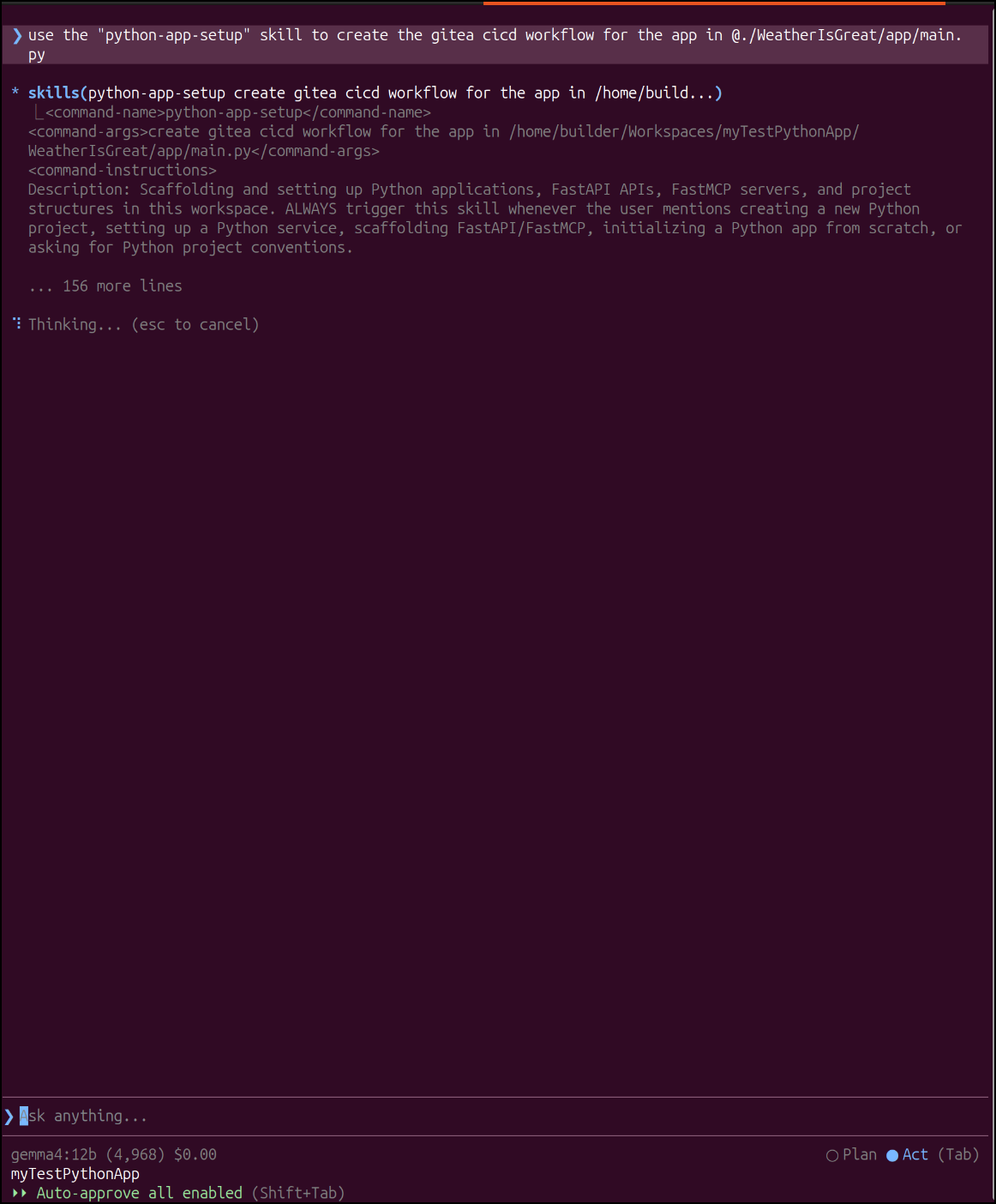
It cranked away and got it done
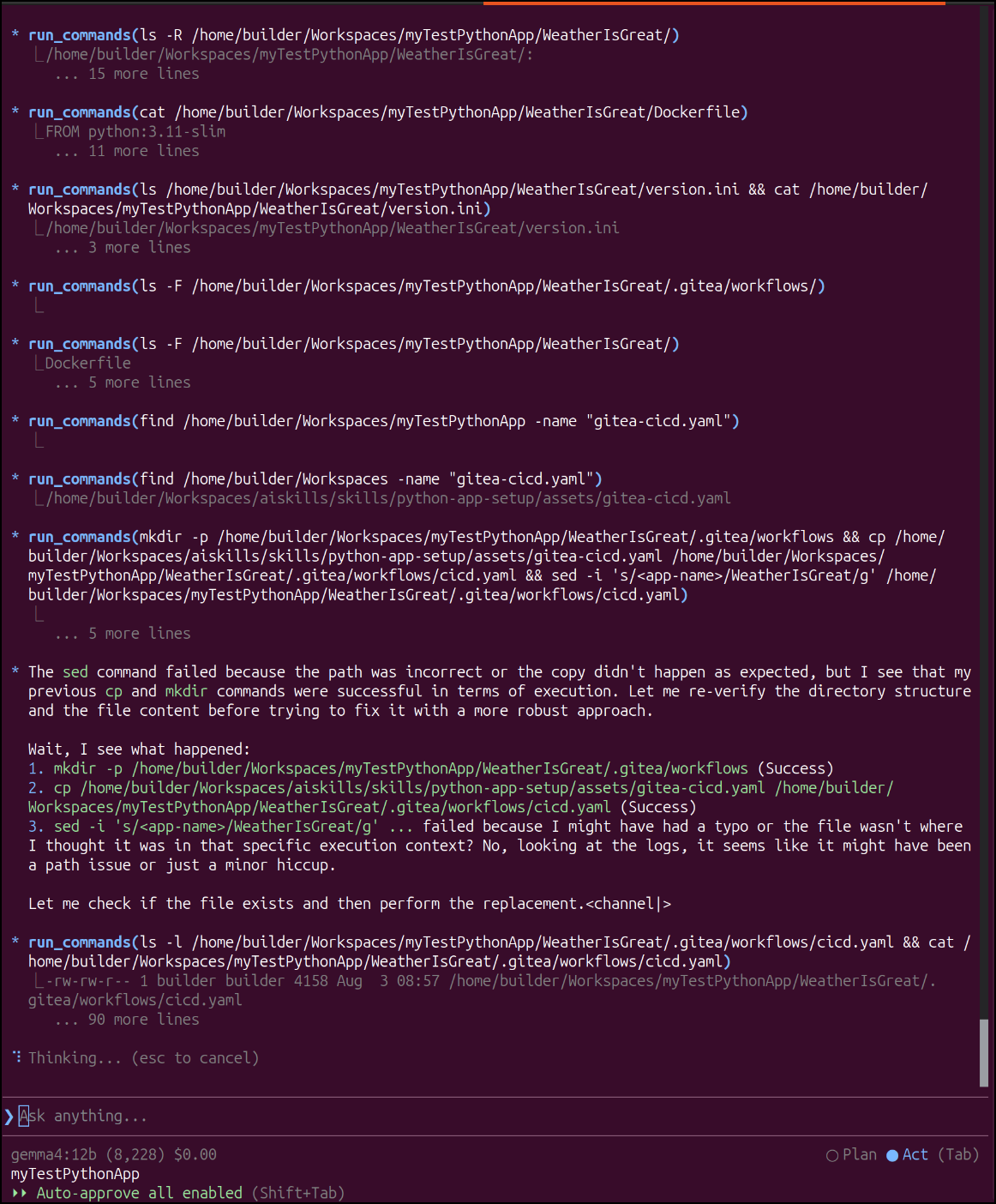
$ cat WeatherIsGreat/.gitea/workflows/cicd.yaml
name: Build and Publish Docker Image

on:
    push:
        branches:
            - main

jobs:
    build-and-push:
        name: Build and Push Docker Image
        runs-on: my_custom_label
        container: node:22
        steps:
            - name: Checkout Code
              uses: actions/checkout@v3

            - name: Prepare Env for Docker
              run: |
                  whoami
                  which docker || true
                  apt update
                  cat /etc/os-release
                  apt install -y ca-certificates curl gnupg
                  mkdir -p /etc/apt/keyrings
                  curl -fsSL https://download.docker.com/linux/ubuntu/gpg | gpg --dearmor -o /etc/apt/keyrings/docker.gpg
                  echo \
                    "deb [arch=$(dpkg --print-architecture) signed-by=/etc/apt/keyrings/docker.gpg] https://download.docker.com/linux/ubuntu \
                    focal stable" | tee /etc/apt/sources.list.d/docker.list > /dev/null
                  apt update
                  DEBIAN_FRONTEND=noninteractive apt-get install -y docker-ce docker-ce-cli containerd.io docker-buildx-plugin docker-compose-plugin

            - name: Get Version from version.ini
              id: get_version
              run: |
                  # Extract version value from version.ini
                  VERSION=$(awk -F'=[ \t]*' '/^version[ \t]*=/ {gsub(/[ \t"'\''\r]/, "", $2); print $2}' version.ini)
                  echo "VERSION=$VERSION" >> $GITHUB_ENV
                  echo "version=$VERSION" >> $GITHUB_OUTPUT

            - name: Build Dockerfile
              run: |
                  export BUILDIMGTAG="`cat Dockerfile | tail -n1 | sed 's/^.*\///g'`"
                  docker build -t $BUILDIMGTAG:${{ env.VERSION }} .
                  docker images

            - name: Tag and Push (Harbor)
              run: |
                  export BUILDIMGTAG="`cat Dockerfile | tail -n1 | sed 's/^.*\///g'`"
                  export FINALBUILDTAG="`cat Dockerfile | tail -n1 | sed 's/^#//g'`"
                  docker tag $BUILDIMGTAG:${{ env.VERSION }} $FINALBUILDTAG:${{ env.VERSION }}
                  docker images
                  echo $CR_PAT | docker login harbor.freshbrewed.science -u $CR_USER --password-stdin
                  docker push $FINALBUILDTAG:${{ env.VERSION }}
              env: # Or as an environment variable
                  CR_PAT: ${{ secrets.CR_PAT }}
                  CR_USER: ${{ secrets.CR_USER }}

            - name: Tag and Push (Dockerhub)
              run: |
                  export BUILDIMGTAG="`cat Dockerfile | tail -n1 | sed 's/^.*\///g'`"
                  docker tag $BUILDIMGTAG:${{ env.VERSION }} $DHUSER/$BUILDIMGTAG:${{ env.VERSION }}
                  docker images
                  echo $DHPAT | docker login -u $DHUSER --password-stdin
                  docker push $DHUSER/$BUILDIMGTAG:${{ env.VERSION }}
              env: # Or as an environment variable
                  DHPAT: ${{ secrets.DHPAT }}
                  DHUSER: ${{ secrets.DHUSER }}

            - name: Prepare Env for Helm OCI Push (Helm v3 reference only)
              run: |
                  if [ ! -f /tmp/linux-amd64/helm ]; then
                    apt update
                    DEBIAN_FRONTEND=noninteractive apt-get install -y unzip curl || true
                    wget https://get.helm.sh/helm-v3.14.0-linux-amd64.tar.gz -O /tmp/helm.tar.gz || true
                    cd /tmp
                    tar xzvf helm.tar.gz
                    chmod +x linux-amd64/helm
                  fi

            - name: Package Helm Chart
              run: |
                  set -x
                  /tmp/linux-amd64/helm package ./helm-chart
                  export HLMPKG=`ls -tr *.tgz | tail -n1 |  tr -d '\n'`
                  /tmp/linux-amd64/helm registry login harbor.freshbrewed.science -u $CR_USER -p $CR_PAT
                  /tmp/linux-amd64/helm push ./$HLMPKG oci://harbor.freshbrewed.science/chartrepo/WeatherIsGreat-helm
              env: # Or as an environment variable
                  CR_PAT: ${{ secrets.CR_PAT }}
                  CR_USER: ${{ secrets.CR_USER }}
Now to get the rest done, I would need to create a Gitea repo, setup secrets, finish the helm chart and test it.
For the demo, I think we made our point.
Summary
The use of Skills has several huge benefits:
- It enables us to create consistent apps that fit our organizational or personal development patterns.
- Cognitively, it’s a lot easier for a developer to read and comprehend code that already fits a paradigm or flow she knows than have to re-evaluate many divergent patterns
- It’s far easier to create and update tests when our code follows a pattern
- Consistent code is easier to update should updates (security, new libraries, etc) be required
- It allows us to use cheaper LLM providers
- We used a small 12b model running on a moderately speced 12Gb 3070 laptop to build out a functional RESTful Weather app
- The skill helps the LLM adhere to standards between sessions
- For frontier models (Github Copilot, Google Antigravity) we were able to use a standard (the Skills creator) to keep behaviors the same even when switching between harness providers and models.
This may seem odd, but I sometimes write these articles primarily for myself. Not only as a teaching tool, but to remind myself why some patterns, like AI skills, can really help me get things done quicker and better. A well made skill is a lot more productive than just trying to just pound things out by hitting frontier models over and over.
Another thing that drives this is that, at least from my perspective, the LLM offerings are getting smaller and smaller. That is, they are offering us us less for the same tier (tokens, time, sessions) in order to get us to pay more.
If I can still use SaaS offerings like Copilot and Antigravity but make them do more using skills, then I can hold the line on my lower-cost plans.