In recent times I have been looking closely into AI Code Reviews using tools like Github Copilot, which consumes my tokens and uses Azure/Microsoft resources. I have also looked at offerings from Qodo as well as CodeRabbit.
All these SaaS tool suites are great, no doubt, but they all cost money. I got to thinking, could I not accomplish the same thing locally?
Setup
I’ll want to use an Ollama host in my network.
Here I started a draft of this post and fed the diff to an Ollama command running on a different host:
$ OLLAMA_HOST=192.168.1.220:114344 ollama run gemma4:e4b "is this code change problematic? please give a one line summary starting with the word SUMMARY: `git diff`" | tee resp.out
2026/07/08 07:05:57 config.go:51: WARN invalid port, using default port=114344 default=11434
2026/07/08 07:05:57 config.go:51: WARN invalid port, using default port=114344 default=11434
2026/07/08 07:05:57 config.go:51: WARN invalid port, using default port=114344 default=11434
2026/07/08 07:05:57 config.go:51: WARN invalid port, using default port=114344 default=11434
Thinking...
Here's a thinking process to arrive at the suggested summary:

1.  **Analyze the Request:** The user wants to know if a provided `diff`
(code change) is problematic and requests a one-line summary starting with
"SUMMARY:".

2.  **Examine the Diff:**
    *   **File:** `content/post/2026-07-21-codereview.md` (A Markdown
post).
    *   **Changes:** The changes occur near the end of a section
discussing AI Code Reviews and their cost.
    *   **Original Content Context (Implied):** The article discusses the
limitations (cost) of commercial AI code review tools and suggests finding
local alternatives.
    *   **Added Lines (The Diff):**
        ```markdown
        # setup

        I'll want to use an Ollama host in my network.

        Perhaps I can test a command
        ```

3.  **Determine the Nature of the Change:**
    *   The change is *additive*. It introduces new structural elements
(`# setup`) and preparatory text that indicates the next steps of the
article (setting up Ollama, testing commands).
    *   This looks like an outline or a transitional placeholder for the
technical instructions that will follow.

4.  **Evaluate Potential Problems:**
    *   *Syntax/Technical Issues:* No obvious syntax errors in Markdown.
    *   *Logic Flow:* The jump from "local alternatives" to "# setup /
Ollama host" is a logical progression within the context of an article
about local AI tools.
    *   *Completeness:* If this section *requires* content immediately, it
might be incomplete. However, as a technical markdown draft, placeholders
are common and acceptable if they frame the next required work.

5.  **Formulate the Conclusion (Is it problematic?):** No, it is not
fundamentally problematic. It appears to be adding necessary structure for
subsequent "how-to" steps in a blog post. The content itself is
introductory and organizational.

6.  **Draft the One-Line Summary:**
    *   Must start with: `SUMMARY:`
    *   Needs to summarize the action (adding setup
instructions/placeholder).
    *   (Self-Correction during drafting): I need to make sure the summary
confirms that *if* it is a draft, it's fine, but if the article needs
immediate polish, the placeholder nature should be mentioned.

7.  **Final Output Generation:** (Matches the provided model answer.)
...done thinking.

SUMMARY: The change is not problematic; it adds necessary structural
placeholders (`# setup`) and introduces the technical topic of using an
Ollama host, logically transitioning the post from discussing AI tools to
outlining the practical local setup steps.
Now, for scripting, I would just want that summary, so we could pull that out:
$ cat resp.out | sed -n '/^SUMMARY/,$p'
SUMMARY: The change is not problematic; it adds necessary structural
placeholders (`# setup`) and introduces the technical topic of using an
Ollama host, logically transitioning the post from discussing AI tools to
outlining the practical local setup steps.
So building out a pipeline, I might setup an LLM AI Check as such
name: CICD
run-name: ${{ gitea.actor }} CICD - ${{ gitea.ref_name }}
on:
  push:

env:
  OLLAMA_HOST: "192.168.1.220:11434"
  OLLAMA_MODEL: "gemma4:e4b"

jobs:
  CICD:
    runs-on: my_custom_label
    container: node:22
    steps:
      - uses: actions/checkout@v3 # Checks out your repository
        with:
          fetch-depth: 2
      - name: Install Ollama
        run: |
          apt update
          apt install -y ca-certificates curl gnupg unzip sudo groff tree jq zstd
          which ollama || true
          curl -fsSL https://ollama.com/install.sh | sh
          which ollama || true

      - name: Check Last Change
        run: |
          OLLAMA_HOST=${{ env.OLLAMA_HOST }} ollama run ${{ env.OLLAMA_MODEL }} "is this code change problematic? please give a one line summary starting with the word SUMMARY: `git diff HEAD^1 HEAD`" | tee resp.out
          echo -e "\n-----------\n"
          cat resp.out | sed -n '/^SUMMARY/,$p'
          echo -e "\n-----------\n"
          cat resp.out
In this example, we look at the last diff and give a summary. We aren’t really gating anything at this point or feeding our own rules. We’ll cover that in a bit.
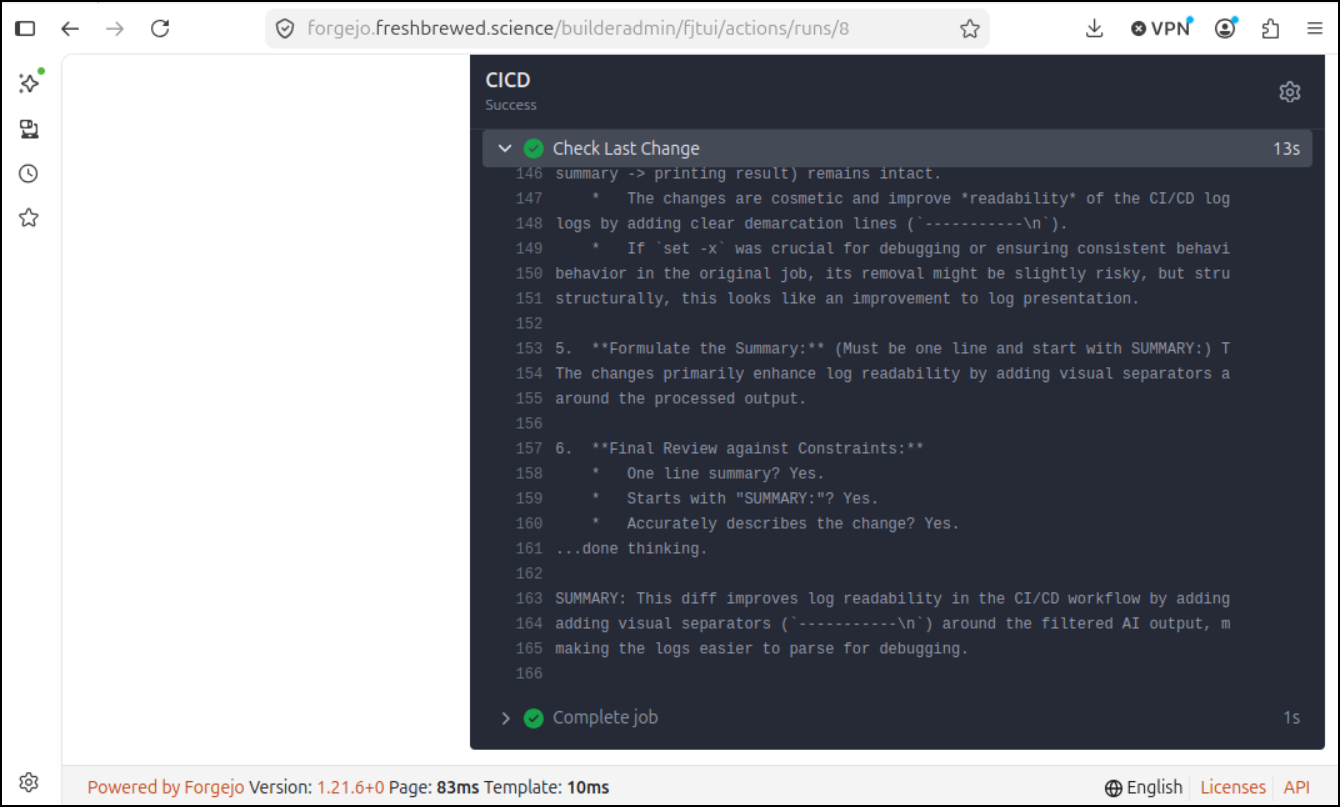
However, in this most basic example our ollama CLI feeds the last diff to a model running on a host nearby and asks “Is this code change problematic - give me a summary”.
Pi
Ollama as the harness is a bit much. We are installing a rather large package meant to host models just to run the CLI aspect.
What if we use a much lighter harness - and one that could be installed with npm
$ npm install -g --ignore-scripts @earendil-works/pi-coding-agent
npm warn deprecated node-domexception@1.0.0: Use your platform's native DOMException instead

added 131 packages in 4s

18 packages are looking for funding
  run `npm fund` for details
i have a model.json like this:
  "providers": {
    "ollama": {
      "baseUrl": "http://192.168.1.220:11434/v1",
      "api": "openai-completions",
      "apiKey": "ollama",
      "models": [
        { "id": "gemma4:12b" },
        { "id": "gemma4:e4b" }
      ]
    }
  }
}
I can base64 it to make it easy to move into a pipeline later.
So let’s setup the models.json as if we were in the pipeline already
$ mkdir -p ~/.pi/agent
$ echo ewogICJwcm92aWRlcnMiOiB7CiAgICAib2xsYW1hIjogewogICAgICAiYmFzZVVybCI6ICJodHRwOi8vMTkyLjE2OC4xLjIyMDoxMTQzNC92MSIsCiAgICAgICJhcGkiOiAib3BlbmFpLWNvbXBsZXRpb25zIiwKICAgICAgImFwaUtleSI6ICJvbGxhbWEiLAogICAgICAibW9kZWxzIjogWwogICAgICAgIHsgImlkIjogImdlbW1hNDoxMmIiIH0sCiAgICAgICAgeyAiaWQiOiAiZ2VtbWE0OmU0YiIgfQogICAgICBdCiAgICB9CiAgfQp9Cg== | base64 --decode > ~/.pi/agent/models.json

$ echo "tell me a joke" | pi -p "do the following: " --model gemma4:12b
It looks like you didn't include any text after the colon! If you provide a topic or a specific scenario, I can definitely craft a joke for you.

In the meantime, here’s one for you:
**Why did the developer go broke?**
Because he kept spending all his "cents" on "cache"!
I can now assume we would want to feed in the git changes
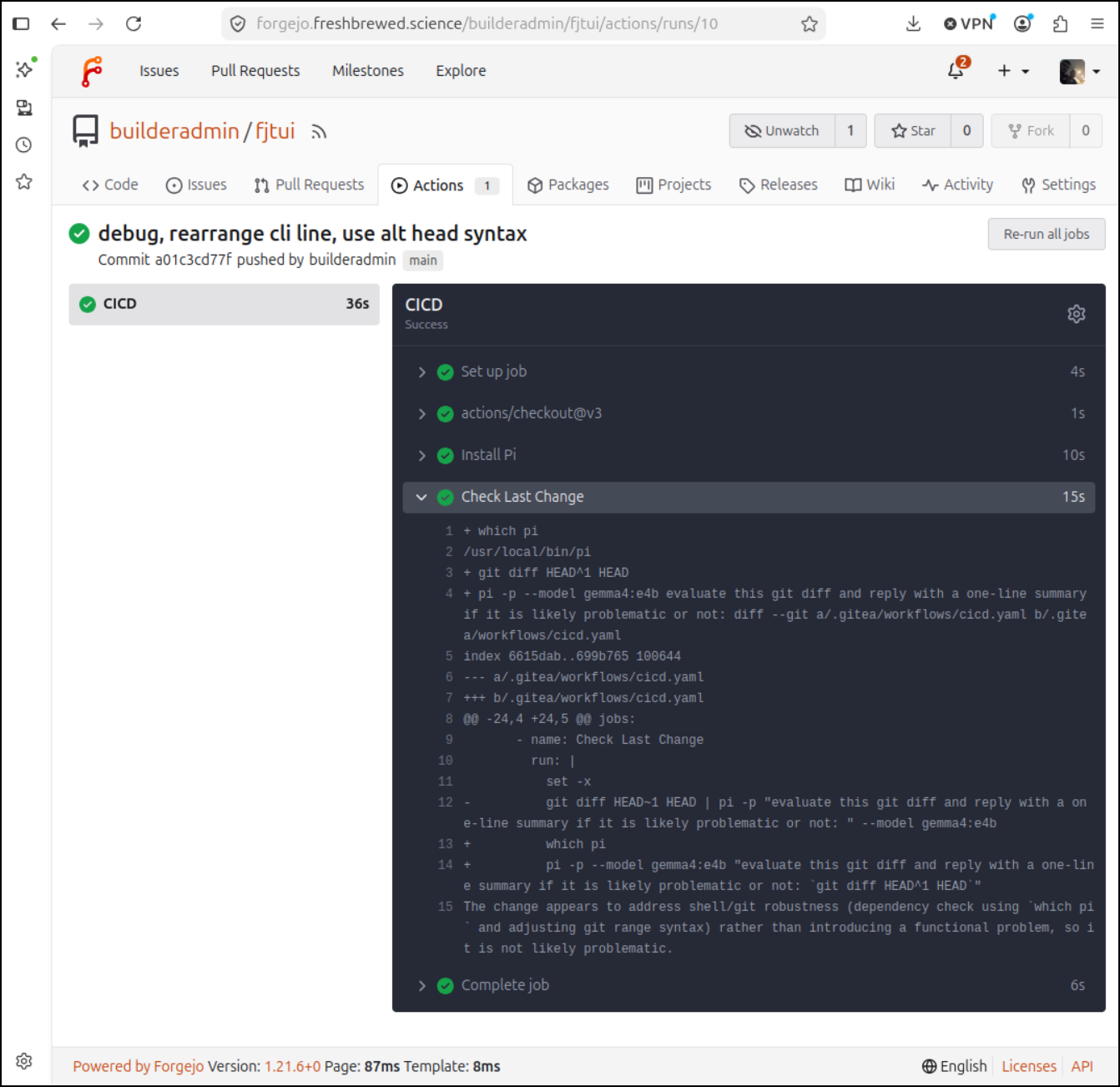
$ git diff HEAD~1 HEAD | pi -p "evaluate this git diff and reply with a one-line summary if it is likely problematic or not: " --model gemma4:e4b
SUMMARY: The changes improve shell script cleanup and logging readability but introduce a syntactic error by appending non-shell instructional text directly into the final `run` block, causing the workflow step to fail.
Let’s use this in our Forgejo pipeline:
name: CICD
run-name: ${{ gitea.actor }} CICD - ${{ gitea.ref_name }}
on:
  push:

env:
  OLLAMA_HOST: "192.168.1.220:11434"
  OLLAMA_MODEL: "gemma4:e4b"

jobs:
  CICD:
    runs-on: my_custom_label
    container: node:22
    steps:
      - uses: actions/checkout@v3 # Checks out your repository
        with:
          fetch-depth: 2
      - name: Install Pi
        run: |
          npm install -g --ignore-scripts @earendil-works/pi-coding-agent
          mkdir -p ~/.pi/agent
          echo ewogICJwcm92aWRlcnMiOiB7CiAgICAib2xsYW1hIjogewogICAgICAiYmFzZVVybCI6ICJodHRwOi8vMTkyLjE2OC4xLjIyMDoxMTQzNC92MSIsCiAgICAgICJhcGkiOiAib3BlbmFpLWNvbXBsZXRpb25zIiwKICAgICAgImFwaUtleSI6ICJvbGxhbWEiLAogICAgICAibW9kZWxzIjogWwogICAgICAgIHsgImlkIjogImdlbW1hNDoxMmIiIH0sCiAgICAgICAgeyAiaWQiOiAiZ2VtbWE0OmU0YiIgfQogICAgICBdCiAgICB9CiAgfQp9Cg== | base64 --decode > ~/.pi/agent/models.json

      - name: Check Last Change
        run: |
          set -x
          which pi
          pi -p --model gemma4:e4b "evaluate this git diff and reply with a one-line summary if it is likely problematic or not: `git diff HEAD^1 HEAD`"
Here we can not only see the output, but how fast the pipeline ran (36s total).
Azure AI
I often use OpenAI models via Azure AI foundry as I can control costs by using a smaller nano deployment
I’ll set an OpenAI key
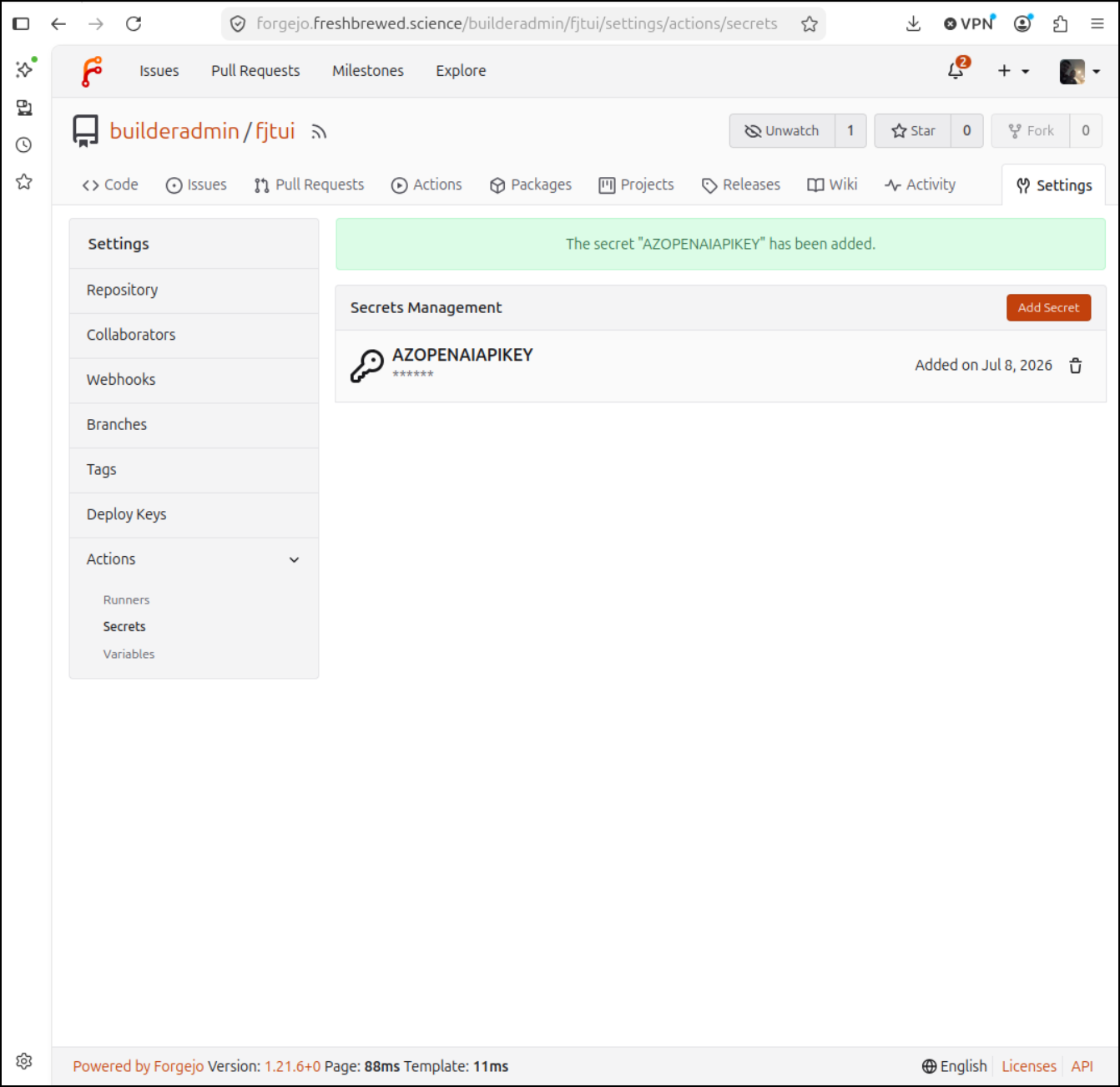
Now, I had many challenges trying to get pi to properly work with the deployed GPT 5 Nano instance I had - it was a mix of API versions and “responses” version “chat completions” that kept blocking it.
However, I paused and thought about it. I really don’t need a harness to just send a query to OpenAI (via Azure) and hear its response. I just need curl.
name: CICD
run-name: ${{ gitea.actor }} CICD - ${{ gitea.ref_name }}
on:
  push:

jobs:
  CICD:
    runs-on: my_custom_label
    container: node:22
    steps:
      - uses: actions/checkout@v3 # Checks out your repository
        with:
          fetch-depth: 2
      - name: Install jq
        run: |
          apt update
          apt install -y ca-certificates curl gnupg unzip sudo groff tree jq

      - name: Check Last Change
        run: |
          set -x
          #!/bin/bash

          git diff HEAD^1 HEAD > diff.txt
          FILE_PATH="diff.txt"
          ENDPOINT="https://isaac-mgp1gfv5-eastus2.cognitiveservices.azure.com/openai/deployments/gpt-5-nano/chat/completions?api-version=2025-01-01-preview"

          FILE_CONTENT=$(cat "$FILE_PATH")
          PROMPT="evaluate this git diff and reply with a one-line summary if it is likely problematic or not:\n\n$FILE_CONTENT"

          JSON_PAYLOAD=$(jq -n \
            --arg prompt_text "$PROMPT" \
            '{
              "messages": [
                {
                  "role": "user",
                  "content": $prompt_text
                }
              ],
              "max_completion_tokens": 16384,
              "model": "gpt-5-nano"
            }')

          curl -X POST "$ENDPOINT" \
              -H "Content-Type: application/json" \
              -H "Authorization: Bearer $AZURE_API_KEY" \
              -d "$JSON_PAYLOAD" | tee output.json

          echo -e "\n---------------\n"
          cat output.json | jq .choices[0].message.content

        env: # Or as an environment variable
          AZURE_API_KEY: ${{ secrets.AZOPENAIAPIKEY }}
The meat of the above is really the JSON payload out that sends a USER message with the content baked in, then the curl that sends the OpenAI data back (which is in JSON format) and lastly the jq that pulls out our evaluation
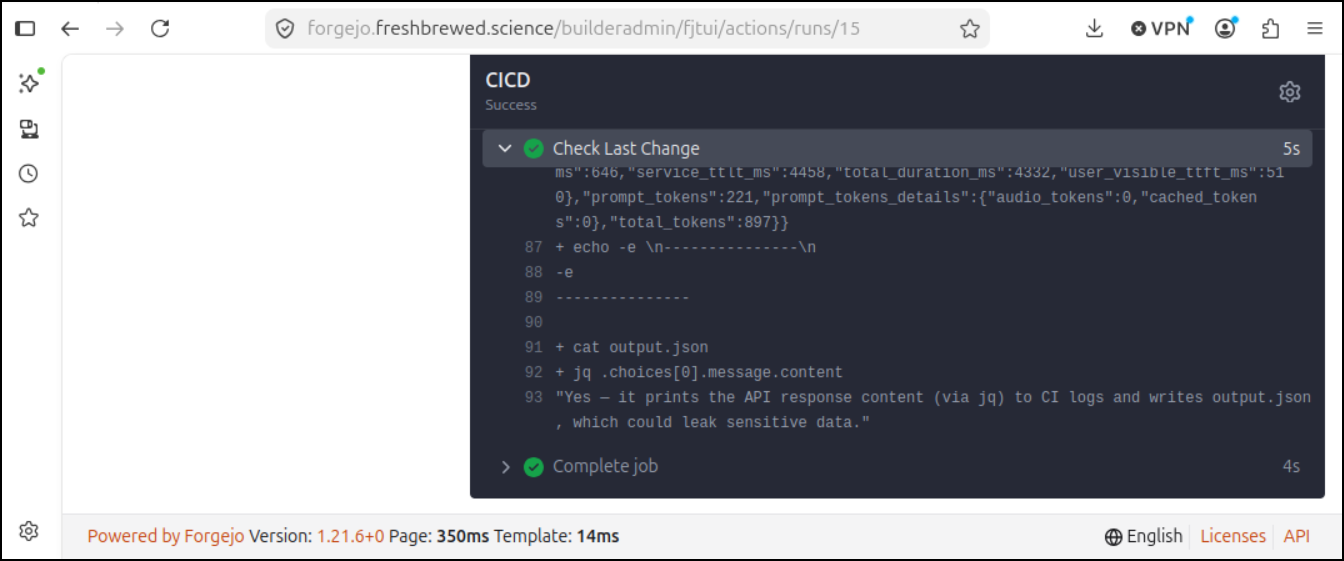
Perhaps we want to gate our flow. Stop right away if there is an issue found.
Let’s tweak the prompt to call that out in a keyword for which we could check:
   FILE_CONTENh=$(cat "$FILE_PATH")
   PROMPT="evaluate this git diff and reply with a one-line summary
   if it is likely problematic or not.  Make sure to say in all
   capitals PROBLEM or NOT_PROBLEM:\n\n$FILE_CONTENT"
Let’s do that - set an environment variable that would denote “good” or “bad” changes (really safe or review-more would be more appropriate words)
name: CICD
run-name: ${{ gitea.actor }} CICD - ${{ gitea.ref_name }}
on:
  push:

jobs:
  CICD:
    runs-on: my_custom_label
    container: node:22
    steps:
      - uses: actions/checkout@v3 # Checks out your repository
        with:
          fetch-depth: 2
      - name: Install jq
        run: |
          apt update
          apt install -y ca-certificates curl gnupg unzip sudo groff tree jq

      - name: Check Last Change
        id: ai_check
        shell: bash
        run: |
          set -x
          #!/bin/bash

          git diff HEAD^1 HEAD > diff.txt
          FILE_PATH="diff.txt"
          ENDPOINT="https://isaac-mgp1gfv5-eastus2.cognitiveservices.azure.com/openai/deployments/gpt-5-nano/chat/completions?api-version=2025-01-01-preview"

          FILE_CONTENT=$(cat "$FILE_PATH")
          PROMPT="evaluate this git diff and reply with a one-line summary if it is likely problematic or not.  Make sure to say in all capitals PROBLEM or NOT_PROBLEM:\n\n$FILE_CONTENT"

          JSON_PAYLOAD=$(jq -n \
            --arg prompt_text "$PROMPT" \
            '{
              "messages": [
                {
                  "role": "user",
                  "content": $prompt_text
                }
              ],
              "max_completion_tokens": 16384,
              "model": "gpt-5-nano"
            }')

          curl -X POST "$ENDPOINT" \
              -H "Content-Type: application/json" \
              -H "Authorization: Bearer $AZURE_API_KEY" \
              -d "$JSON_PAYLOAD" | tee output.json

          echo -e "\n---------------\n"
          cat output.json | jq .choices[0].message.content

          if [[ $(cat output.json | jq .choices[0].message.content) == *"NOT_PROBLEM"* ]]; then
            echo "No problem detected"
            echo "AICHECK=good" >> $GITHUB_OUTPUT
          else
            echo "Problem detected"
            echo "AICHECK=bad" >> $GITHUB_OUTPUT
            exit 1
          fi
        env: # Or as an environment variable
          AZURE_API_KEY: ${{ secrets.AZOPENAIAPIKEY }}
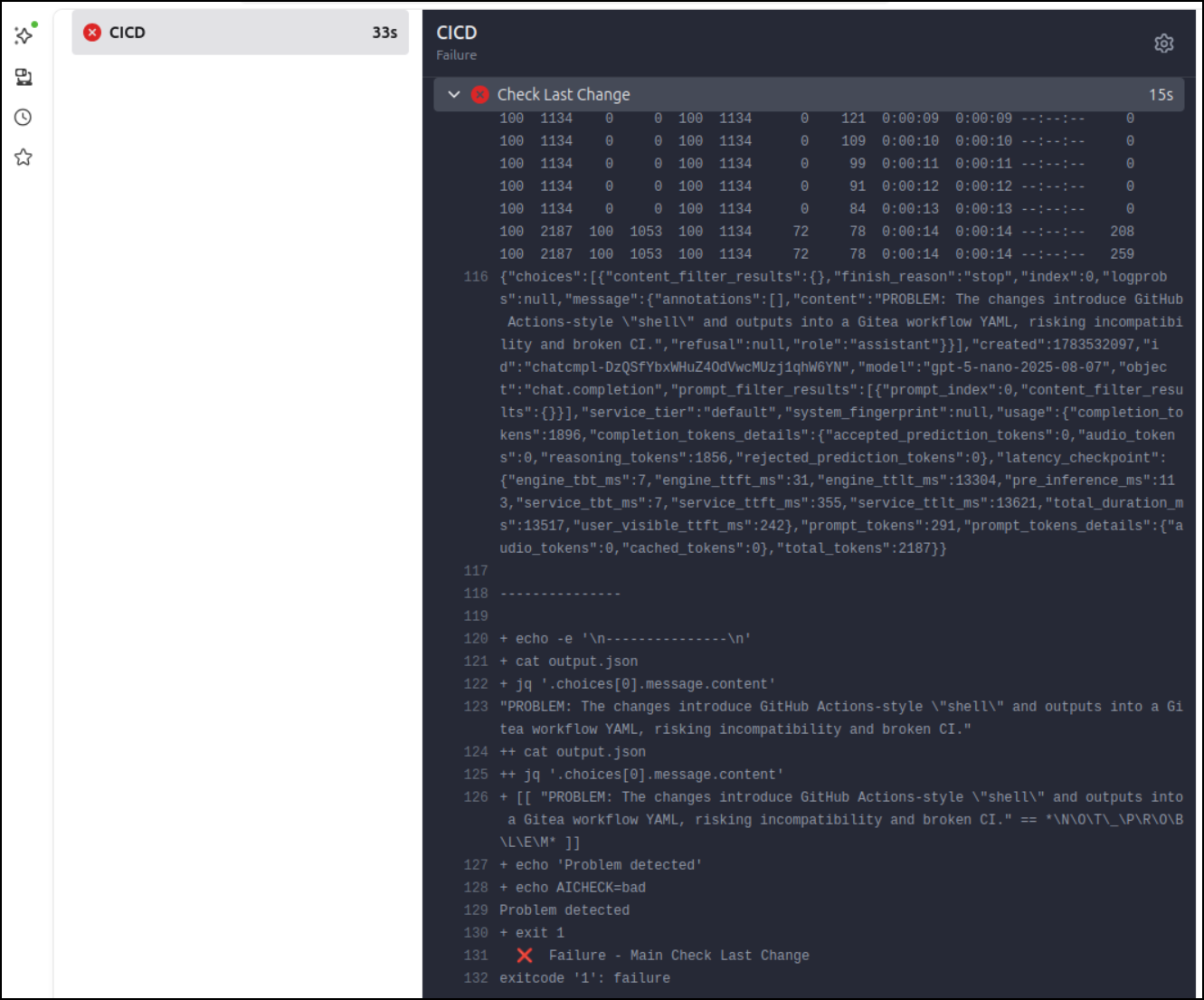
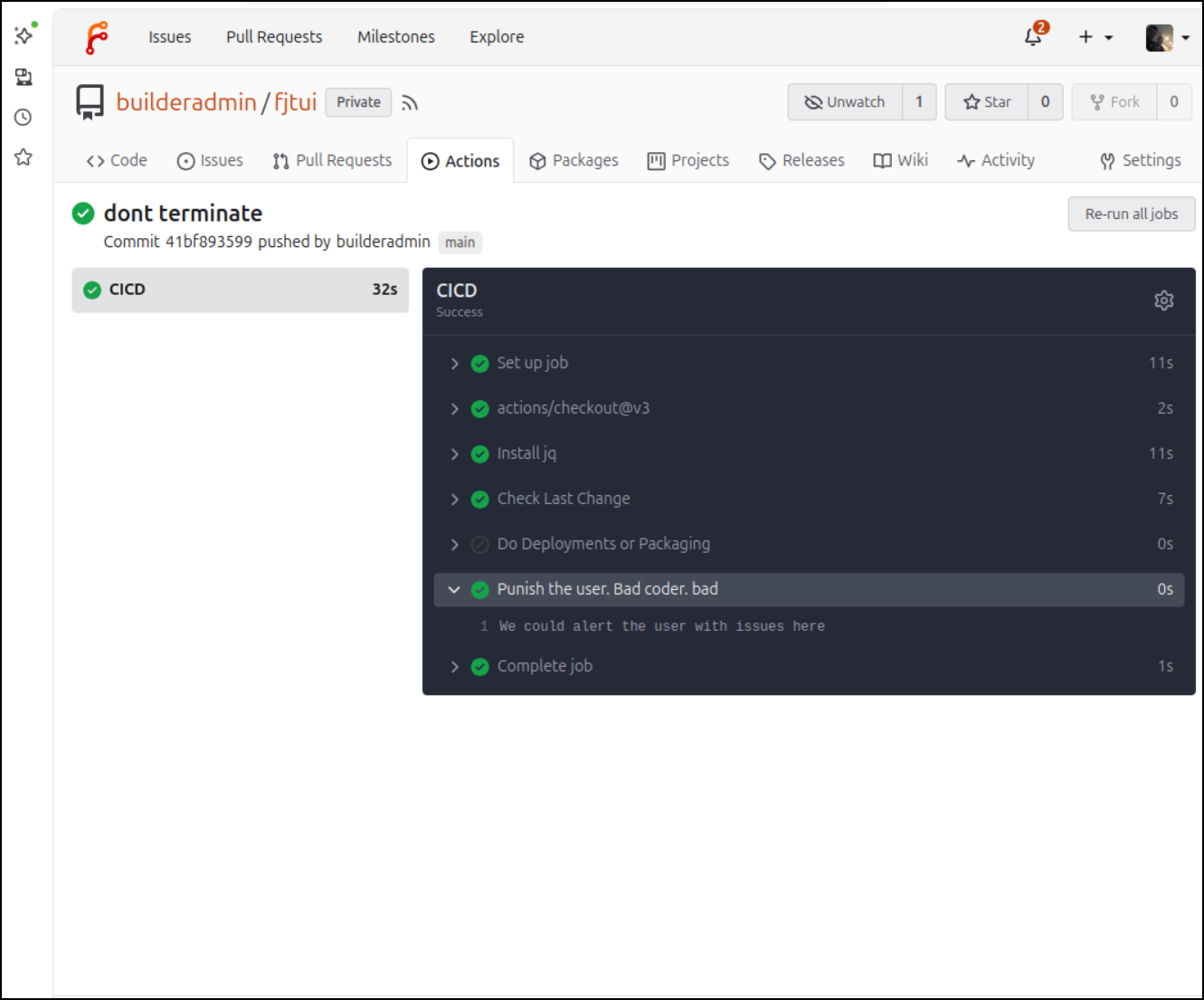
maybe we want to key off that and not just stop at the step
          if [[ $(cat output.json | jq .choices[0].message.content) == *"NOT_PROBLEM"* ]]; then
            echo "No problem detected"
            echo "AICHECK=good" >> $GITHUB_OUTPUT
          else
            echo "Problem detected"
            echo "AICHECK=bad" >> $GITHUB_OUTPUT
          fi
        env: # Or as an environment variable
          AZURE_API_KEY: ${{ secrets.AZOPENAIAPIKEY }}

      - name: Do Deployments or Packaging
        shell: bash
        run: |
          echo "We could do deployments or packaging here"
        if: ${{ steps.ai_check.outputs.AICHECK == 'good' }}

      - name: Punish the user. Bad coder. bad
        shell: bash
        run: |
          echo "We could alert the user with issues here"
        if: ${{ steps.ai_check.outputs.AICHECK == 'bad' }}
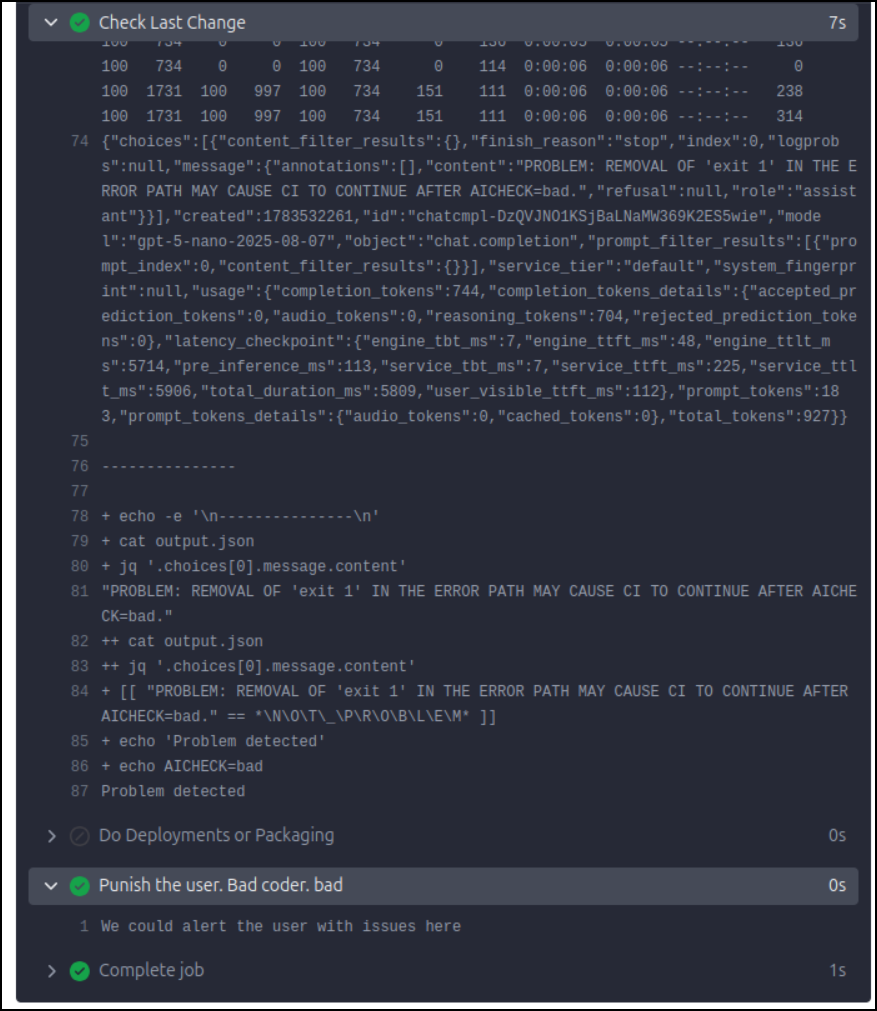
I, as author, might scroll up to see what OpenAI was raising issues on with my change:
Now all this is just using curl and jq.
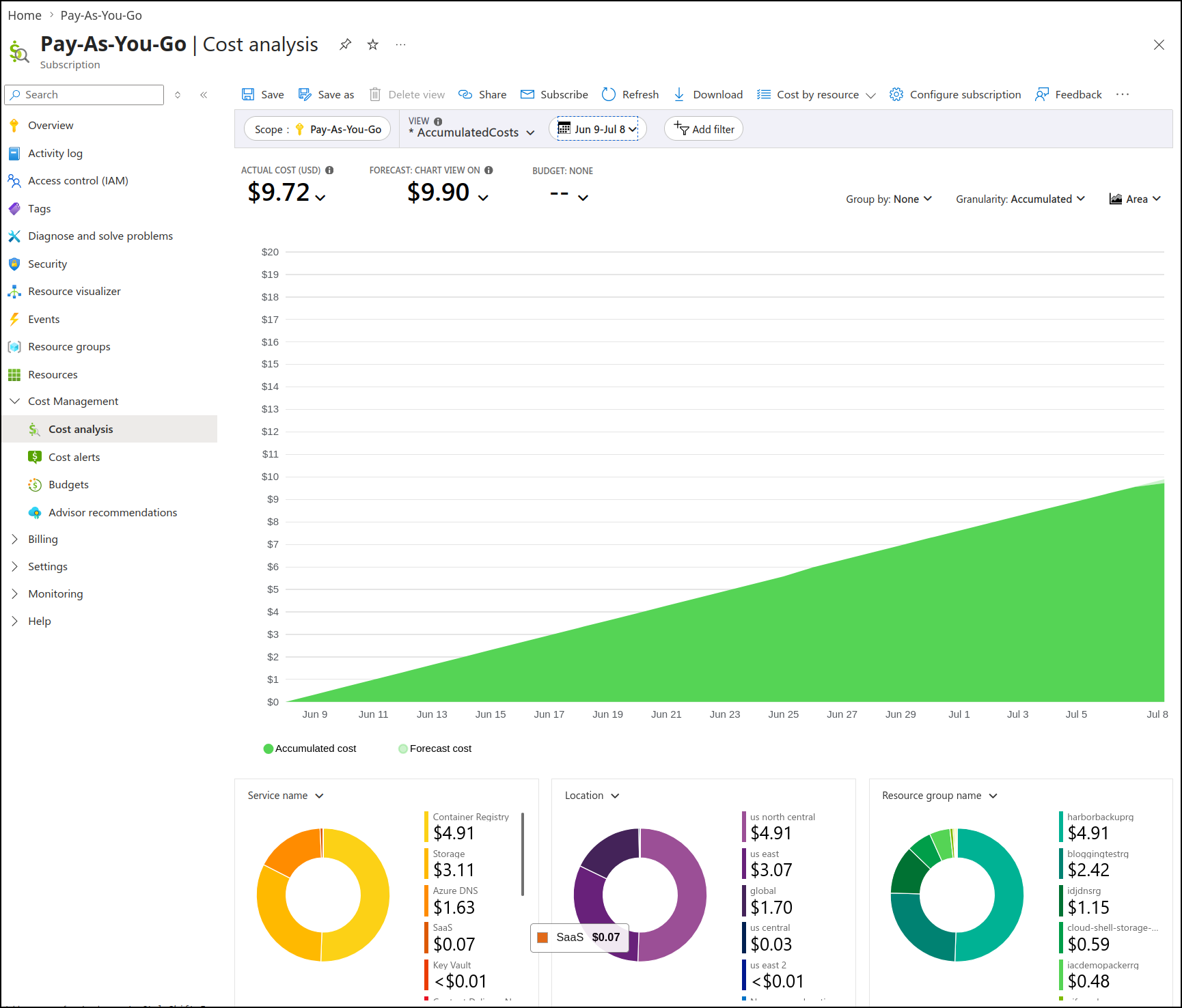
And because I’m using such a small older model, it’s hard to even dig up likely costs because in the last 30 days its cost me about 7c
Summary and Next steps
This was just to prove the point - we can get a whole lot done with just some basic coding. I really only used AI for the above when I was trying to fight Pi and make it use the Azure AI Foundry endpoint, otherwise these are really quite simple pipeline steps anyone can throw into their flow.
And using a small model just to review a GIT diff is appropriate. We aren’t doing deeply nested analysis. If you want strong code testing use… testing. I mean, that is what unit tests and test automation frameworks are for.
The goal with an AI agent in the mix is just some quick cursory feedback.
As far as next steps go, I would next want to add in some company created Skills that detail rules around our coding best practices. Things like naming conventions, creating unit tests, documentation, code comments, tab structure (though linters are better for that).