In our post earlier this week we built out idjohnson/shuffledeck-users:latest which uses AlloyDB Express to query a users table for a “ShuffleUsers” demo app.
In that article, we built out the app with docker then used docker build and push. Next, we showed how to launch with a helm chart to Kubernetes and route TLS traffic to it with shuffledeck.tpk.pw
The app is running on our local Kubernetes, and by extension, could run just fine in GKE. However, what about serverless? The whole point of low cost scale-to-zero database options like AlloyDB Express is they could be paired with non-persistent workloads. What about using something like GCP Cloud Run with AlloyDB Express? Could this be a killer combo of serverless?
Let’s start by moving this containerized app over to Cloud Run
Cloud Run
But what makes this AlloyDB Express option even more interesting is when we pair it with Cloud Run.
I’ll start at the end. I’ll invoke a script that will build and push to GCR before invoking Cloud Run as we cannot pull directly from Dockerhub
NOTE: the full scripts used are at the bottom of this article
$ ./create_cloudrun.sh -project careful-compass-241122 -manual 1 -build
Building and pushing container image us-west1-docker.pkg.dev/careful-compass-241122/cloud-run-source-deploy/shuffledeck-users:latest locally with Docker...
WARNING: Your config file at [/home/builder/.docker/config.json] contains these credential helper entries:

{
  "credHelpers": {
    "us-west1-docker.pkg.dev": "gcloud"
  }
}
Adding credentials for: us-west1-docker.pkg.dev
gcloud credential helpers already registered correctly.
[+] Building 0.9s (12/12) FINISHED                                                                    docker:default
 => [internal] load build definition from Dockerfile                                                            0.0s
 => => transferring dockerfile: 763B                                                                            0.0s
 => [internal] load metadata for docker.io/library/node:20-alpine                                               0.7s
 => [auth] library/node:pull token for registry-1.docker.io                                                     0.0s
 => [internal] load .dockerignore                                                                               0.0s
 => => transferring context: 104B                                                                               0.0s
 => [1/6] FROM docker.io/library/node:20-alpine@sha256:fb4cd12c85ee03686f6af5362a0b0d56d50c58a04632e6c0fb8363f  0.0s
 => [internal] load build context                                                                               0.0s
 => => transferring context: 1.49kB                                                                             0.0s
 => CACHED [2/6] RUN apk add --no-cache bash postgresql-client                                                  0.0s
 => CACHED [3/6] WORKDIR /usr/src/app                                                                           0.0s
 => CACHED [4/6] COPY package*.json ./                                                                          0.0s
 => CACHED [5/6] RUN npm install --omit=dev                                                                     0.0s
 => CACHED [6/6] COPY . .                                                                                       0.0s
 => exporting to image                                                                                          0.0s
 => => exporting layers                                                                                         0.0s
 => => writing image sha256:cfc5f37fe729f4f091fb637d680df0b994e962d25d7ec4bc3da183ee5ce1f5cc                    0.0s
 => => naming to us-west1-docker.pkg.dev/careful-compass-241122/cloud-run-source-deploy/shuffledeck-users:late  0.0s
The push refers to repository [us-west1-docker.pkg.dev/careful-compass-241122/cloud-run-source-deploy/shuffledeck-users]
f30a8dc6cff4: Layer already exists
ecae4a8accf4: Layer already exists
a7b2a09152da: Layer already exists
16f268e83290: Layer already exists
786cb3d5c2b6: Layer already exists
afa543f85b46: Layer already exists
e10358715ead: Layer already exists
4983b93ee796: Layer already exists
29df493baa13: Layer already exists
latest: digest: sha256:5517491a2c4b3e3d589be9f283c905f37b60fc5794e11dc12de3c640911391d0 size: 2207
Deploying Cloud Run service 'shuffledeck-users' in project 'careful-compass-241122' (region: us-west1)...
Deploying container to Cloud Run service [shuffledeck-users] in project [careful-compass-241122] region [us-west1]
✓ Deploying... Done.
  ✓ Creating Revision...
  ✓ Routing traffic...
  ✓ Setting IAM Policy...
  ✓ Setting IAP service agent...
Done.
Service [shuffledeck-users] revision [shuffledeck-users-00003-rzd] has been deployed and is serving 100 percent of traffic.
Service URL: https://shuffledeck-users-243917726587.us-west1.run.app
Cloud Run deployment complete.
You can see there is a PostgreSQL error in the middle
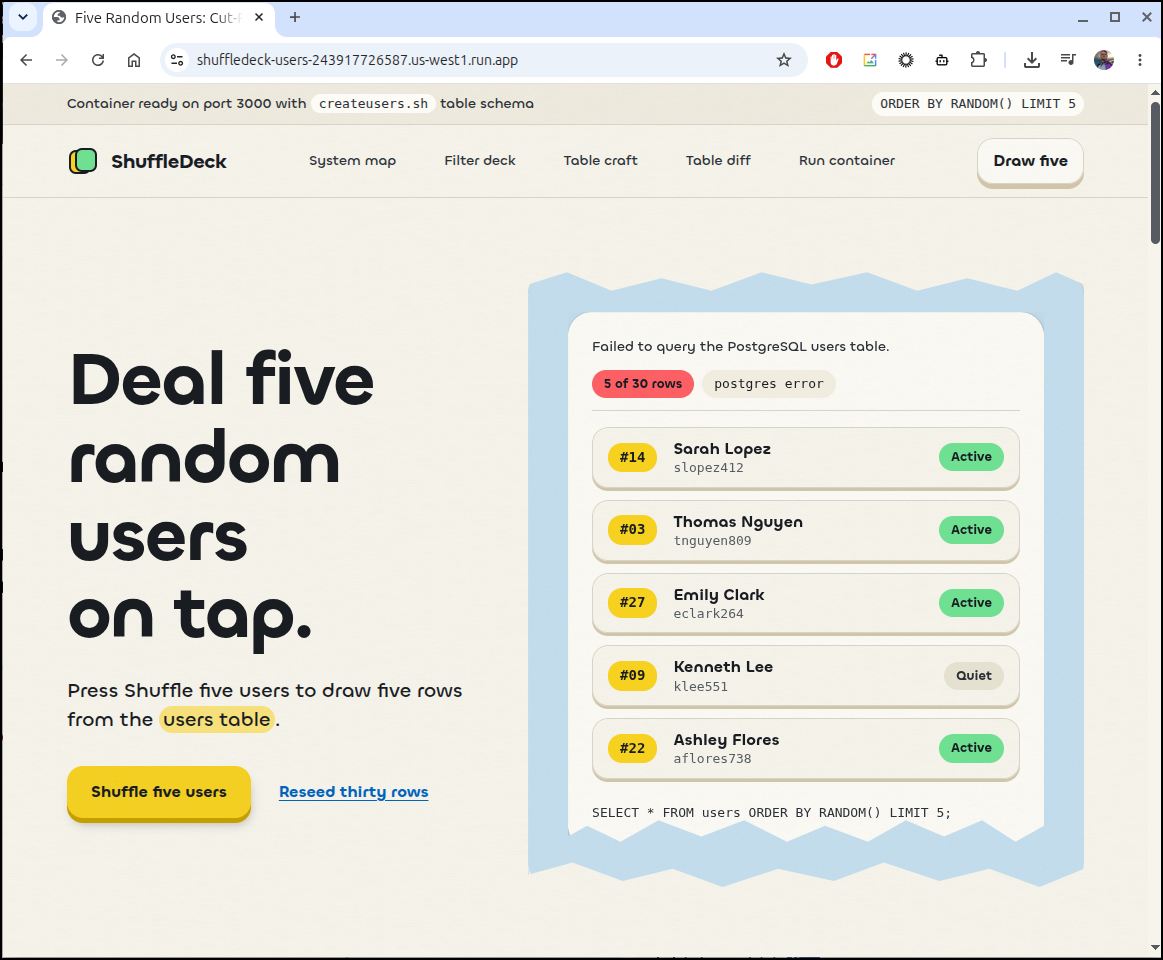
The browser console shows 500.
I suspect it is because i have a public IP restricted to my home egress.
I’ll add all IPs (generally a bad idea)
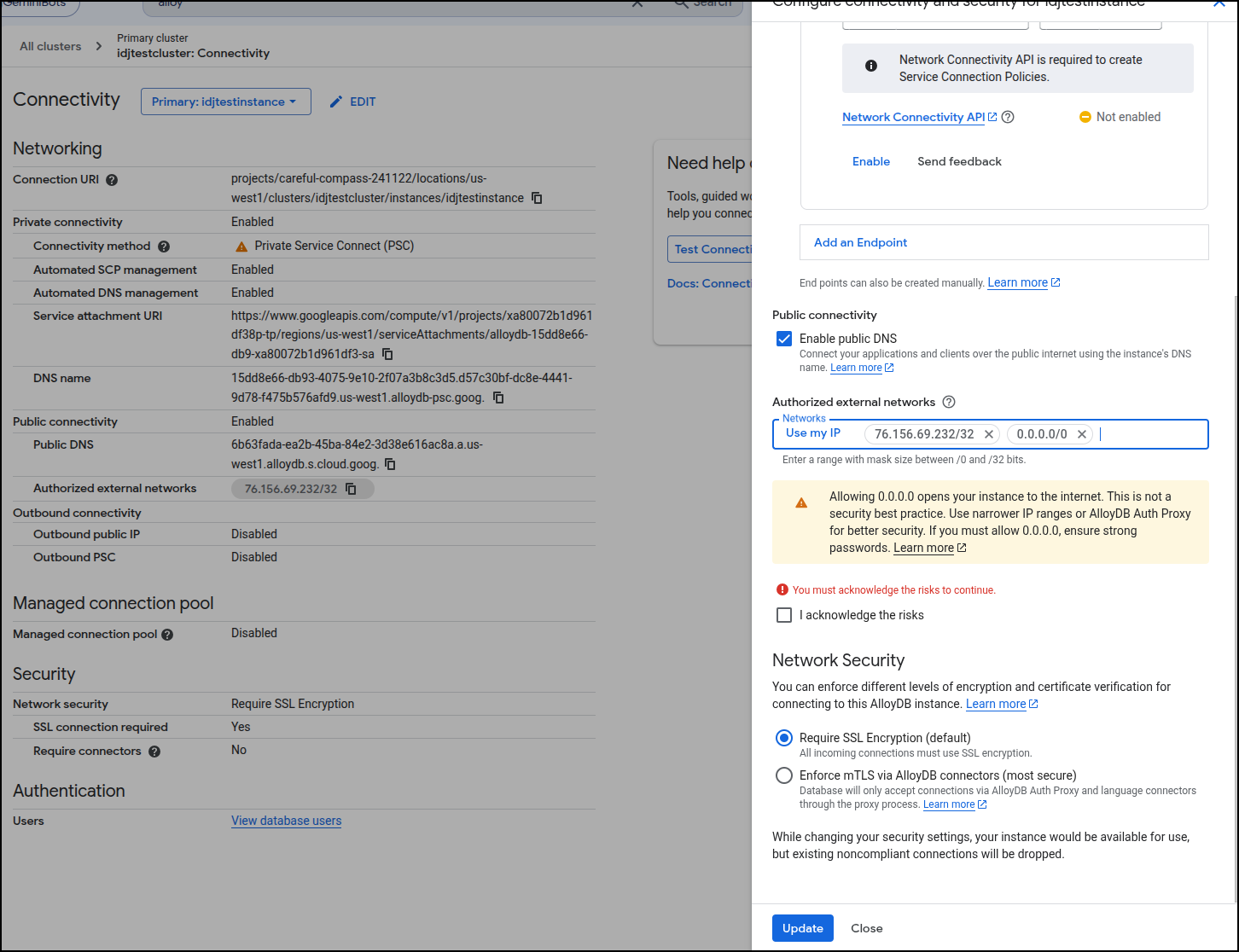
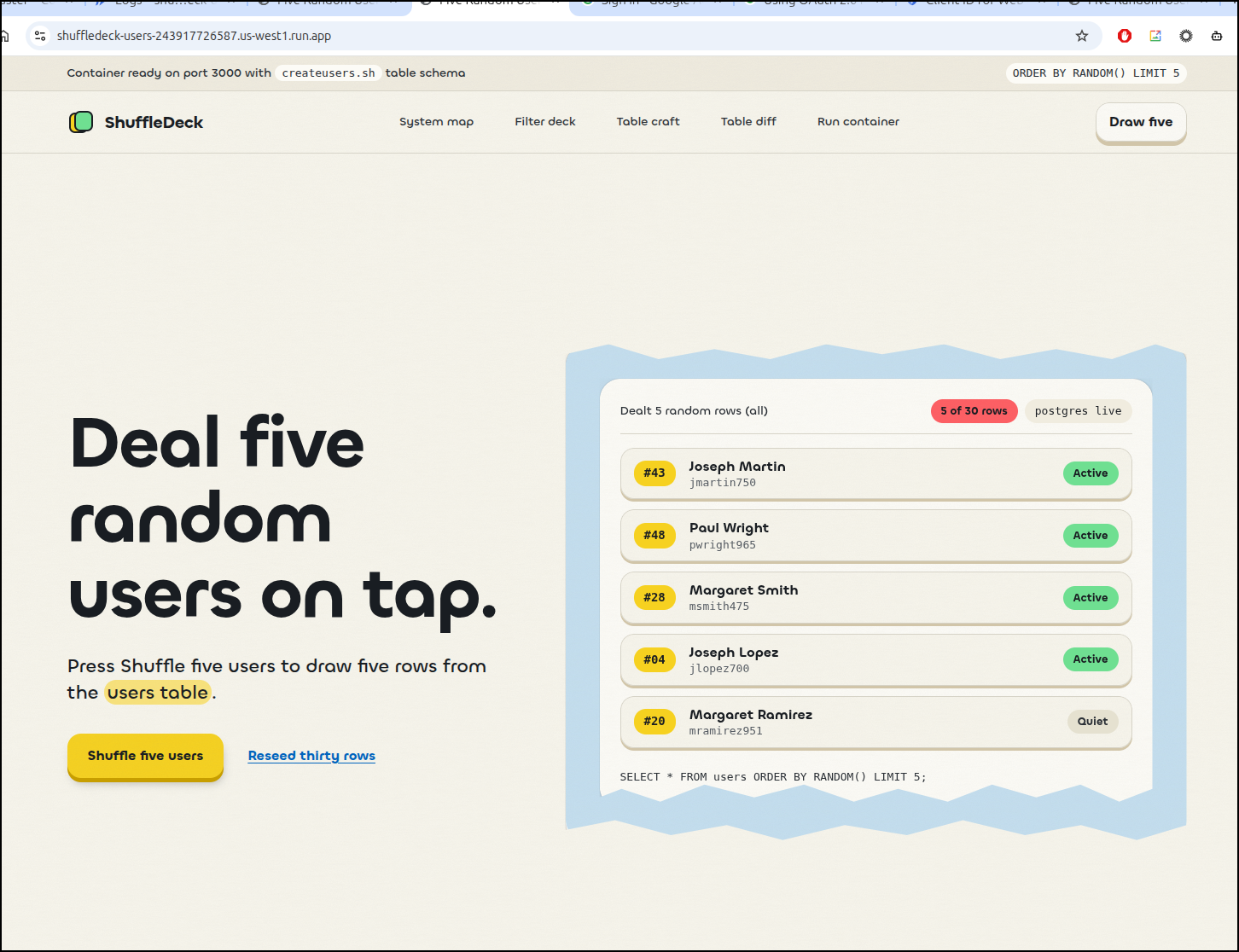
I tried the app again (no redeploy) and it works
The other path (better) is to create a private service connection
gcloud compute networks subnets describe default --region=us-west1 --project=careful-compass-241122 &&
gcloud compute addresses list --regions=us-west1 --project=careful-compass-241122 && gcloud compute
forwarding-rules list --regions=us-west1 --project=careful-compass-241122
I had agy complete the work as well as update the logging
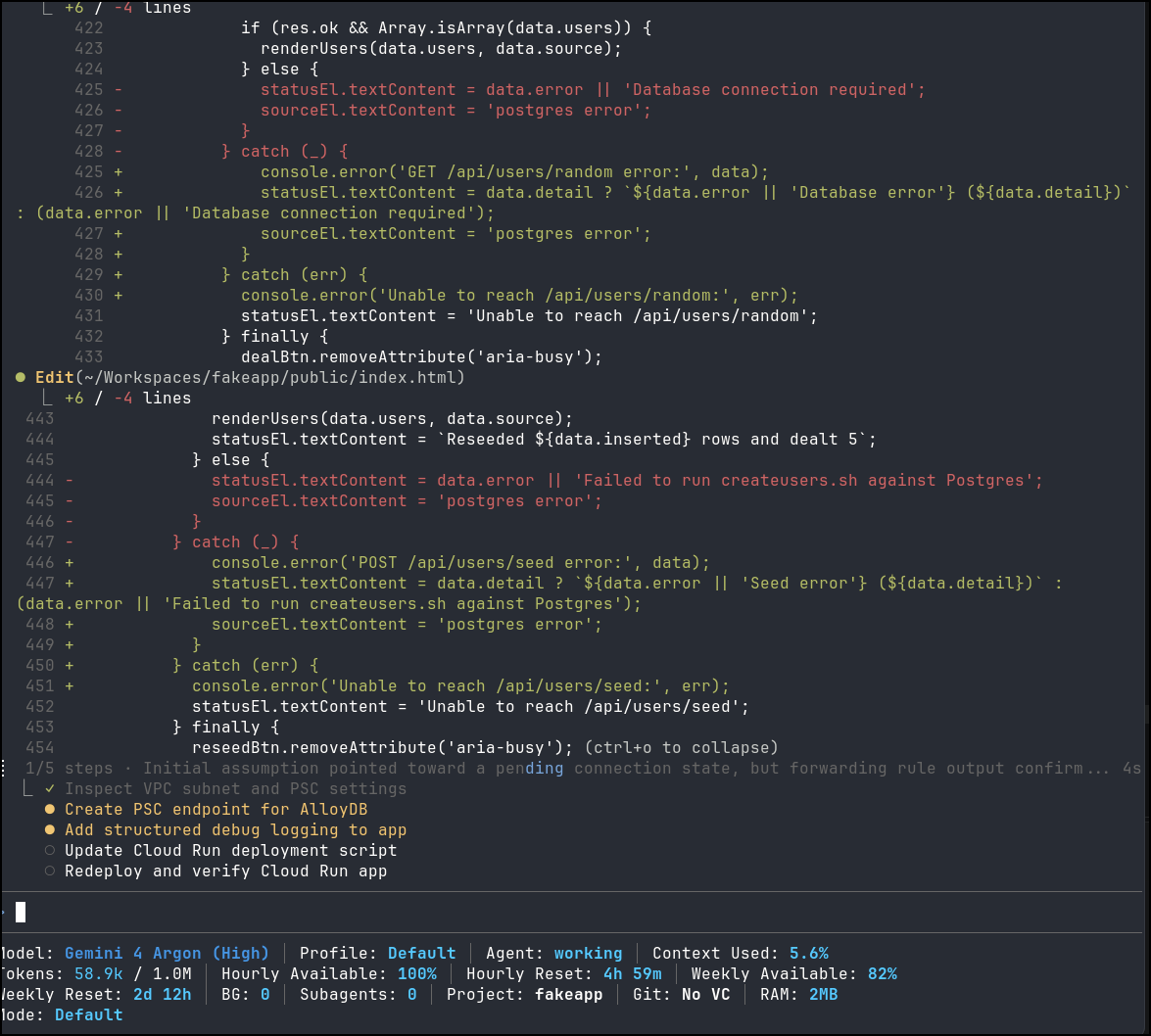
It fired up the updates
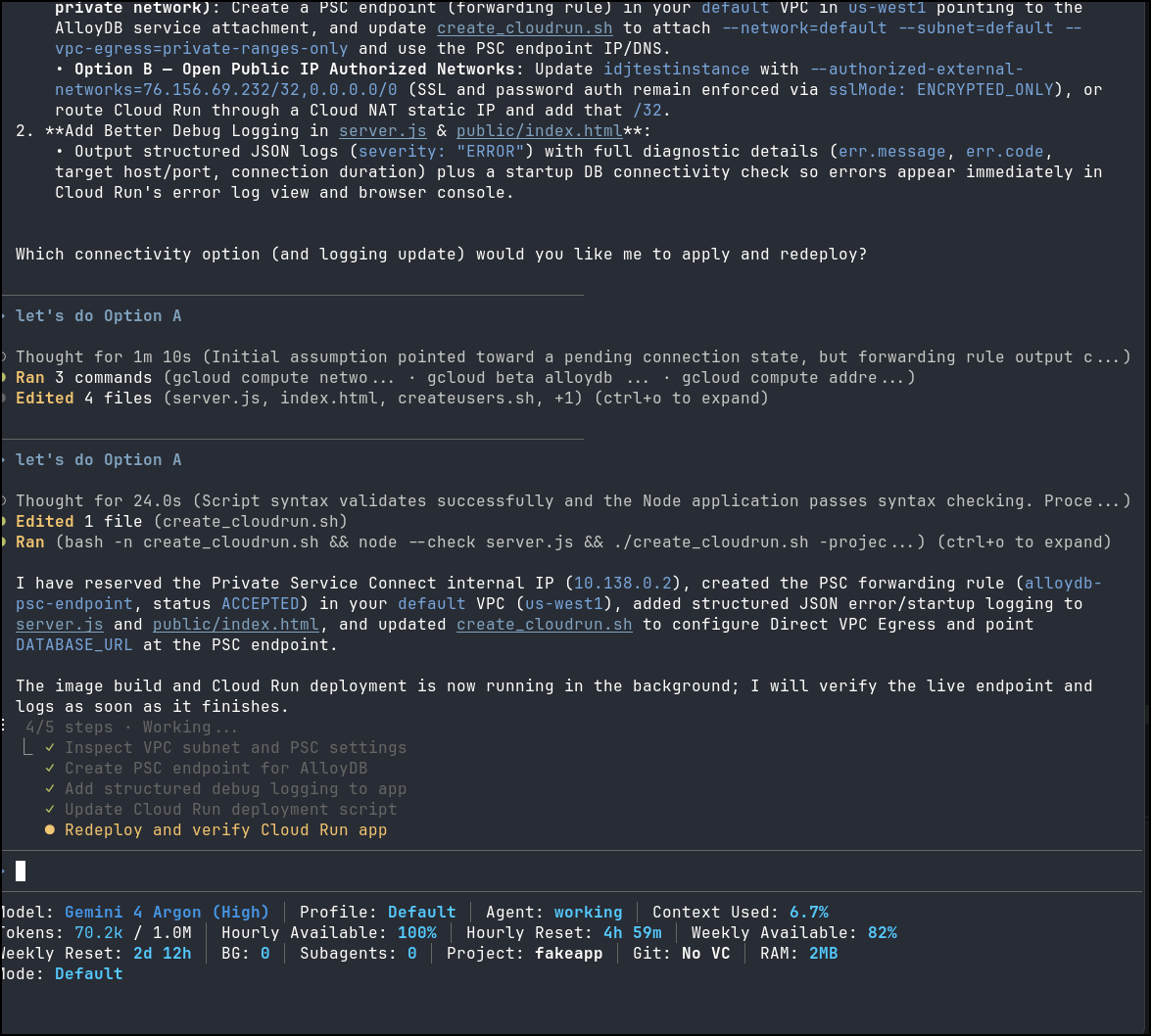
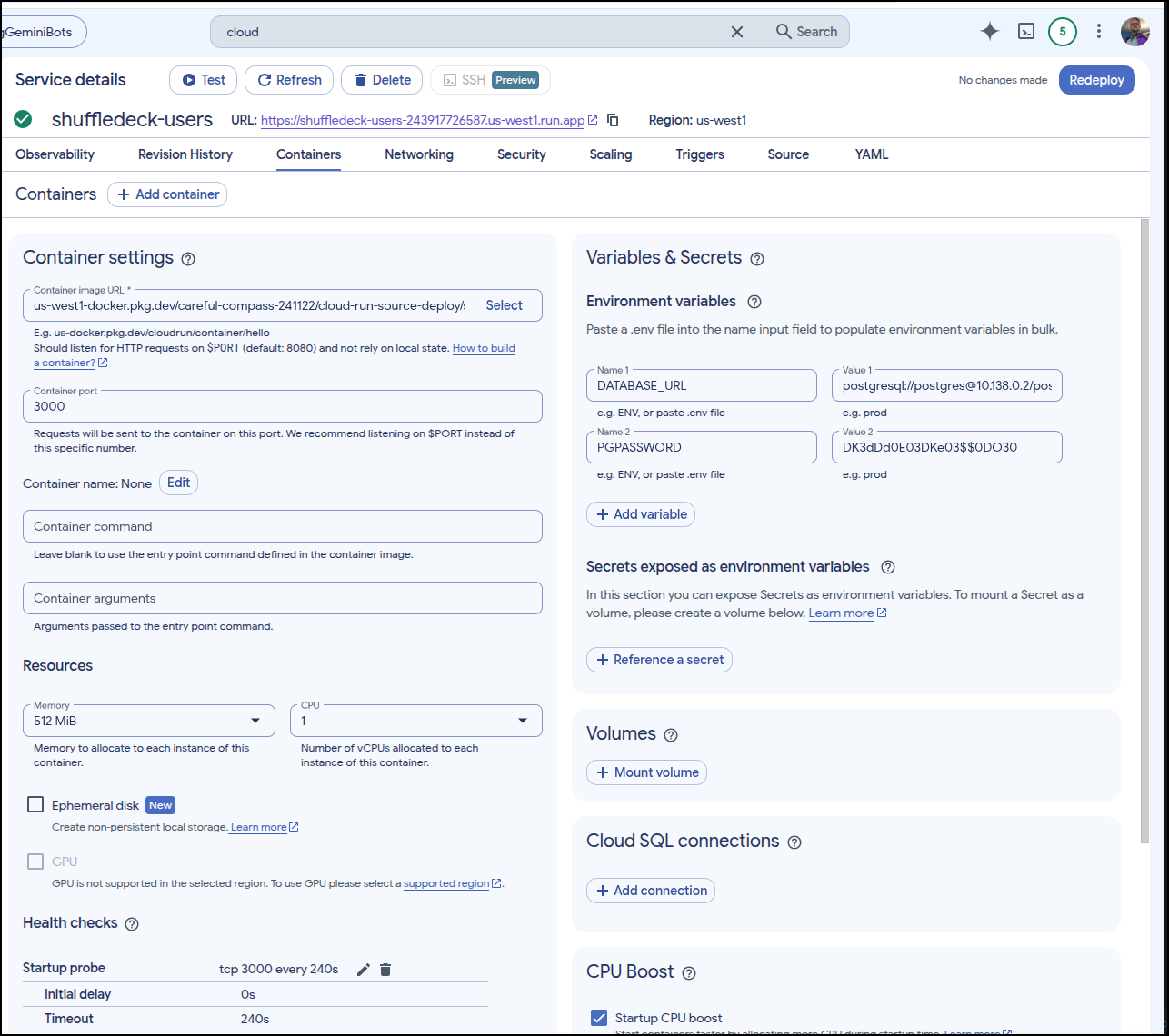
I can see it is now using private networking
And we can see it works
With Auth
I’ll first create an OAuth consent screen
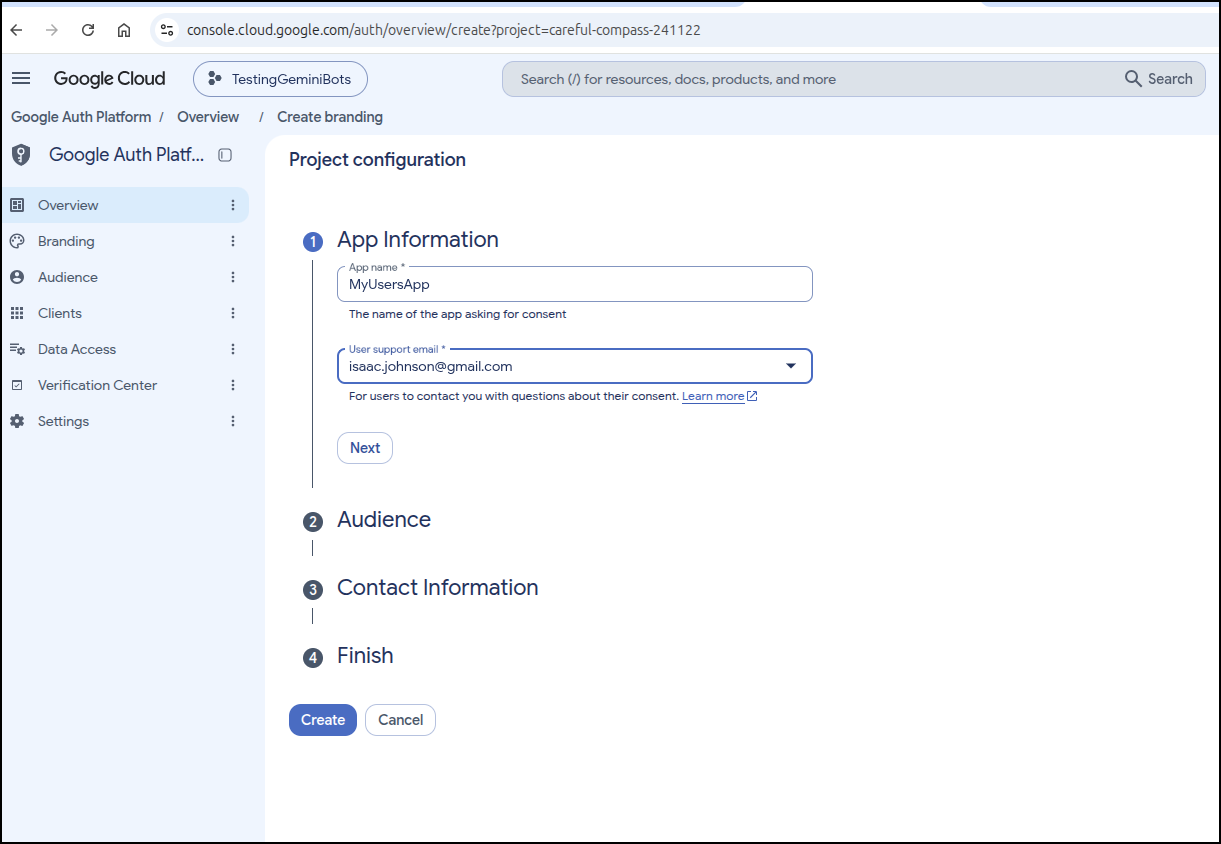
I’ll confirm and set it up
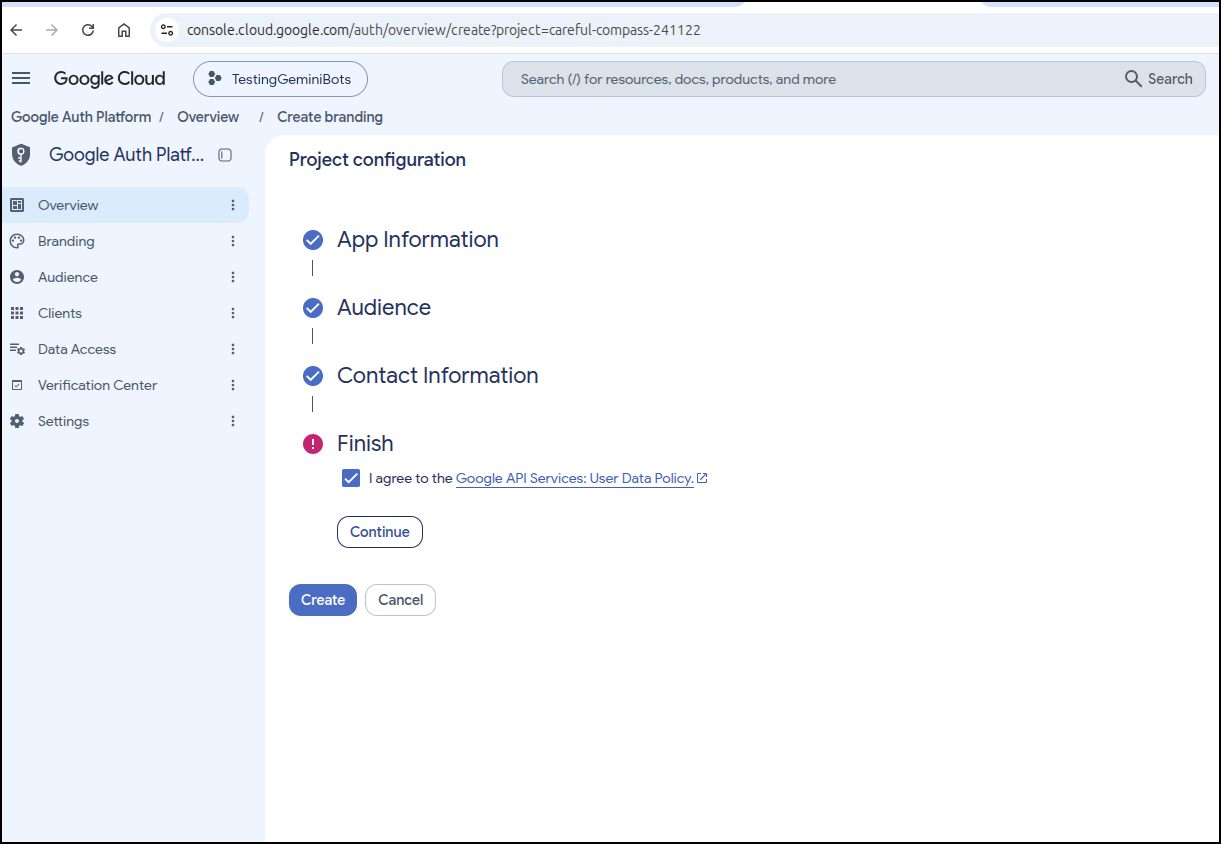
I’ll now create OAuth screen
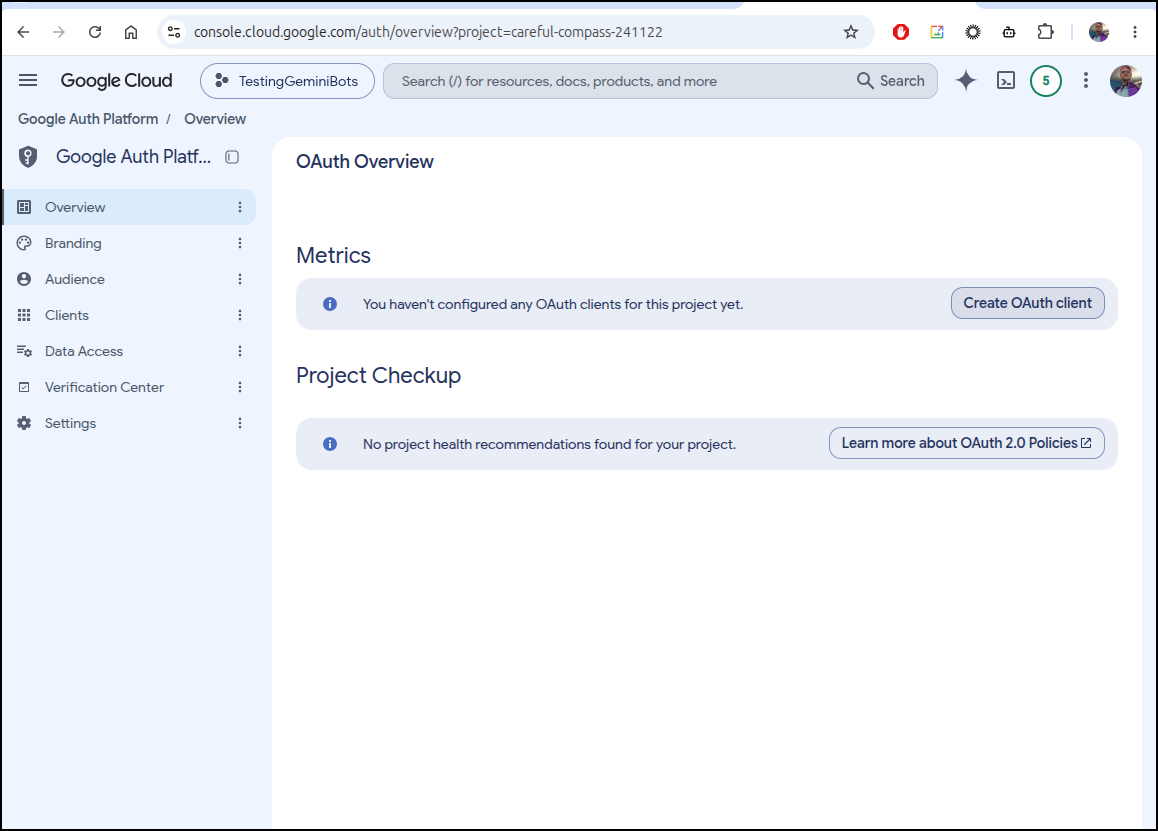
I can then create the OAuth2 credentials
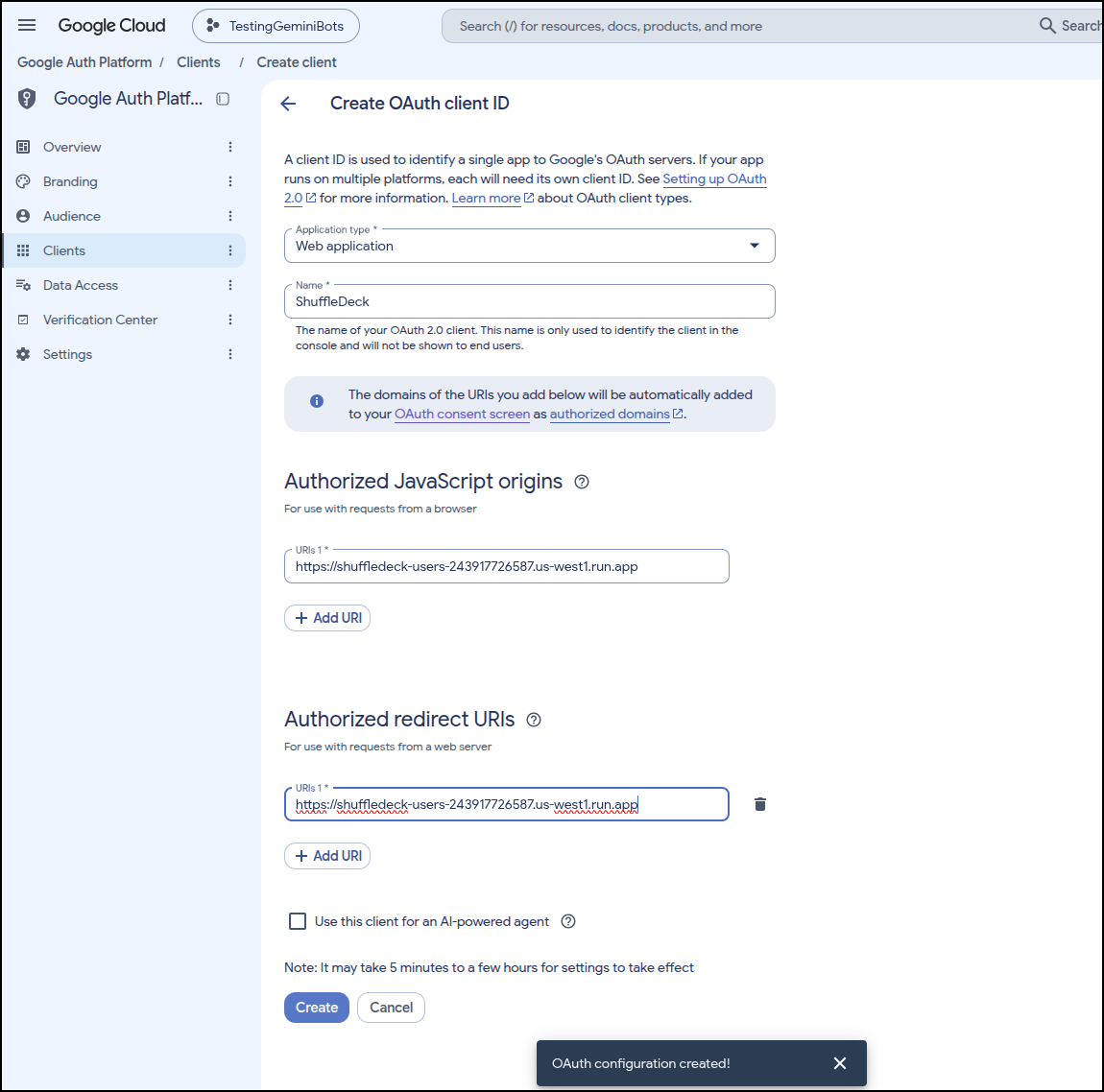
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
243917726587-qrt99dujqek53rmb50g4gj8pjdjkh76v.apps.googleusercontent.com
$ ./create_cloudrun.sh -project careful-compass-241122 -manual 1 -user isaac.johnson@gmail.com -build -oauth-client-id 243917726587-qrt99dujqek53rmb50g4gj8pjdjkh76v.apps.googleusercontent.com -oauth-client-secret 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
Enabling Identity-Aware Proxy (IAP) API on project 'careful-compass-241122'...
Building and pushing container image us-west1-docker.pkg.dev/careful-compass-241122/cloud-run-source-deploy/shuffledeck-users:latest locally with Docker...
WARNING: Your config file at [/home/builder/.docker/config.json] contains these credential helper entries:

{
  "credHelpers": {
    "us-west1-docker.pkg.dev": "gcloud"
  }
}
Adding credentials for: us-west1-docker.pkg.dev
gcloud credential helpers already registered correctly.
[+] Building 0.8s (12/12) FINISHED                                                                    docker:default
 => [internal] load build definition from Dockerfile                                                            0.0s
 => => transferring dockerfile: 763B                                                                            0.0s
 => [internal] load metadata for docker.io/library/node:20-alpine                                               0.6s
 => [auth] library/node:pull token for registry-1.docker.io                                                     0.0s
 => [internal] load .dockerignore                                                                               0.0s
 => => transferring context: 104B                                                                               0.0s
 => [1/6] FROM docker.io/library/node:20-alpine@sha256:fb4cd12c85ee03686f6af5362a0b0d56d50c58a04632e6c0fb8363f  0.0s
 => [internal] load build context                                                                               0.0s
 => => transferring context: 1.49kB                                                                             0.0s
 => CACHED [2/6] RUN apk add --no-cache bash postgresql-client                                                  0.0s
 => CACHED [3/6] WORKDIR /usr/src/app                                                                           0.0s
 => CACHED [4/6] COPY package*.json ./                                                                          0.0s
 => CACHED [5/6] RUN npm install --omit=dev                                                                     0.0s
 => CACHED [6/6] COPY . .                                                                                       0.0s
 => exporting to image                                                                                          0.0s
 => => exporting layers                                                                                         0.0s
 => => writing image sha256:cfc5f37fe729f4f091fb637d680df0b994e962d25d7ec4bc3da183ee5ce1f5cc                    0.0s
 => => naming to us-west1-docker.pkg.dev/careful-compass-241122/cloud-run-source-deploy/shuffledeck-users:late  0.0s
The push refers to repository [us-west1-docker.pkg.dev/careful-compass-241122/cloud-run-source-deploy/shuffledeck-users]
f30a8dc6cff4: Layer already exists
ecae4a8accf4: Layer already exists
a7b2a09152da: Layer already exists
16f268e83290: Layer already exists
786cb3d5c2b6: Layer already exists
afa543f85b46: Layer already exists
e10358715ead: Layer already exists
4983b93ee796: Layer already exists
29df493baa13: Layer already exists
latest: digest: sha256:5517491a2c4b3e3d589be9f283c905f37b60fc5794e11dc12de3c640911391d0 size: 2207
Deploying Cloud Run service 'shuffledeck-users' in project 'careful-compass-241122' (region: us-west1)...
Deploying container to Cloud Run service [shuffledeck-users] in project [careful-compass-241122] region [us-west1]

 **[Warning]** Deploying services with IAP enabled in a project outside of an Organization and may require initial setup via the Cloud Console. Please use the Cloud Run UI to enable IAP for the first time in the project. https://cloud.google.com/run/docs/securing/identity-aware-proxy-cloud-run#custom-oauth-client

✓ Deploying... Done.
  ✓ Creating Revision...
  ✓ Routing traffic...
  ✓ Setting IAM Policy...
  ✓ Setting IAP service agent...
Done.
Service [shuffledeck-users] revision [shuffledeck-users-00002-8mk] has been deployed and is serving 100 percent of traffic.
Service URL: https://shuffledeck-users-243917726587.us-west1.run.app
Proxy locally with: gcloud run services proxy shuffledeck-users --region us-west1 --project careful-compass-241122
Provisioning IAP service agent and granting it Cloud Run Invoker role...
Updated IAM policy for service [shuffledeck-users].
Granting Cloud Run Invoker (IAM) role on 'shuffledeck-users' to 'user:isaac.johnson@gmail.com'...
Updated IAM policy for service [shuffledeck-users].
bindings:
- members:
  - serviceAccount:service-243917726587@gcp-sa-iap.iam.gserviceaccount.com
  - user:isaac.johnson@gmail.com
  role: roles/run.invoker
etag: BwZhEIRYq9Y=
version: 1
Granting IAP-secured Web App User (IAP) role on 'shuffledeck-users' to 'user:isaac.johnson@gmail.com'...
Updated IAM policy for cloud run [projects/243917726587/iap_web/cloud_run-us-west1/services/shuffledeck-users].
Configuring custom OAuth client credentials on IAP for 'shuffledeck-users'...
accessSettings:
  oauthSettings:
    clientId: 243917726587-qrt99dujqek53rmb50g4gj8pjdjkh76v.apps.googleusercontent.com
    clientSecretSha256: b236dbb43edbbacaced5576680f58fae6611f2e9665f558062bafe72e880b00c
name: projects/243917726587/iap_web/cloud_run-us-west1/services/shuffledeck-users
Cloud Run deployment complete.
I got an error and had to add “https://iap.googleapis.com/v1/oauth/clientIds/243917726587-qrt99dujqek53rmb50g4gj8pjdjkh76v.apps.googleusercontent.com:handleRedirect" to the authorized Redirect URIs
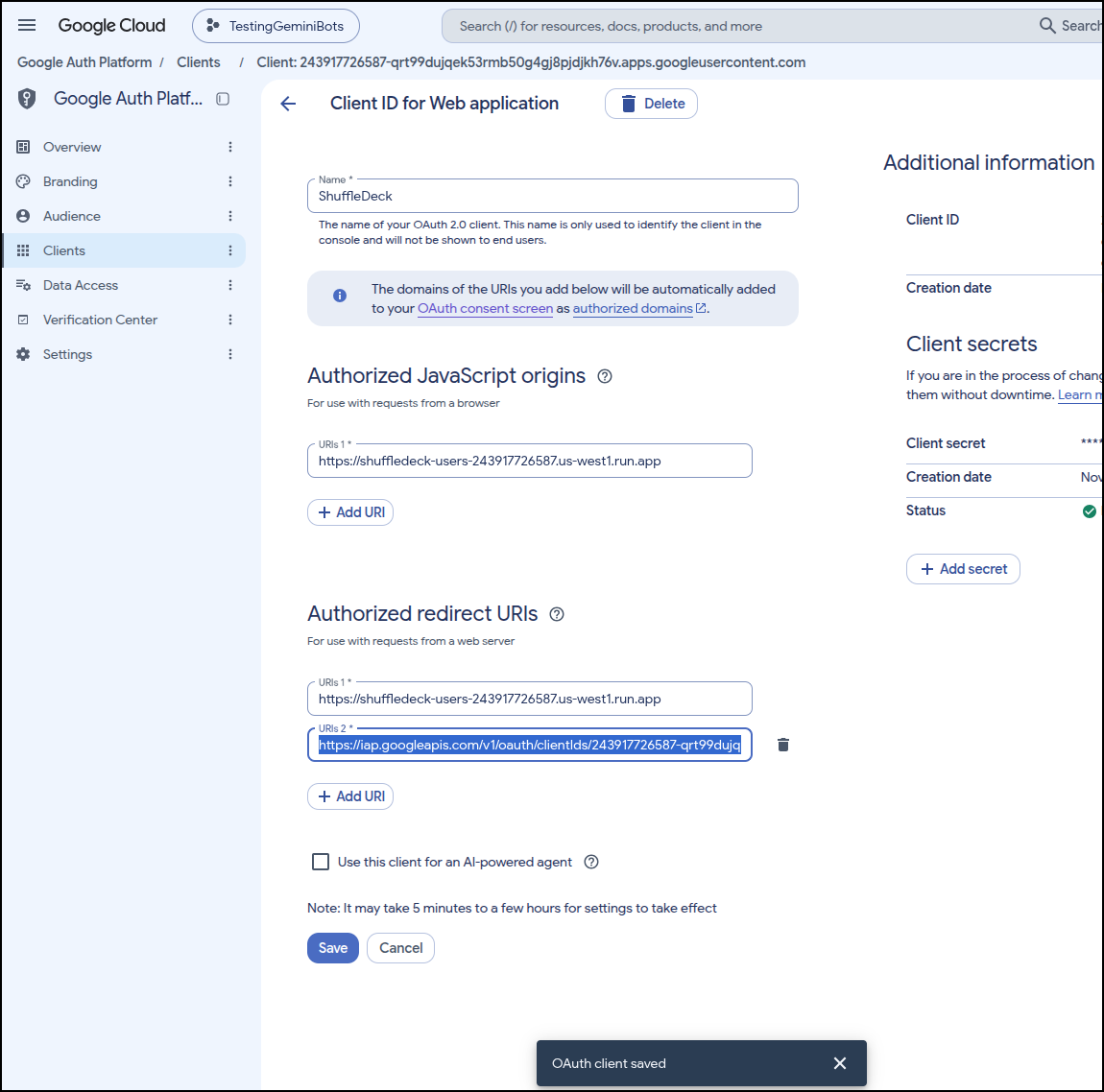
But then it worked:
I came back on a second pass and verified the fix from earlier worked:
Here is the script
$ cat create_cloudrun.sh
#!/usr/bin/env bash
set -euo pipefail

# Defaults derived from Dockerfile and k8s.yaml
SERVICE_NAME="shuffledeck-users"
REGION="${REGION:-us-west1}"
IMAGE="docker.io/idjohnson/shuffledeck-users:latest"
PORT="3000"
VPC_NETWORK="${VPC_NETWORK:-default}"
VPC_SUBNET="${VPC_SUBNET:-default}"
PSC_ADDRESS_NAME="${PSC_ADDRESS_NAME:-alloydb-psc-ip}"
PSC_ENDPOINT_NAME="${PSC_ENDPOINT_NAME:-alloydb-psc-endpoint}"
ALLOYDB_CLUSTER="${ALLOYDB_CLUSTER:-idjtestcluster}"
ALLOYDB_INSTANCE="${ALLOYDB_INSTANCE:-idjtestinstance}"
ALLOYDB_SERVICE_ATTACHMENT="${ALLOYDB_SERVICE_ATTACHMENT:-https://www.googleapis.com/compute/v1/projects/xa80072b1d961df38p-tp/regions/us-west1/serviceAttachments/alloydb-15dd8e66-db9-xa80072b1d961df3-sa}"
DATABASE_URL="${DATABASE_URL:-}"
PGPASSWORD="${PGPASSWORD:-DK3dDd0E03DKe03\$\$0DO30}"

PROJECT_ID=""
ALLOWED_USER=""
MIN_INST=""
MAX_INST=""
MANUAL_INST=""
BUILD_FROM_SOURCE=false
IAP_CLIENT_ID="${IAP_CLIENT_ID:-}"
IAP_CLIENT_SECRET="${IAP_CLIENT_SECRET:-}"

usage() {
  cat <<EOF
Usage: $(basename "$0") -project <GCP_PROJECT_ID> [Scaling Options] [Optional Flags]

Required:
  -project, --project <PROJECT_ID>   GCP project ID to deploy Cloud Run service into

Scaling Options (choose either autoscaling OR manual scaling):
  Autoscaling:
    -min-inst, -mix-inst <NUM>       Minimum number of container instances (e.g., 0 or 1)
    -max-inst <NUM>                  Maximum number of container instances (e.g., 10)
  Manual Scaling:
    -manual <NUM>                    Fixed number of instances for manual scaling (e.g., 3)

Optional Access & Deployment Flags:
  -user, --user <EMAIL>              Restrict Cloud Run access to a specific user via IAM and
                                     Identity-Aware Proxy (IAP) (e.g., alice@example.com).
                                     If omitted, disables IAP and allows unauthenticated access.
  -oauth-client-id <CLIENT_ID>       Custom OAuth 2.0 Client ID for IAP (required for projects
                                     outside a Google Cloud Organization)
  -oauth-client-secret <SECRET>      Custom OAuth 2.0 Client Secret for IAP
  -region, --region <REGION>         GCP region (default: ${REGION})
  -service, --service <NAME>         Cloud Run service name (default: ${SERVICE_NAME})
  -image, --image <IMAGE_URI>        Container image to deploy (default: ${IMAGE})
  -build, --build                    Build image from local Dockerfile via Cloud Build before deploying
  -h, --help                         Show this help message

Examples:
  # Autoscaling (1 to 5 instances), public access:
  $(basename "$0") -project my-gcp-project -min-inst 1 -max-inst 5

  # Manual scaling (3 instances), restricted to a specific user:
  $(basename "$0") -project my-gcp-project -manual 3 -user user@example.com
EOF
}

while [[ $# -gt 0 ]]; do
  case "$1" in
    -project|--project|-p)
      PROJECT_ID="${2:-}"
      shift 2
      ;;
    -user|--user|-u)
      ALLOWED_USER="${2:-}"
      shift 2
      ;;
    -oauth-client-id|--oauth-client-id)
      IAP_CLIENT_ID="${2:-}"
      shift 2
      ;;
    -oauth-client-secret|--oauth-client-secret)
      IAP_CLIENT_SECRET="${2:-}"
      shift 2
      ;;
    -min-inst|--min-inst|-mix-inst|--mix-inst)
      MIN_INST="${2:-}"
      shift 2
      ;;
    -max-inst|--max-inst)
      MAX_INST="${2:-}"
      shift 2
      ;;
    -manual|--manual)
      MANUAL_INST="${2:-}"
      shift 2
      ;;
    -region|--region|-r)
      REGION="${2:-}"
      shift 2
      ;;
    -service|--service|-s)
      SERVICE_NAME="${2:-}"
      shift 2
      ;;
    -image|--image|-i)
      IMAGE="${2:-}"
      shift 2
      ;;
    -build|--build)
      BUILD_FROM_SOURCE=true
      shift
      ;;
    -h|--help)
      usage
      exit 0
      ;;
    *)
      echo "Error: Unknown argument '$1'" >&2
      usage >&2
      exit 1
      ;;
  esac
done

# Validate required project ID
if [[ -z "$PROJECT_ID" ]]; then
  echo "Error: GCP project is required (-project <PROJECT_ID>)." >&2
  usage >&2
  exit 1
fi

# Validate scaling mode (either autoscaling OR manual scaling, not both)
HAS_AUTOSCALE=false
HAS_MANUAL=false

if [[ -n "$MIN_INST" || -n "$MAX_INST" ]]; then
  HAS_AUTOSCALE=true
fi
if [[ -n "$MANUAL_INST" ]]; then
  HAS_MANUAL=true
fi

if [[ "$HAS_AUTOSCALE" == true && "$HAS_MANUAL" == true ]]; then
  echo "Error: Cannot specify both autoscaling (-min-inst/-mix-inst, -max-inst) and manual scaling (-manual)." >&2
  exit 1
fi

if [[ "$HAS_AUTOSCALE" == false && "$HAS_MANUAL" == false ]]; then
  echo "Error: Must specify either autoscaling (-min-inst/-mix-inst and -max-inst) or manual scaling (-manual <NUM>)." >&2
  usage >&2
  exit 1
fi

SCALING_ARGS=()
if [[ "$HAS_MANUAL" == true ]]; then
  if ! [[ "$MANUAL_INST" =~ ^[1-9][0-9]*$ ]]; then
    echo "Error: -manual must be a positive integer (got '$MANUAL_INST')." >&2
    exit 1
  fi
  SCALING_ARGS+=(--scaling="$MANUAL_INST")
else
  if [[ -z "$MIN_INST" || -z "$MAX_INST" ]]; then
    echo "Error: Both -min-inst (or -mix-inst) and -max-inst must be provided for autoscaling." >&2
    exit 1
  fi
  if ! [[ "$MIN_INST" =~ ^[0-9]+$ ]] || ! [[ "$MAX_INST" =~ ^[1-9][0-9]*$ ]]; then
    echo "Error: -min-inst must be a non-negative integer and -max-inst must be a positive integer." >&2
    exit 1
  fi
  if (( MIN_INST > MAX_INST )); then
    echo "Error: -min-inst ($MIN_INST) cannot be greater than -max-inst ($MAX_INST)." >&2
    exit 1
  fi
  SCALING_ARGS+=(--scaling=auto --min-instances="$MIN_INST" --max-instances="$MAX_INST")
fi

# Configure authentication flags (IAM + IAP when user is specified)
AUTH_ARGS=()
if [[ -n "$ALLOWED_USER" ]]; then
  echo "Enabling Identity-Aware Proxy (IAP) API on project '${PROJECT_ID}'..."
  gcloud services enable iap.googleapis.com --project="$PROJECT_ID"
  AUTH_ARGS+=(--no-allow-unauthenticated --iap)
else
  AUTH_ARGS+=(--allow-unauthenticated --no-iap)
fi

# Ensure Artifact Registry repository exists and resolve container image for Cloud Run
AR_REPO="cloud-run-source-deploy"
AR_HOST="${REGION}-docker.pkg.dev"
AR_IMAGE="${AR_HOST}/${PROJECT_ID}/${AR_REPO}/${SERVICE_NAME}:latest"

ensure_ar_repo() {
  if ! gcloud artifacts repositories describe "$AR_REPO" \
    --project="$PROJECT_ID" \
    --location="$REGION" >/dev/null 2>&1; then
    echo "Creating Artifact Registry repository '${AR_REPO}' in ${REGION}..."
    gcloud artifacts repositories create "$AR_REPO" \
      --repository-format=docker \
      --location="$REGION" \
      --description="Cloud Run container images" \
      --project="$PROJECT_ID"
  fi
}

if [[ "$BUILD_FROM_SOURCE" == true ]]; then
  ensure_ar_repo
  IMAGE="$AR_IMAGE"
  if command -v docker >/dev/null 2>&1 && docker info >/dev/null 2>&1; then
    echo "Building and pushing container image ${IMAGE} locally with Docker..."
    gcloud auth configure-docker "$AR_HOST" --quiet
    docker build -t "$IMAGE" .
    docker push "$IMAGE"
  else
    echo "Building container image ${IMAGE} using Cloud Build..."
    gcloud builds submit --project="$PROJECT_ID" --tag="$IMAGE" .
  fi
elif [[ "$IMAGE" == docker.io/* || ( "$IMAGE" != *.gcr.io/* && "$IMAGE" != gcr.io/* && "$IMAGE" != *-docker.pkg.dev/* ) ]]; then
  ensure_ar_repo
  SOURCE_IMAGE="$IMAGE"
  IMAGE="$AR_IMAGE"
  echo "Cloud Run requires images in Artifact Registry/GCR. Mirroring '${SOURCE_IMAGE}' to '${IMAGE}'..."
  gcloud auth configure-docker "$AR_HOST" --quiet
  if ! docker image inspect "$SOURCE_IMAGE" >/dev/null 2>&1; then
    docker pull "$SOURCE_IMAGE"
  fi
  docker tag "$SOURCE_IMAGE" "$IMAGE"
  docker push "$IMAGE"
fi

echo "Ensuring Private Service Connect (PSC) endpoint '${PSC_ENDPOINT_NAME}' exists in VPC '${VPC_NETWORK}' (${REGION})..."
ALLOWED_PSC_PROJECTS="$(gcloud beta alloydb instances describe "$ALLOYDB_INSTANCE" \
  --cluster="$ALLOYDB_CLUSTER" \
  --region="$REGION" \
  --project="$PROJECT_ID" \
  --format='value(pscInstanceConfig.allowedConsumerProjects)' 2>/dev/null || true)"
if [[ "$ALLOWED_PSC_PROJECTS" != *"$PROJECT_ID"* ]]; then
  echo "Authorizing project '${PROJECT_ID}' on AlloyDB instance '${ALLOYDB_INSTANCE}' for PSC..."
  gcloud beta alloydb instances update "$ALLOYDB_INSTANCE" \
    --cluster="$ALLOYDB_CLUSTER" \
    --region="$REGION" \
    --allowed-psc-projects="$PROJECT_ID" \
    --project="$PROJECT_ID"
fi

if ! gcloud compute addresses describe "$PSC_ADDRESS_NAME" \
  --region="$REGION" \
  --project="$PROJECT_ID" >/dev/null 2>&1; then
  echo "Reserving internal IP '${PSC_ADDRESS_NAME}' in subnet '${VPC_SUBNET}'..."
  gcloud compute addresses create "$PSC_ADDRESS_NAME" \
    --region="$REGION" \
    --subnet="$VPC_SUBNET" \
    --project="$PROJECT_ID"
fi

PSC_IP="$(gcloud compute addresses describe "$PSC_ADDRESS_NAME" \
  --region="$REGION" \
  --project="$PROJECT_ID" \
  --format='value(address)')"

if ! gcloud compute forwarding-rules describe "$PSC_ENDPOINT_NAME" \
  --region="$REGION" \
  --project="$PROJECT_ID" >/dev/null 2>&1; then
  echo "Creating PSC forwarding rule '${PSC_ENDPOINT_NAME}' -> ${ALLOYDB_SERVICE_ATTACHMENT}..."
  gcloud compute forwarding-rules create "$PSC_ENDPOINT_NAME" \
    --region="$REGION" \
    --network="$VPC_NETWORK" \
    --address="$PSC_ADDRESS_NAME" \
    --target-service-attachment="$ALLOYDB_SERVICE_ATTACHMENT" \
    --project="$PROJECT_ID"
fi

if [[ -z "$DATABASE_URL" ]]; then
  DATABASE_URL="postgresql://postgres@${PSC_IP}/postgres"
fi
echo "Using AlloyDB Private Service Connect endpoint IP ${PSC_IP} (DATABASE_URL=${DATABASE_URL})"

echo "Deploying Cloud Run service '${SERVICE_NAME}' in project '${PROJECT_ID}' (region: ${REGION})..."
gcloud run deploy "$SERVICE_NAME" \
  --project="$PROJECT_ID" \
  --region="$REGION" \
  --image="$IMAGE" \
  --port="$PORT" \
  --timeout=3600 \
  --network="$VPC_NETWORK" \
  --subnet="$VPC_SUBNET" \
  --vpc-egress=private-ranges-only \
  --set-env-vars="DATABASE_URL=${DATABASE_URL},PGPASSWORD=${PGPASSWORD}" \
  "${SCALING_ARGS[@]}" \
  "${AUTH_ARGS[@]}"

# If a specific user was provided, grant them Cloud Run Invoker (IAM) and IAP-secured Web App User (IAP) roles
if [[ -n "$ALLOWED_USER" ]]; then
  MEMBER="$ALLOWED_USER"
  if [[ "$MEMBER" != user:* && "$MEMBER" != serviceAccount:* && "$MEMBER" != group:* && "$MEMBER" != domain:* ]]; then
    MEMBER="user:${ALLOWED_USER}"
  fi

  PROJECT_NUMBER="$(gcloud projects describe "$PROJECT_ID" --format='value(projectNumber)')"
  IAP_SA="serviceAccount:service-${PROJECT_NUMBER}@gcp-sa-iap.iam.gserviceaccount.com"

  echo "Provisioning IAP service agent and granting it Cloud Run Invoker role..."
  gcloud beta services identity create --service=iap.googleapis.com --project="$PROJECT_ID" >/dev/null 2>&1 || true
  gcloud run services add-iam-policy-binding "$SERVICE_NAME" \
    --project="$PROJECT_ID" \
    --region="$REGION" \
    --member="$IAP_SA" \
    --role="roles/run.invoker" >/dev/null

  echo "Granting Cloud Run Invoker (IAM) role on '${SERVICE_NAME}' to '${MEMBER}'..."
  gcloud run services add-iam-policy-binding "$SERVICE_NAME" \
    --project="$PROJECT_ID" \
    --region="$REGION" \
    --member="$MEMBER" \
    --role="roles/run.invoker"

  echo "Granting IAP-secured Web App User (IAP) role on '${SERVICE_NAME}' to '${MEMBER}'..."
  gcloud iap web add-iam-policy-binding \
    --project="$PROJECT_ID" \
    --resource-type=cloud-run \
    --region="$REGION" \
    --service="$SERVICE_NAME" \
    --member="$MEMBER" \
    --role="roles/iap.httpsResourceAccessor"

  if [[ -n "$IAP_CLIENT_ID" && -n "$IAP_CLIENT_SECRET" ]]; then
    echo "Configuring custom OAuth client credentials on IAP for '${SERVICE_NAME}'..."
    IAP_SETTINGS_FILE="$(mktemp)"
    cat > "$IAP_SETTINGS_FILE" <<EOF
accessSettings:
  oauthSettings:
    clientId: "${IAP_CLIENT_ID}"
    clientSecret: "${IAP_CLIENT_SECRET}"
EOF
    gcloud iap settings set "$IAP_SETTINGS_FILE" \
      --project="$PROJECT_ID" \
      --resource-type=cloud-run \
      --region="$REGION" \
      --service="$SERVICE_NAME"
    rm -f "$IAP_SETTINGS_FILE"
  fi
fi

echo "Cloud Run deployment complete."
Costs
If we look back on recent charges
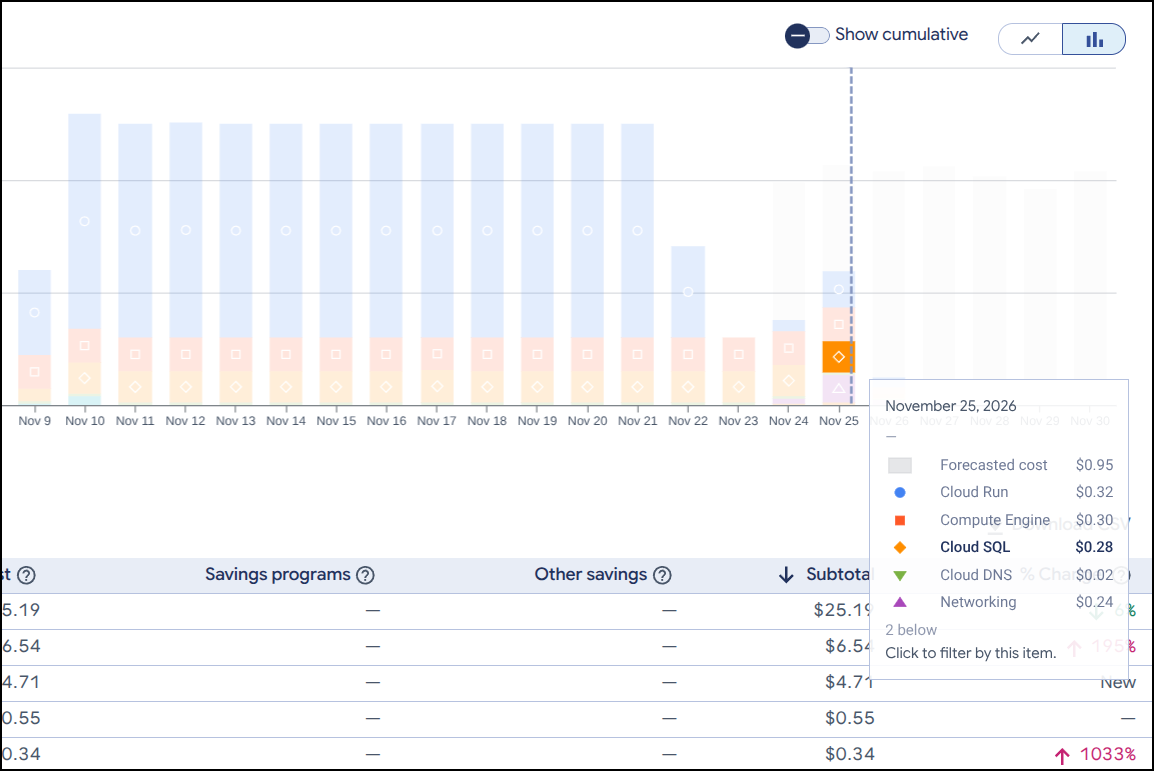
We’ll note that from my prior work having an n8n instance running in CloudRun 24x7 was not cheap - basically $1.91 a day for that. However, leaving this going for a few days to see normal Cloud Run usage with AlloyDB Express we see a very cost effective solution.
With minimal usage i was at about at $1.30 and on the days I barely used it like yesterday we spent about $0.25 total for the day
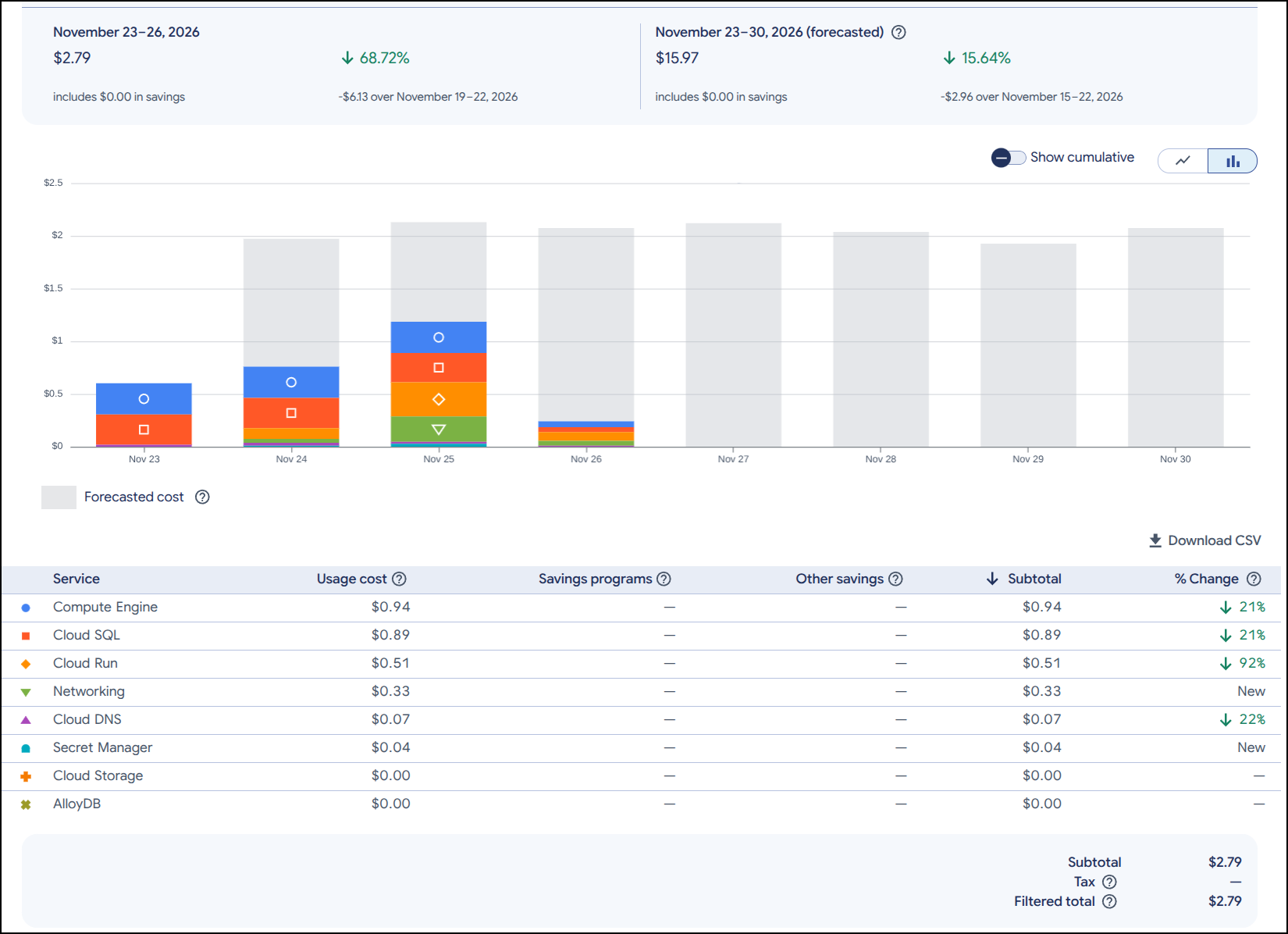
Let’s just look at the AlloyDB Express costs:
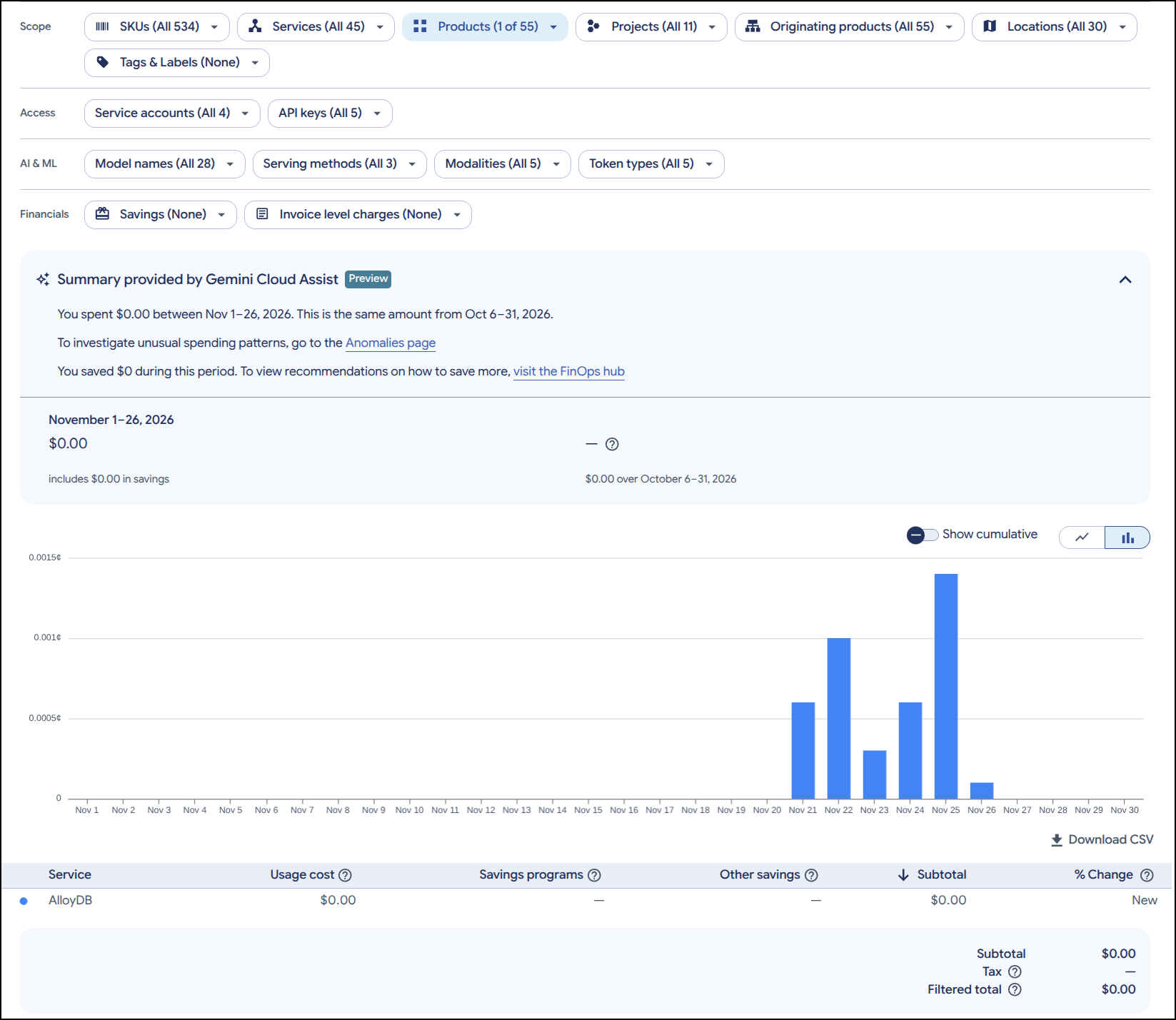
I can’t even get to a billable number - they are less than $0.01.
Summary
I want to just move right into summarizing here - AlloyDB Express is a real game changer. We can get clustering PostgreSQL servers that effectively scale to 0 and barely charge us for small/simple usage. I can see so many use cases for this kind of workload.
The drawbacks are minor - sometimes after sitting a while, the first load is slow, but sometimes, like testing it right now, it’s incredibly fast to come unpaused and work.
Note on above - i did not game it, that was the first time trying that Cloud Run URL today.
I really think CloudRun + AlloyDB Express is a killer combo.