Recently I gave an Infrastructure as Code (IaC) talk on Open-Source tooling and focused on Ansible and OpenTofu. One of the participants asked me about Pyinfra which I had never heard of before.
Pyinfra is fully MIT licensed and seems rather full featured.
Today we will get it setup locally, create some basic “deploys” (their word for playbooks), then look at remote deploys before showing how we can create scheduled YAML based pipelines to launch and manage infrastructure with Pyinfra.
But first, let’s get it installed locally…
Getting Started
As the name suggests, it is Python based so the first thing we need to do is install with uv
(base) builder@LuiGi:~/Workspaces/ansible-playbooks$ source .venv/bin/activate
(.venv) (base) builder@LuiGi:~/Workspaces/ansible-playbooks$ sudo snap install astral-uv --classic
astral-uv 0.12.21 from Alex Lowe (lengau✪) installed
$ uv tool install pyinfra
Resolved 26 packages in 1.52s
Prepared 24 packages in 1.83s                                                                     Installed 26 packages in 22ms                                                                      + annotated-types==0.8.0                                                                          + bcrypt==5.0.0                                                                                   + cffi==2.1.1                                                                                     + click==8.5.0                                                                                    + cryptography==50.0.2                                                                            + distro==1.9.0                                                                                   + gevent==26.9.0                                                                                  + greenlet==3.5.6                                                                                 + invoke==3.0.3                                                                                   + jinja2==3.1.6                                                                                   + markupsafe==3.0.4                                                                               + packaging==26.3                                                                                 + paramiko==4.0.0                                                                                 + pycparser==3.12                                                                                 + pydantic==2.14.2                                                                                + pydantic-core==2.50.2                                                                           + pyinfra==3.10.0                                                                                 + pynacl==1.6.2                                                                                   + python-dateutil==2.9.0.post0
 + six==1.17.0
 + typeguard==4.6.0
 + types-paramiko==4.0.0.20260518
 + typing-extensions==4.16.0
 + typing-inspection==0.4.4
 + zope-event==6.2
 + zope-interface==8.7
Installed 1 executable: pyinfra
Let’s do a simple test for one box in our network (192.168.1.99) with SSH and a docker host. As an example package, we’ll install iputils-ping.
The inventory.py looks like this:
$ cat ./inventory.py
# Define a group as a list of hosts
my_hosts = [
    (
        "ubuntu2204",
        {
            "ssh_port": 22,
            "ssh_hostname": "192.168.1.99",
            "ssh_user": "builder",
            "ssh_password": "SSH-PASSWORD-HERE",
            "_sudo": True,
        },
    ),
    "@docker/ubuntu:22.04",
]
If you already have passwordless ssh (e.g. the user in the authorized hosts) then you can omit “ssh_password” in the above.
And the deploy.py is:
$ cat ./deploy.py
from pyinfra.operations import apt, server

apt.packages(
    name="Ensure the iptuils ping package is installed",
    packages=["iputils-ping"],
    update=True,
)
Now we can run it
$ pyinfra inventory.py deploy.py
    Attempting to work in a virtualenv.
    If you encounter problems, please install pyinfra inside the virtualenv.


--> Loading config...
--> Loading inventory...
--> Connecting to hosts...
    [ubuntu2204]           Connected
    [@docker/ubuntu:22.04] Connected

--> Preparing operation files...
    Loading: deploy.py
    [@docker/ubuntu:22.04] Ready: deploy.py
    [ubuntu2204]           Ready: deploy.py

--> Detected changes:
    Operation                                      Change                                 Conditional Change
    Ensure the iptuils ping package is installed   2 (@docker/ubuntu:22.04, ubuntu2204)   -

    Detected changes may not include every change pyinfra will execute.
    Hidden side effects of operations may alter behaviour of future operations,
    this will be shown in the results. The remote state will always be updated
    to reflect the state defined by the input operations.

    Detected changes displayed above, skip this step with -y

--> Beginning operation run...
--> Starting operation: Ensure the iptuils ping package is installed
    [@docker/ubuntu:22.04] Success
    [ubuntu2204]           Get:1 https://download.docker.com/linux/ubuntu focal InRelease [57.7 kB]
    [ubuntu2204]           Hit:2 https://packages.microsoft.com/repos/azure-cli focal InRelease
    [ubuntu2204]           Ign:3 https://apt.datadoghq.com stable InRelease
    [ubuntu2204]           Hit:4 https://apt.datadoghq.com stable Release
    [ubuntu2204]           Hit:6 http://security.ubuntu.com/ubuntu jammy-security InRelease
    [ubuntu2204]           Hit:7 https://packages.cloud.google.com/apt gcsfuse-jammy InRelease
    [ubuntu2204]           Ign:8 https://apt.kubernetes.io kubernetes-xenial InRelease
    [ubuntu2204]           Err:9 https://apt.kubernetes.io kubernetes-xenial Release
    [ubuntu2204]             404  Not Found [IP: 34.107.204.206 443]
    [ubuntu2204]           Hit:10 http://us.archive.ubuntu.com/ubuntu jammy InRelease
    [ubuntu2204]           Hit:11 http://us.archive.ubuntu.com/ubuntu jammy-updates InRelease
    [ubuntu2204]           Hit:12 http://us.archive.ubuntu.com/ubuntu jammy-backports InRelease
    [ubuntu2204]           Reading package lists...
    [ubuntu2204]           W: https://packages.cloud.google.com/apt/dists/gcsfuse-jammy/InRelease: Key is stored in legacy trusted.gpg keyring (/etc/apt/trusted.gpg), see the DEPRECATION section in apt-key(8) for details.
    [ubuntu2204]           E: The repository 'https://apt.kubernetes.io kubernetes-xenial Release' no longer has a Release file.
    [ubuntu2204]           Error: executed 0 commands

    One of more hosts failed, continue?

--> Results:
    Operation                                      Hosts   Success   Error   No Change
    Ensure the iptuils ping package is installed   2       1         1       -
    Grand total                                    2       1         1       -

--> Disconnecting from hosts...
    [@docker/ubuntu:22.04] docker build complete, image ID: 1013178a232a
One of the issues is the old deprecated Apt packages (the old xenial kubernetes one).
Let’s remove that in the deploy playbook
$ cat ./deploy.py
from pyinfra.operations import apt, files, server

files.file(
    name="Remove deprecated kubernetes.io apt list",
    path="/etc/apt/sources.list.d/kubernetes.list",
    present=False,
)

apt.repo(
    name="Ensure deprecated kubernetes-xenial repo is removed",
    src="deb https://apt.kubernetes.io/ kubernetes-xenial main",
    present=False,
)

apt.packages(
    name="Ensure the iptuils ping package is installed",
    packages=["iputils-ping"],
    update=True,
)
And try again
$ pyinfra inventory.py deploy.py
    Attempting to work in a virtualenv.
    If you encounter problems, please install pyinfra inside the virtualenv.


--> Loading config...
--> Loading inventory...
--> Connecting to hosts...
    [ubuntu2204]           Connected
    [@docker/ubuntu:22.04] Connected

--> Preparing operation files...
    Loading: deploy.py
    [@docker/ubuntu:22.04] Ready: deploy.py
    [ubuntu2204]           Ready: deploy.py

--> Detected changes:
    Operation                                             Change                                 Conditional Change
    Remove deprecated kubernetes.io apt list              1 (ubuntu2204)                         -
    Ensure deprecated kubernetes-xenial repo is removed   -                                      -
    Ensure the iptuils ping package is installed          2 (@docker/ubuntu:22.04, ubuntu2204)   -

    Detected changes may not include every change pyinfra will execute.
    Hidden side effects of operations may alter behaviour of future operations,
    this will be shown in the results. The remote state will always be updated
    to reflect the state defined by the input operations.

    Detected changes displayed above, skip this step with -y

--> Beginning operation run...
--> Starting operation: Remove deprecated kubernetes.io apt list
    [@docker/ubuntu:22.04] No changes
    [ubuntu2204]           Success

--> Starting operation: Ensure deprecated kubernetes-xenial repo is removed
    [ubuntu2204]           No changes
    [@docker/ubuntu:22.04] No changes

--> Starting operation: Ensure the iptuils ping package is installed
    [@docker/ubuntu:22.04] Success
    [ubuntu2204]           Success

--> Results:
    Operation                                             Hosts   Success   Error   No Change
    Remove deprecated kubernetes.io apt list              2       1         -       1
    Ensure deprecated kubernetes-xenial repo is removed   2       -         -       2
    Ensure the iptuils ping package is installed          2       2         -       -
    Grand total                                           6       3         -       3

--> Disconnecting from hosts...
    [@docker/ubuntu:22.04] docker build complete, image ID: b62f67fb49c6
I did a quick test on the target host to ensure it installed
$ ssh builder@192.168.1.99
builder@192.168.1.99's password:
Welcome to Ubuntu 22.04.2 LTS (GNU/Linux 6.8.0-138-generic x86_64)

 * Documentation:  https://help.ubuntu.com
 * Management:     https://landscape.canonical.com
 * Support:        https://ubuntu.com/advantage

Expanded Security Maintenance for Applications is not enabled.

177 updates can be applied immediately.
4 of these updates are standard security updates.
To see these additional updates run: apt list --upgradable

27 additional security updates can be applied with ESM Apps.
Learn more about enabling ESM Apps service at https://ubuntu.com/esm

New release '24.04.5 LTS' available.
Run 'do-release-upgrade' to upgrade to it.


1 updates could not be installed automatically. For more details,
see /var/log/unattended-upgrades/unattended-upgrades.log
*** System restart required ***
Last login: Sat Oct 31 20:15:28 2026 from 192.168.1.108
builder@builder-T100:~$ ping harbor.freshbrewed.science
PING harbor.freshbrewed.science (76.156.69.232) 56(84) bytes of data.
64 bytes from c-76-156-69-232.hsd1.mn.comcast.net (76.156.69.232): icmp_seq=1 ttl=64 time=0.623 ms
64 bytes from c-76-156-69-232.hsd1.mn.comcast.net (76.156.69.232): icmp_seq=2 ttl=64 time=0.695 ms
I want to create a new type of playbook that can hop into a host, clone my aiskills repo and ensure it’s updated
$ cat deployaiskills.py
from pyinfra import host
from pyinfra.facts.server import Home
from pyinfra.operations import apt, files, git

apt.packages(
    name="Ensure git and ca-certificates are installed",
    packages=["git", "ca-certificates"],
    update=True,
)

home = host.get_fact(Home, _sudo=False)
workspaces_dir = f"{home}/Workspaces"
repo_dir = f"{workspaces_dir}/aiskills"

files.directory(
    name="Ensure ~/Workspaces directory exists",
    path=workspaces_dir,
    present=True,
    _sudo=False,
)

git.repo(
    name="Clone or update aiskills repo in ~/Workspaces/aiskills",
    src="https://github.com/idjohnson/aiskills.git",
    dest=repo_dir,
    branch="main",
    pull=True,
    _sudo=False,
)
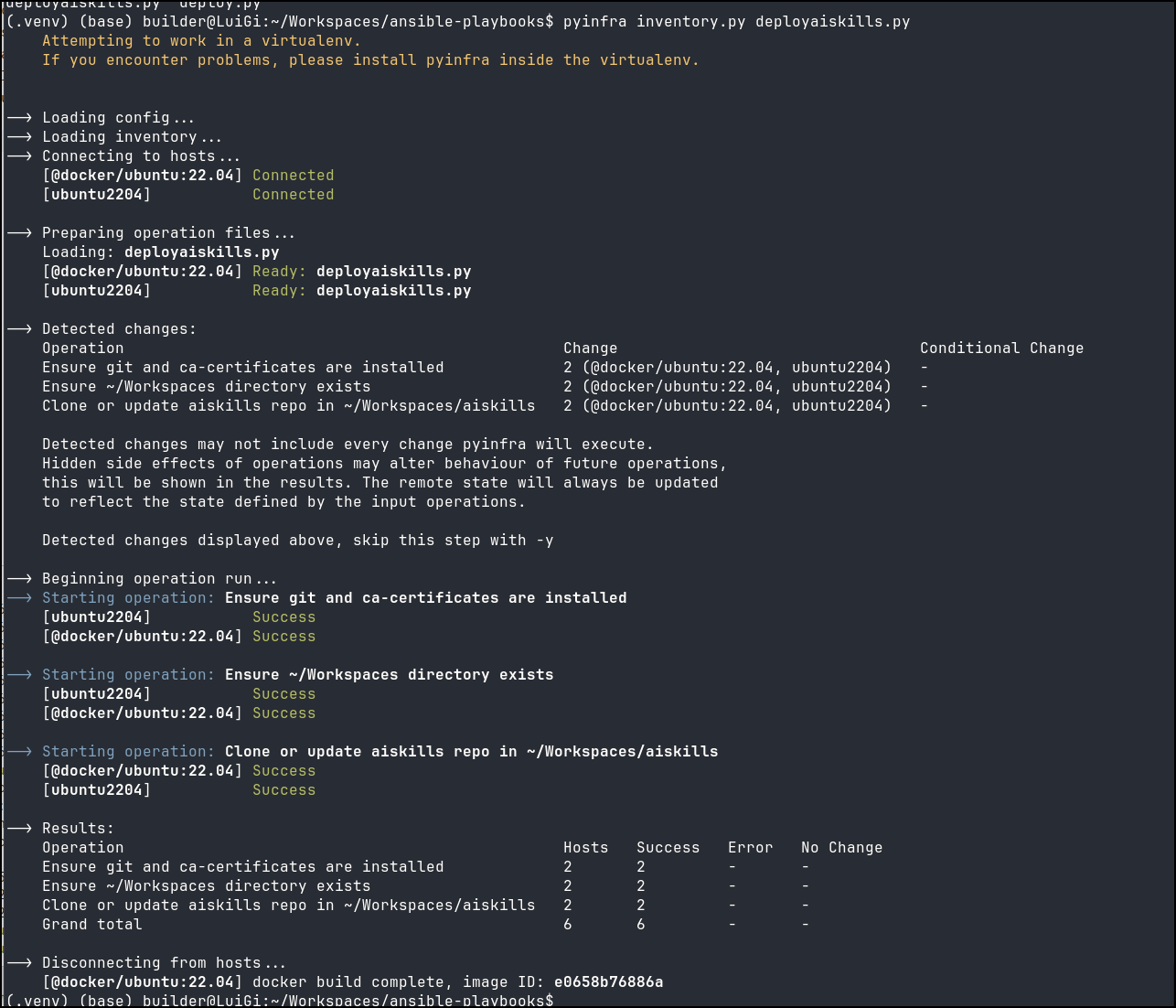
I then checked that host (which i know did not have the AISkills repo) and saw it listed
builder@builder-T100:~$ cd Workspaces/
builder@builder-T100:~/Workspaces$ cd aiskills/
builder@builder-T100:~/Workspaces/aiskills$ ls
INSTALL.md  install.sh  LICENSE  README.md  skills
We can convert an Ansible playbook pretty easily
The BTop ansible playbook
$ cat btop.yaml
---
- name: Install BTop
  hosts: all

  tasks:
  - name: Update apt
    ansible.builtin.shell: |
      apt-get update --allow-releaseinfo-change
    become: true
    args:
      chdir: /tmp

  - name: Install Dependencies
    ansible.builtin.shell: |
      apt-get install -y coreutils sed git build-essential gcc-10 g++-10
    become: true
    args:
      chdir: /tmp

  - name: Download btop
    ansible.builtin.shell: |
      # Clean if needed
      rm -rf /tmp/btop || true
      rmdir /tmp/btop || true

      # Clone
      git clone --recursive https://github.com/aristocratos/btop.git /tmp/btop
    become: true
    args:
      chdir: /tmp

  - name: Make
    ansible.builtin.shell: |
      make QUIET=true CXX=g++-10
    become: true
    args:
      chdir: /tmp/btop

  - name: Make
    ansible.builtin.shell: |
      umask 0002
      make QUIET=true CXX=g++-10
    become: true
    args:
      chdir: /tmp/btop

  - name: Make Install
    ansible.builtin.shell: |
      umask 0002
      make install CXX=g++-10
    become: true
    args:
      chdir: /tmp/btop

  - name: Test
    ansible.builtin.shell: |
      btop --version
    become: true
    args:
      chdir: /tmp/btop
Converted to pyinfra
$ cat btop.py
from pyinfra.operations import apt, files, git, server

# Update apt (--allow-releaseinfo-change)
server.shell(
    name="Update apt",
    commands=["apt-get update --allow-releaseinfo-change"],
    _sudo=True,
    _chdir="/tmp",
)

# Install dependencies using pyinfra's native apt.packages operation
apt.packages(
    name="Install Dependencies",
    packages=[
        "coreutils",
        "sed",
        "git",
        "build-essential",
        "gcc-10",
        "g++-10",
    ],
    _sudo=True,
)

# Clean existing /tmp/btop directory if present
files.directory(
    name="Clean /tmp/btop if needed",
    path="/tmp/btop",
    present=False,
    _sudo=True,
)

# Clone btop repository with submodules
git.repo(
    name="Download btop",
    src="https://github.com/aristocratos/btop.git",
    dest="/tmp/btop",
    update_submodules=True,
    recursive_submodules=True,
    _sudo=True,
)

# Build and install btop
server.shell(
    name="Make and Install btop",
    commands=[
        "umask 0002 && make QUIET=true CXX=g++-10",
        "umask 0002 && make install CXX=g++-10",
    ],
    _sudo=True,
    _chdir="/tmp/btop",
)

# Verify installation
server.shell(
    name="Test btop",
    commands=["btop --version"],
    _sudo=True,
    _chdir="/tmp/btop",
)
However it had issues
(.venv) (base) builder@LuiGi:~/Workspaces/ansible-playbooks$ sudo -v
[sudo: authenticate] Password:
(.venv) (base) builder@LuiGi:~/Workspaces/ansible-playbooks$ pyinfra --same-sudo-password inventory_self.py btop.py
    Attempting to work in a virtualenv.
    If you encounter problems, please install pyinfra inside the virtualenv.


--> Loading config...
sudo password:
--> Loading inventory...
--> Connecting to hosts...
    [@local] Connected

--> Preparing operation files...
    Loading: btop.py
    [@local] Ready: btop.py

--> Detected changes:
    Operation                   Change       Conditional Change
    Update apt                  1 (@local)   -
    Install Dependencies        1 (@local)   -
    Clean /tmp/btop if needed   -            -
    Download btop               1 (@local)   -
    Make and Install btop       1 (@local)   -
    Test btop                   1 (@local)   -

    Detected changes may not include every change pyinfra will execute.
    Hidden side effects of operations may alter behaviour of future operations,
    this will be shown in the results. The remote state will always be updated
    to reflect the state defined by the input operations.

    Detected changes displayed above, skip this step with -y

--> Beginning operation run...
--> Starting operation: Update apt
    [@local] Success

--> Starting operation: Install Dependencies
    [@local] Reading package lists...
    [@local] Building dependency tree...
    [@local] Reading state information...
    [@local] Package g++-10 is not available, but is referred to by another package.
    [@local] This may mean that the package is missing, has been obsoleted, or
    [@local] is only available from another source
    [@local]
    [@local] E: Unable to locate package gcc-10
    [@local] E: Package 'g++-10' has no installation candidate
    [@local] Error: executed 0 commands

--> Disconnecting from hosts...
--> pyinfra error: No hosts remaining!
In Ubuntu 26, which is on this laptop, g++/gcc"-10" should just be g++/gcc
$ cat ./btop.py
from pyinfra.operations import apt, files, git, server

# Update apt (--allow-releaseinfo-change)
server.shell(
    name="Update apt",
    commands=["apt-get update --allow-releaseinfo-change"],
    _sudo=True,
    _chdir="/tmp",
)

# Install dependencies using pyinfra's native apt.packages operation
apt.packages(
    name="Install Dependencies",
    packages=[
        "coreutils",
        "sed",
        "git",
        "build-essential",
        "gcc",
        "g++",
    ],
    _sudo=True,
)

# Clean existing /tmp/btop directory if present
files.directory(
    name="Clean /tmp/btop if needed",
    path="/tmp/btop",
    present=False,
    _sudo=True,
)

# Clone btop repository with submodules
git.repo(
    name="Download btop",
    src="https://github.com/aristocratos/btop.git",
    dest="/tmp/btop",
    update_submodules=True,
    recursive_submodules=True,
    _sudo=True,
)

# Build and install btop
server.shell(
    name="Make and Install btop",
    commands=[
        "umask 0002 && make QUIET=true CXX=g++",
        "umask 0002 && make install CXX=g++",
    ],
    _sudo=True,
    _chdir="/tmp/btop",
)

# Verify installation
server.shell(
    name="Test btop",
    commands=["btop --version"],
    _sudo=True,
    _chdir="/tmp/btop",
)
Here we can see it invoked
(.venv) (base) builder@LuiGi:~/Workspaces/ansible-playbooks$ pyinfra --same-sudo-password inventory_self.py btop.py
    Attempting to work in a virtualenv.
    If you encounter problems, please install pyinfra inside the virtualenv.


--> Loading config...
sudo password:
--> Loading inventory...
--> Connecting to hosts...
    [@local] Connected

--> Preparing operation files...
    Loading: btop.py
    [@local] Ready: btop.py

--> Detected changes:
    Operation                   Change       Conditional Change
    Update apt                  1 (@local)   -
    Install Dependencies        -            -
    Clean /tmp/btop if needed   1 (@local)   -
    Download btop               1 (@local)   -
    Make and Install btop       1 (@local)   -
    Test btop                   1 (@local)   -

    Detected changes may not include every change pyinfra will execute.
    Hidden side effects of operations may alter behaviour of future operations,
    this will be shown in the results. The remote state will always be updated
    to reflect the state defined by the input operations.

    Detected changes displayed above, skip this step with -y

--> Beginning operation run...
--> Starting operation: Update apt
    [@local] Success

--> Starting operation: Install Dependencies
    [@local] No changes

--> Starting operation: Clean /tmp/btop if needed
    [@local] Success

--> Starting operation: Download btop
    [@local] Success

--> Starting operation: Make and Install btop
    [@local] Success

--> Starting operation: Test btop
    [@local] Success

--> Results:
    Operation                   Hosts   Success   Error   No Change
    Update apt                  1       1         -       -
    Install Dependencies        1       -         -       1
    Clean /tmp/btop if needed   1       1         -       -
    Download btop               1       1         -       -
    Make and Install btop       1       1         -       -
    Test btop                   1       1         -       -
    Grand total                 6       5         -       1

--> Disconnecting from hosts...
Here we can see it in action
Pipelines
I’ve shown examples of OpenTofu in Azure DevOps Pipelines and Forgejo.
Let’s look at making an pyinfra deploy for btop
I basically have a deploy.py, an example inventory and a bash script for dynamically making the inventory (will make sense in a moment).
(.venv) (base) builder@LuiGi:~/Workspaces/infraPipeline$ tree .
.
├── create_inventory.sh
├── deploy.py
└── inventory.py.example

1 directory, 3 files
The bash script:
$ cat create_inventory.sh
#!/usr/bin/env bash
set -euo pipefail

HOSTS=""
SSH_USER=""
SSH_PASS=""
SSH_PORT=22
OUTPUT_FILE="inventory.py"

usage() {
    cat <<EOF
Usage: $(basename "$0") --hosts <host1,host2,...> --sshuser <user> --sshpass <password> [--port <port>] [--output <file>]

Options:
  --hosts     Comma-separated list of host IPs or hostnames (e.g. 192.168.1.99,192.168.1.100)
  --sshuser   SSH username for the hosts
  --sshpass   SSH password for the hosts
  --port      SSH port (default: 22)
  --output    Output file path (default: inventory.py)
  -h, --help  Show this help message
EOF
}

while [[ $# -gt 0 ]]; do
    case "$1" in
        --hosts)
            HOSTS="${2:-}"
            shift 2
            ;;
        --hosts=*)
            HOSTS="${1#*=}"
            shift
            ;;
        --sshuser)
            SSH_USER="${2:-}"
            shift 2
            ;;
        --sshuser=*)
            SSH_USER="${1#*=}"
            shift
            ;;
        --sshpass)
            SSH_PASS="${2:-}"
            shift 2
            ;;
        --sshpass=*)
            SSH_PASS="${1#*=}"
            shift
            ;;
        --port)
            SSH_PORT="${2:-}"
            shift 2
            ;;
        --port=*)
            SSH_PORT="${1#*=}"
            shift
            ;;
        --output)
            OUTPUT_FILE="${2:-}"
            shift 2
            ;;
        --output=*)
            OUTPUT_FILE="${1#*=}"
            shift
            ;;
        -h|--help)
            usage
            exit 0
            ;;
        *)
            echo "Error: Unknown parameter '$1'" >&2
            usage >&2
            exit 1
            ;;
    esac
done

if [[ -z "$HOSTS" || -z "$SSH_USER" || -z "$SSH_PASS" ]]; then
    echo "Error: --hosts, --sshuser, and --sshpass are required." >&2
    usage >&2
    exit 1
fi

IFS=',' read -r -a HOST_ARRAY <<< "$HOSTS"

escape_py_string() {
    local str="$1"
    str="${str//\\/\\\\}"
    str="${str//\"/\\\"}"
    printf '%s' "$str"
}

ESCAPED_USER="$(escape_py_string "$SSH_USER")"
ESCAPED_PASS="$(escape_py_string "$SSH_PASS")"

{
    echo "my_hosts = ["
    for host in "${HOST_ARRAY[@]}"; do
        # Trim whitespace
        host="${host#"${host%%[![:space:]]*}"}"
        host="${host%"${host##*[![:space:]]}"}"
        [[ -z "$host" ]] && continue

        # Strip dots/non-alphanumeric characters to form the host identifier (e.g. linuxhost192168199)
        host_id="linuxhost${host//[^a-zA-Z0-9]/}"
        escaped_host="$(escape_py_string "$host")"

        cat <<EOF
    (
        "${host_id}",
        {
            "ssh_port": ${SSH_PORT},
            "ssh_hostname": "${escaped_host}",
            "ssh_user": "${ESCAPED_USER}",
            "ssh_password": "${ESCAPED_PASS}",
            "ssh_known_hosts_file": "/dev/null",
            "ssh_strict_host_key_checking": "no",
            "_sudo": True,
        },
    ),
EOF
    done
    echo "]"
} > "$OUTPUT_FILE"

echo "Generated ${OUTPUT_FILE} with ${#HOST_ARRAY[@]} host(s)."
and the btop deploy file
$ cat deploy.py
from pyinfra.operations import apt, files, git, server

# Update apt (--allow-releaseinfo-change)
server.shell(
    name="Update apt",
    commands=["apt-get update --allow-releaseinfo-change"],
    _sudo=True,
    _chdir="/tmp",
)

# Install dependencies using pyinfra's native apt.packages operation
apt.packages(
    name="Install Dependencies",
    packages=[
        "coreutils",
        "sed",
        "git",
        "build-essential",
        "gcc",
        "g++",
    ],
    _sudo=True,
)

# Clean existing /tmp/btop directory if present
files.directory(
    name="Clean /tmp/btop if needed",
    path="/tmp/btop",
    present=False,
    _sudo=True,
)

# Clone btop repository with submodules
git.repo(
    name="Download btop",
    src="https://github.com/aristocratos/btop.git",
    dest="/tmp/btop",
    update_submodules=True,
    recursive_submodules=True,
    _sudo=True,
)

# Build and install btop
server.shell(
    name="Make and Install btop",
    commands=[
        "umask 0002 && make QUIET=true CXX=g++",
        "umask 0002 && make install CXX=g++",
    ],
    _sudo=True,
    _chdir="/tmp/btop",
)

# Verify installation
server.shell(
    name="Test btop",
    commands=["btop --version"],
    _sudo=True,
    _chdir="/tmp/btop",
)
I then have the Gitea CICD file:
(.venv) (base) builder@LuiGi:~/Workspaces/infraPipeline$ cat .gitea/workflows/cicd.yaml
name: CICD
run-name: ${{ gitea.actor }} CICD - ${{ gitea.ref_name }}
on:
  schedule:
    - cron: "0 5 * * *"
  push:
    branches:
      - "main"

jobs:
  CICD:
    runs-on: ubuntu-latest
    container: node:22
    steps:
      - uses: actions/checkout@v3 # Checks out your repository
      - name: Install UV
        shell: bash
        run: |
          whoami
          which hugo || true
          apt update
          cat /etc/os-release
          apt install -y ca-certificates curl gnupg unzip sudo groff tree jq
          apt install -y python3 python3-pip python3-venv
          python3 -m venv .venv
          source .venv/bin/activate
          pip install uv
          echo "$PWD/.venv/bin" >> "$GITHUB_PATH"
          echo "$HOME/.local/bin" >> "$GITHUB_PATH"

      # In staging, we want to see the 'future' posts
      - name: Test uv exists
        shell: bash
        run: |
          source .venv/bin/activate
          uv --version
          which uv
          ls -ltra

      - name: Install and configure
        shell: bash
        run: |
          which uv
          uv tool install pyinfra
          ls -ltra
          ./create_inventory.sh --hosts 192.168.1.99 --sshuser '${{ secrets.SSHUSER }}' \
                   --sshpass '${{ secrets.SSHPASS }}' --output ./our_inventory.py

      - name: Invokaton
        shell: bash
        run: |
          set -x
          pyinfra -y our_inventory.py deploy.py
Now I probably could optimize that by using a python base container instead of a generic node:22… I just know the node 22 works pretty well in my local docker host. I add python3 virtual env, then install uv needed to install pyinfra.
Once we have pyinfra installed, you see the script used to take some Gitea secrets (username and password) and add that to an inventory.py script we can then use to deploy btop.
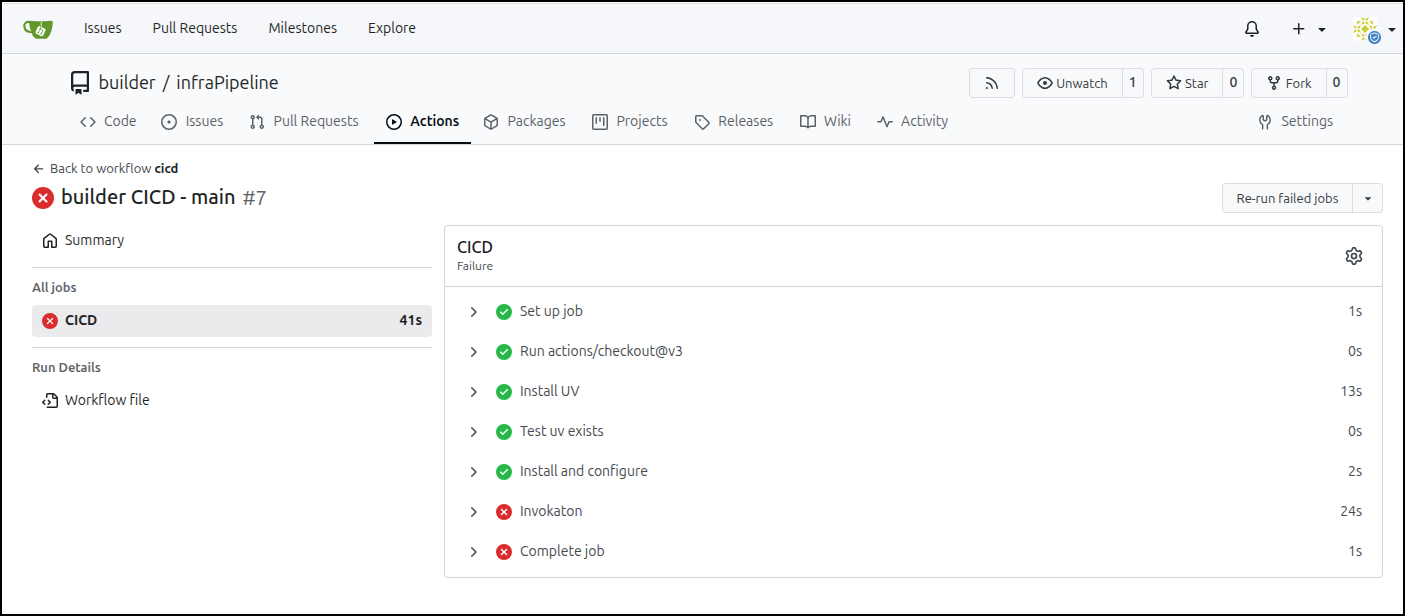
It runs okay
The error is really about the older g++ on that docker host having issues with the makefile
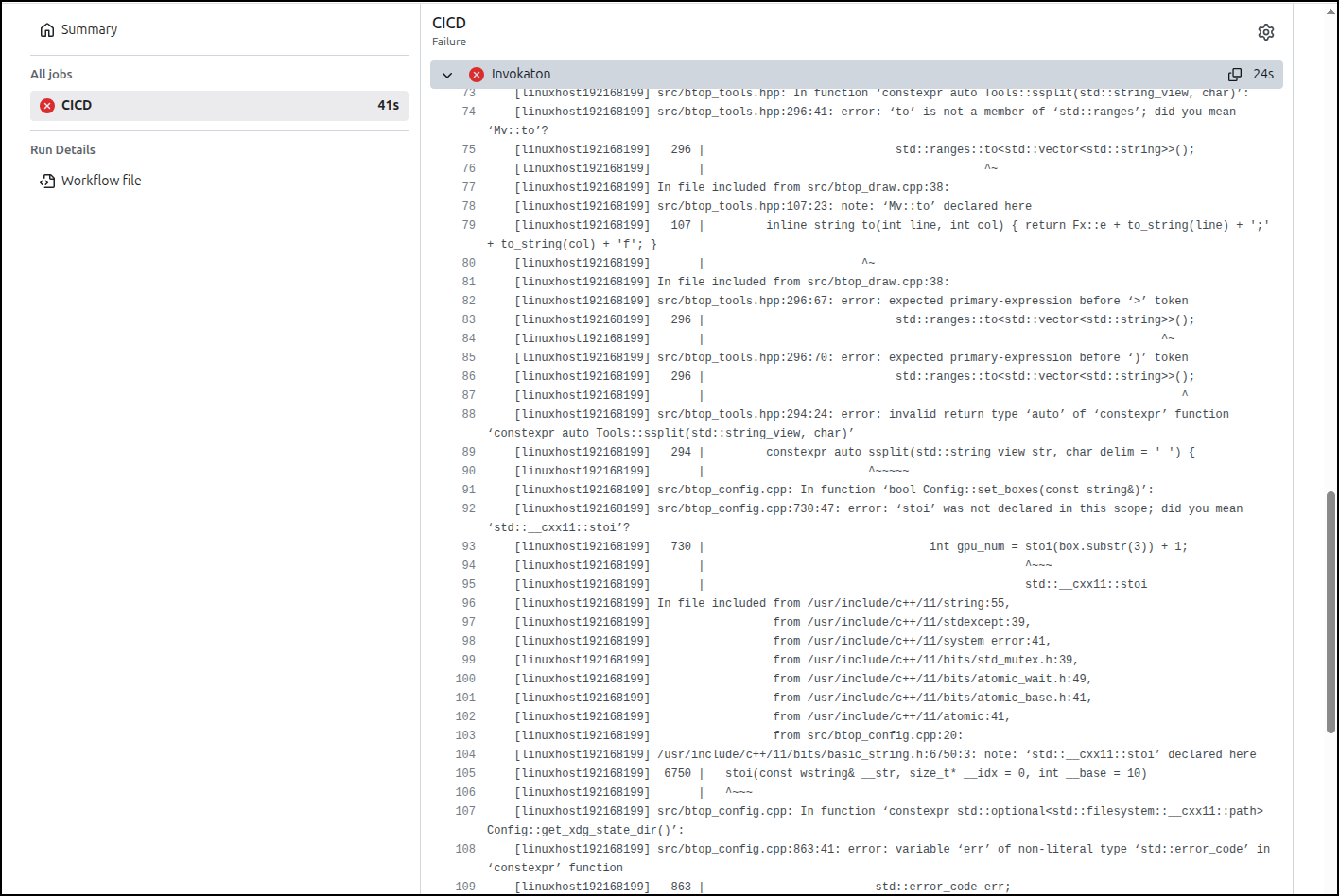
I’ll use “-10” to make it work on older Ubuntu hosts
(.venv) (base) builder@LuiGi:~/Workspaces/infraPipeline$ git diff deploy.py
diff --git a/deploy.py b/deploy.py
index 5ab9f55..2a36c8e 100644
--- a/deploy.py
+++ b/deploy.py
@@ -16,8 +16,8 @@ apt.packages(
         "sed",
         "git",
         "build-essential",
-        "gcc",
-        "g++",
+        "gcc-10",
+        "g++-10",
     ],
     _sudo=True,
 )
@@ -44,8 +44,8 @@ git.repo(
 server.shell(
     name="Make and Install btop",
     commands=[
-        "umask 0002 && make QUIET=true CXX=g++",
-        "umask 0002 && make install CXX=g++",
+        "umask 0002 && make QUIET=true CXX=g++-10",
+        "umask 0002 && make install CXX=g++-10",
     ],
     _sudo=True,
     _chdir="/tmp/btop",
(.venv) (base) builder@LuiGi:~/Workspaces/infraPipeline$ git add deploy.py
(.venv) (base) builder@LuiGi:~/Workspaces/infraPipeline$ git commit -m "make deploy work with older Ubuntu hosts"
[main 0b9aec3] make deploy work with older Ubuntu hosts
 1 file changed, 4 insertions(+), 4 deletions(-)
(.venv) (base) builder@LuiGi:~/Workspaces/infraPipeline$ git push
Enumerating objects: 5, done.
Counting objects: 100% (5/5), done.
Delta compression using up to 16 threads
Compressing objects: 100% (3/3), done.
Writing objects: 100% (3/3), 345 bytes | 345.00 KiB/s, done.
Total 3 (delta 2), reused 0 (delta 0), pack-reused 0 (from 0)
To https://gitea2.freshbrewed.science/builder/infraPipeline.git
   a40d146..0b9aec3  main -> main
I had one last update for a new base gcc (and different host):
from pyinfra.operations import apt, files, git, server

# Update apt (--allow-releaseinfo-change)
server.shell(
    name="Update apt",
    commands=["apt-get update --allow-releaseinfo-change"],
    _sudo=True,
    _chdir="/tmp",
)

# Install software-properties-common for PPA management
apt.packages(
    name="Install PPA Prerequisites",
    packages=[
        "software-properties-common",
    ],
    _sudo=True,
)

# Add Ubuntu Toolchain PPA for GCC 14 (required for C++23 in btop v1.4.6+ on Ubuntu 22.04)
apt.ppa(
    name="Add Ubuntu Toolchain PPA",
    src="ppa:ubuntu-toolchain-r/test",
    _sudo=True,
)

# Install dependencies using pyinfra's native apt.packages operation
apt.packages(
    name="Install Dependencies",
    packages=[
        "coreutils",
        "sed",
        "git",
        "build-essential",
        "lowdown",
        "gcc-14",
        "g++-14",
    ],
    update=True,
    _sudo=True,
)

# Clean existing /tmp/btop directory if present
files.directory(
    name="Clean /tmp/btop if needed",
    path="/tmp/btop",
    present=False,
    _sudo=True,
)

# Clone btop repository with submodules
git.repo(
    name="Download btop",
    src="https://github.com/aristocratos/btop.git",
    dest="/tmp/btop",
    update_submodules=True,
    recursive_submodules=True,
    _sudo=True,
)

# Build and install btop
server.shell(
    name="Make and Install btop",
    commands=[
        "umask 0002 && make QUIET=true CC=gcc-14 CXX=g++-14",
        "umask 0002 && make install CC=gcc-14 CXX=g++-14",
    ],
    _sudo=True,
    _chdir="/tmp/btop",
)

# Verify installation
server.shell(
    name="Test btop",
    commands=["btop --version"],
    _sudo=True,
    _chdir="/tmp/btop",
)
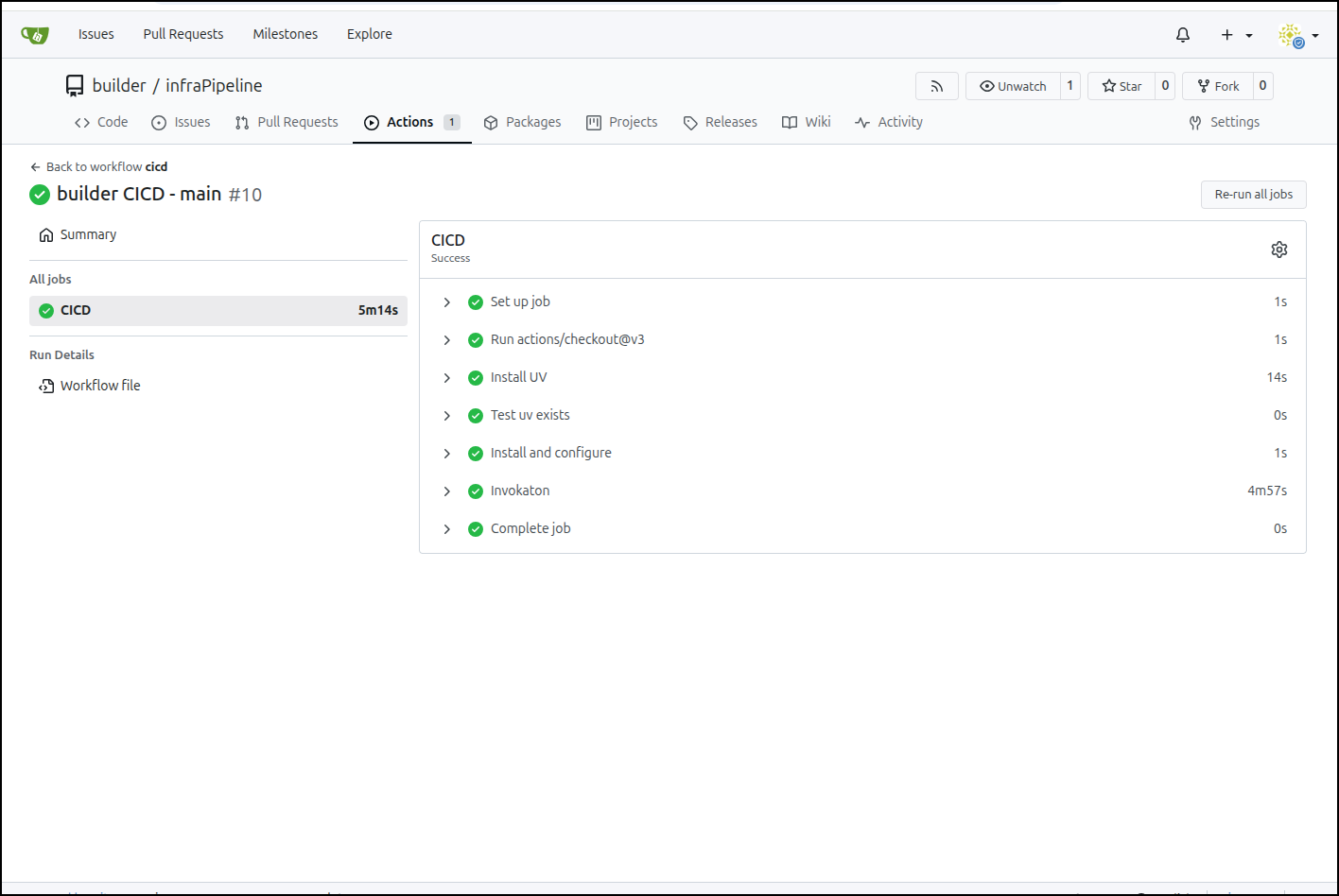
Which worked
Summary
Today we looked at pyinfra and compared to Ansible with AWX. We did some new deploys and converted some playbooks to deploy files.
There were some more advanced things we could do like setting system limits
security_limit(
    name="Set nofile limit for all users",
    domain='*',
    limit_type='soft',
    item='nofile',
    value=1024,
)
or enabling a service
server.service(
    name="Enable open-vm-tools service",
    service="open-vm-tools",
    enabled=True,
)
Lastly, I wanted to show a pipeline option for which we used Gitea to invoke a btop pipeline on a list of Linux hosts remotely.
I would argue this is a good equivalent to Ansible playbooks. It is very simple and doesn’t require a Kubernetes AWX host to invoke.
As it is python based, there is a lot more things we could do.